Atticus Writing Software for Book Authors
One $147 tool that replaces Scrivener, Google Docs, and Vellum for self-publishers.

Atticus is a $147 piece of software that tries to replace three separate tools in the self-publishing workflow with one browser tab. That's the whole pitch, and whether it works depends entirely on what kind of author is asking.
Before Atticus existed, the standard indie production line looked something like this: draft in Scrivener or Word, hand chapters off to beta readers or an editor in Google Docs, then move the finished manuscript into Vellum to actually make it look like a book. Three programs, three sets of files, and the special kind of chaos that comes from realizing your "final" draft in Vellum isn't the same version your editor just marked up in Docs. Dave Chesson, who runs Kindlepreneur, summed up the pitch at launch better than most marketing copy could: "If Scrivener, Google Docs, and Vellum got together and had a baby, its name would be Atticus." It's a tidy line because it maps exactly onto the problem being solved, not just the feature list being sold.
Worth saying upfront: Atticus has no AI writing assistant, no autocomplete, no outline generator. It doesn't finish a sentence for anyone and it doesn't want to. It's a production tool for people who already have words on a page and need those words to become a properly formatted book. Keep that framing in mind for everything below, because most of what disappoints reviewers about Atticus comes from expecting it to be something it never claimed to be.
What $147 buys and how the pricing holds up over time
The deal is simple enough to state in one breath: $147 once, lifetime updates included, a 30-day money-back guarantee, no subscription and no tiered plans to upsell into later. Compare that to a hypothetical subscription running the same monthly rate as, say, a mid-tier writing app, and the breakeven point lands around seven months. After that, the software is free forever, which is a strange sentence to write about software in 2026 but there it is.
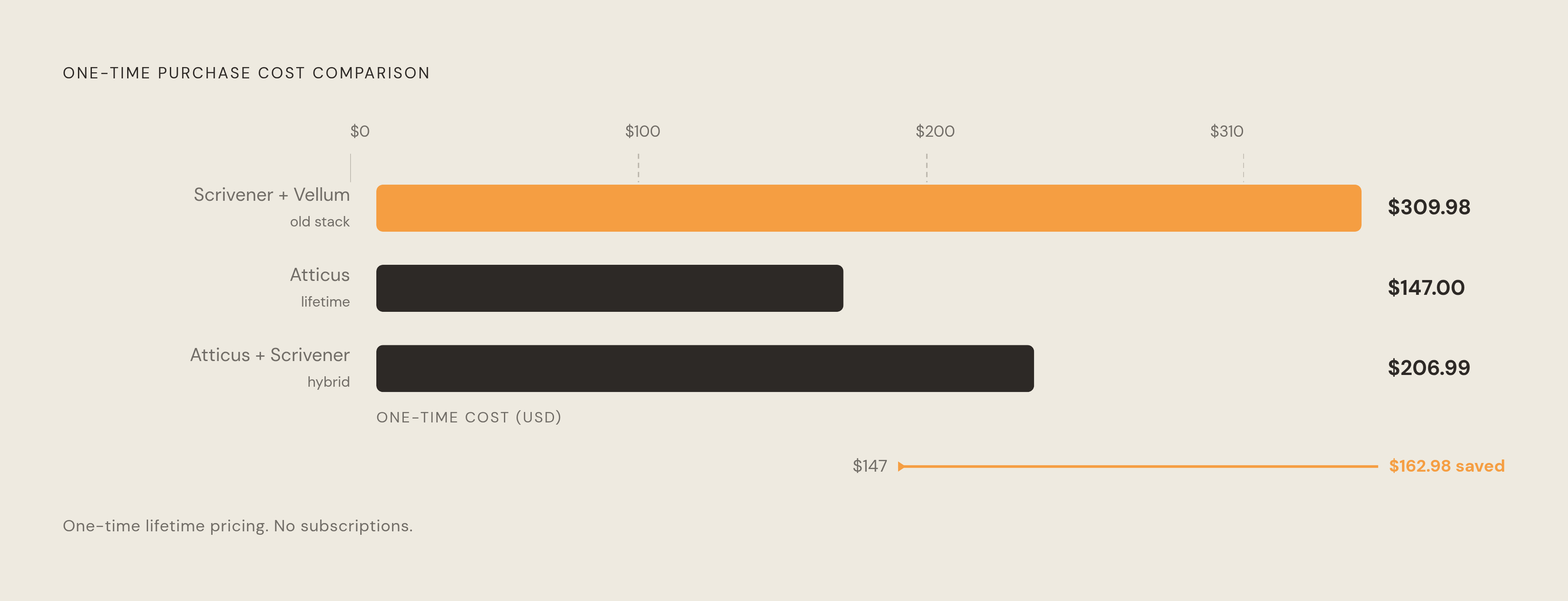
Set it against the old stack: Scrivener runs $59.99, Vellum runs $249.99, and buying both puts an author at $309.98 before formatting a single page. Atticus, at $147, costs less than half that combined total and does both jobs (drafting and design) under one roof. Compare it instead to outsourcing: professional interior formatting for a single book typically runs into the hundreds of dollars, meaning an author who formats even one or two books a year recovers the entire cost of the software before the second project wraps.
Atticus does not offer a free trial. Instead, the 30-day refund window does the job a trial normally would. Occasional discounts of $20 to $30 are also available during NaNoWriMo, the 20Books conference, and other major author events, so timing a purchase around one of those isn't a bad idea if there's no launch deadline forcing a decision right now.
Where Atticus actually runs, and the honest answer on offline use
Atticus runs in a browser, which means Mac, Windows, Linux, and Chromebook users all get the identical experience. That's the single sharpest structural difference between Atticus and Vellum, which has been Mac-only since it launched and shows no sign of changing that. For the large share of self-publishing authors running Windows, that restriction alone used to mean Vellum simply wasn't an option, full stop.
Atticus also ships as a Progressive Web App, which can be installed to a desktop as an icon and used with a cached version of the app when there's no connection. Here's the catch worth sitting with for a second: that's not the same as a true installed desktop application. The "offline" mode caches the interface, but changes still need to sync back to Atticus's cloud once a connection returns. So it's less "unplug and go" and more "pin this tab to your desktop and hope the wifi comes back before you need to export." For an author drafting somewhere without a reliable connection, that distinction matters.
No dedicated native app for iOS or Android has been confirmed. The browser version works fine on a tablet, but it's not built for a phone screen the way a purpose-made mobile app would be. On the upside, the cloud auto-save and cross-device sync mean a manuscript opened on a laptop can be picked up on a tablet or a borrowed machine without any manual file-juggling, no thumb drives, no emailing a draft to yourself. For authors who treat true offline-first design as a non-negotiable, though, this is a real limitation, not a nitpick.
The writing environment: functional but deliberately lean
Atticus organizes a manuscript in a sidebar not unlike Scrivener's binder, but flatter: chapters are organized within a straightforward hierarchy, and that's about the extent of it. There are no research folders, no nested documents, no corkboard to pin index cards to. The writing view itself is stripped down on purpose, filling the screen with text, a slim chapter list on the left, and a minimal toolbar. Dark mode exists; a dedicated focus mode is available.
Built-in word count goals with daily targets and monthly tracking are a nice touch for anyone who needs a little external pressure to hit a page count. There's also a ProWritingAid integration, which catches passive voice, overused words, and long sentences, though it works as a tool layered on top of the writing environment rather than a fully embedded editor. It's rule-based grammar checking, not an AI editor, and it's the only editorial assistance built into the app.
What's missing matters more than what's there, according to reviews through 2026. No native spell check. No find-and-replace with wildcards or regex. No track changes, no version snapshots, no split-screen view for comparing two drafts side by side. No research pane at all. And collaboration features exist but are less developed than what Google Docs offers for real-time editorial back-and-forth. The practical workaround most reviewers land on is drafting and editing in Docs or Word first, then importing the finished manuscript into Atticus once it's locked, using Atticus purely for the formatting stage rather than the whole writing life of the book. A few reviews also flag noticeable lag on very long manuscripts, which tracks: a browser tab holding an entire 100,000-word novel in memory is working harder than a native app built for exactly that job.
So the honest read here is that writers who lean on deep organizational scaffolding (character sheets, world-building boards, a wall of research notes) will still want Scrivener for the actual drafting. Atticus was never trying to win that fight.
Where Atticus earns its price: the formatting engine
This is the section where Atticus stops being merely convenient and starts being genuinely good. The workflow runs import or draft chapters, arrange front and back matter, pick a formatting theme, apply structural elements like headings and footnotes, preview across device sizes, export. Nothing revolutionary in the steps themselves, but the execution is where the software separates from its predecessors.
Start with fonts: Atticus offers over 1,500, compared to Vellum's 26. For an author trying to match a series aesthetic or just wanting their book to look distinct on a shelf next to fifty other similar covers, that's not a trivial gap. The chapter theme builder allows custom header images per chapter or applied uniformly, full-bleed print images, ornamental scene breaks, and dark background headers with light text laid over an image, options that go well beyond Vellum's preset-only theme system. Full custom theme creation is possible in Atticus in a way it simply isn't in Vellum, and Atticus supports large print formatting for accessibility.
Nonfiction authors get particular value here: callout boxes, numbered lists, footnotes, and varied heading structures, the kind of layout choices that business books, how-to guides, and self-help titles depend on and that Vellum handles less gracefully. On the export side, Atticus produces ePub files compatible with Amazon KDP, Draft2Digital, Kobo, and Apple Books, along with print-ready PDFs with bleed, margins, and trim marks sized for KDP Print and IngramSpark, plus DOCX exports for sending a manuscript to an editor. Trim sizes including 6x9 and 5x8 are supported, and reviewed sources describe the output as meeting the specifications major distributors require.
Where does Vellum still win? Micro-typography and print polish. It's a subtle gap, the kind of thing a professional typesetter or a detail-obsessed author will notice and most readers never will. But it's real, and it's worth naming rather than pretending Atticus has closed every gap.
The stability and bug record authors should know before a launch deadline
Here's the part that deserves attention before anyone plans a formatting session for the night before a launch. Multiple reviews through 2026, including hands-on coverage from independent reviewers, document ePub export errors and user-reported issues around PDF exports and sync, along with user-reported issues around PDF exports and sync. These aren't constant, and plenty of authors export clean files without incident. But they show up often enough that keeping a manual DOCX backup of every manuscript is a sensible precaution, not paranoia.
The browser-based architecture, the same thing that makes Atticus available on any platform, also means it can feel slower than a native Mac app like Vellum, especially on longer manuscripts. That's a structural trade-off baked into the design, not a bug that a future update fixes. And the offline sync caveat from earlier compounds the risk here: if a connection drops mid-export, getting back on track requires reconnecting before continuing.
The practical guidance, then, is straightforward. Export early, not the night before a deadline. Keep a DOCX backup of every manuscript, always. And treat the very first ePub file uploaded to a retailer as a test run to open and check, not the version that goes live untested.
How Atticus compares to Vellum and Scrivener for different author situations
Set against Vellum, the calculation comes down to platform and layout complexity. Vellum costs $249.99 for the full ebook-plus-print package, runs on Mac only, offers 26 fonts and preset themes, includes no writing environment at all, and earns consistent praise for its print micro-typography. Atticus costs $147, runs anywhere, offers over 1,500 fonts and fully custom themes, and bundles in a drafting space along with large print support. Switching to Atticus makes sense for Windows or Linux authors (who never had Vellum as an option anyway), for nonfiction authors juggling complex layouts, and for anyone working across multiple devices. It makes far less sense for a Mac-based fiction author who already owns Vellum and is happy with the output. There's no reason to fix what isn't broken.
Against Scrivener, the comparison is really a comparison of different jobs. Scrivener costs $59.99 and offers deep organizational tools: a corkboard, a research pane, nested documents, and a compile function that Atticus doesn't attempt to replicate. But Scrivener's compile function is notoriously complex, and its output isn't professional book formatting, it's a manuscript that still needs real design work done to it. Many authors land on a pairing: Scrivener for drafting and research, Atticus for final formatting and export. That combination costs more than Atticus alone, but less than the old Scrivener-plus-Vellum stack, and it plays to what each tool actually does well.
One more note for authors who think out loud before they write: voice-first drafters who like to talk through an idea before sitting down to type might find a conversational journaling app useful for that pre-writing stage, capturing a train of thought before it evaporates. That's a separate job from anything Atticus handles, worth mentioning only because the two workflows (spoken reflection and manuscript formatting) rarely overlap but often sit side by side in a working author's toolkit. Joice is one app built for exactly that spoken-reflection side, where you talk through your thoughts and it responds rather than asking you to type.
The author profiles Atticus is genuinely built for
The clearest fit is the self-publishing author who wants one tool to carry a manuscript from draft to a file ready for a distributor, who publishes on Windows or across multiple platforms, and who wants to format their own books rather than pay someone else to do it. For that author, Atticus is close to a direct answer to the exact problem it was built to solve.
Nonfiction authors, particularly in business, how-to, and self-help categories, get a strong fit too: their layouts depend on callout boxes, numbered lists, and varied headings, elements Vellum was never really designed around. Authors currently paying a formatter hundreds of dollars per book will likely recoup Atticus's entire cost on the very first project they format themselves.
The fit weakens for authors who need serious organizational infrastructure while drafting: nested research, character tracking, story timelines. Pair Atticus with Scrivener rather than asking Atticus to replace it. It also weakens for authors who need genuine offline-first software or who collaborate closely with editors in real time; nothing here matches Google Docs for live back-and-forth editing. And it's simply not a fit at all for anyone expecting AI-assisted drafting, autocomplete, or content generation, because none of that exists in Atticus and none of it is coming.
The single sentence that covers the whole case: Atticus solves the formatting problem for self-publishers who don't own a Mac and don't want to pay a formatter, and it does that job well enough that its limits on the writing side rarely matter to the authors it was actually built for.
Sources
- Atticus.io Review: A Review of Dave Chesson's Book Formatting Software
- 6 Best Book Writing Software Options for Authors in 2026 | Kindlepreneur
- Atticus Review: My Favorite Book Formatting Software!
- Atticus Review: An All-In-One Writing and Formatting Tool for Authors? - Written Word Media
- Atticus Review: Is This Book Writing Software Your Writing and Formatting Solution?
- Atticus Review: Really an All-In-One for Writing and Formatting?
- Atticus Review: Is It Worth The Money?
- Atticus: The Cross-Platform Writing and Formatting Tool for Indie Authors | ScribeCount