Offline Writing Apps for Unreliable Connections
Local-first writing apps let you keep working when the internet—and your plans—fall apart.

There is something quietly absurd about the fact that, in 2025, reliable internet access is still a negotiation. Not a given. A negotiation. You are in a budget hotel in Lisbon, or a co-working space in Chiang Mai whose Wi-Fi is splitting bandwidth among thirty laptops, or a rural Airbnb where the router's ambitions exceed its capabilities. You are mid-draft; and you are watching a spinning indicator decide the fate of your last paragraph.
This is not the "no internet" problem. That problem is simpler. This is the intermittent signal problem: connectivity that exists just enough to create expectations, then disappears without warning. According to MBO Partners' 2024 State of Independence report, there were approximately 18.1 million American digital nomads in 2024; global estimates vary, but figures commonly cited in industry research range from 35 to 40 million. According to a 2024 Pew Research Center survey, only 57% of U.S. adults in households earning under $30,000 subscribe to home broadband. That gap is not closing fast enough to be ignored; and even among writers with fast broadband at home, transit, cafes, conference venues, and flights all routinely deliver the same intermittent experience.
What has changed recently is the pace of the underlying lifestyle. According to A Little Adrift's 2024 Digital Nomad Survey, the average digital nomad stayed approximately 6 weeks per stop, up from roughly 5 weeks in 2022. That shift matters; a writer spending six weeks somewhere is not improvising their setup, they are living with it. Which means the app they chose, and the architecture underneath it, shapes their daily writing life in ways that demand more than a casual download decision.
The question worth sitting with, before picking any tool, is this: what does "offline" actually mean for how you work? Because, as it turns out, it means several different things, and confusing them is where most writers go wrong.
What offline-first actually means, and why most "offline" apps aren't
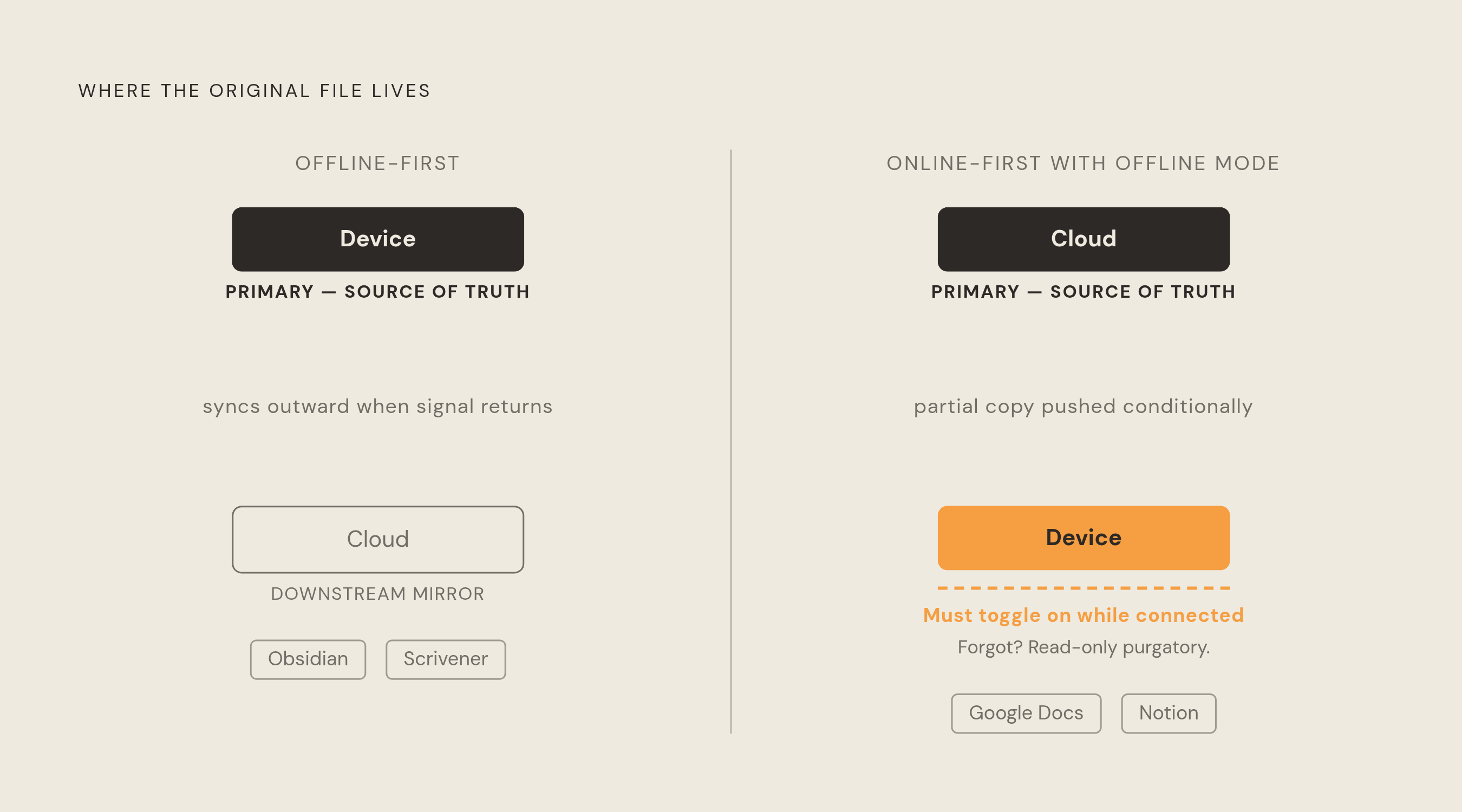
Two fundamentally different software architectures share the same marketing language.
Offline-first means the local device is the primary source of truth. The app stores your writing on your machine, loads without network access, functions completely without a connection, and syncs to a remote server when signal returns. Scrivener works this way. Several other local-first tools work this way. The cloud, if it exists at all in these tools, is downstream of the local file; it is a mirror, not the original.
Online-first with offline mode is a different creature entirely. Here, the cloud is primary. Offline access is a feature added later, often because users demanded it loudly enough that it appeared on the product roadmap. Google Docs is the clearest illustration of the gap: offline mode exists, but you must toggle it on while you still have a connection. If you forgot, and your signal drops, you are working in read-only purgatory. Think of it as a restaurant that serves takeout — but only if you call ahead while you're still inside.
That distinction sounds academic. It is not. Intermittent connectivity is actually harder on hybrid apps than a clean, complete disconnection. When signal disappears entirely, a hybrid app at least knows where it stands. When signal flickers, partial syncs happen. Writes drop mid-transmission. A reconnection triggers a sync operation before the previous one finished. These are edge cases that pure offline-first tools sidestep consistently, because they were never relying on the network in the first place.
Going offline used to be the default state for software. A word processor ran locally, saved locally, and the idea of needing a network to write would have seemed strange. Cloud dominance inverted that assumption so thoroughly that local-first design now requires a deliberate architectural choice; which means choosing the right tool also requires a deliberate choice, one grounded in understanding what the architecture actually does when the Wi-Fi dies.
The apps that work fully offline, and what each one actually costs you
Every fully offline tool extracts a price. The price is just different for each one. Understanding it in advance is considerably less painful than discovering it mid-project.
Some local-first Markdown tools store all files as plain Markdown. That is not a constraint; it is the point. Your writing is yours, in a format any text editor on earth can open, permanently. Plugins in such tools can extend them into serious long-form territory: chapter management, visual organization, and diagramming research. Base applications of this type are often free for personal use, with commercial licenses available. The real cost arrives when you want the same files on multiple devices: sync either requires a paid add-on service or a third-party solution using iCloud, Dropbox, or Syncthing. That cobbling works, but it adds a layer of complexity the app itself does not manage for you. There is typically no web version and no real-time collaboration. For researchers and non-fiction writers who want full data ownership and don't mind curating their plugin setup, this category of tool is an excellent choice. The investment is in configuration, not in recurring fees.
Scrivener has been the serious writer's workhorse for long enough that its one-time purchase price — $59 for macOS or Windows, $23.99 for iOS, per Literature & Latte's published pricing — feels almost anachronistic in a subscription economy. Everything lives locally. The organizational architecture, binder, corkboard, research folders, compile settings, is built specifically for the complexity of book-length projects. No other tool in this category matches it for heavy planning. The cost: cross-device sync has historically required discipline and patience; the same architecture that makes it a superb offline tool makes it a less forgiving sync tool. There is no native cloud backup, which means backup discipline is entirely the writer's responsibility.
iA Writer is for writers who want to disappear into a sentence. Markdown, a clean interface, a focus mode that dims everything except the line you are currently writing. Available across Mac, iOS, Android, and Windows. One-time purchase at $49.99 on macOS (pricing varies by platform; see iA's website for current figures). Chapter and project organization is lighter than Scrivener, which is either a feature or a limitation depending on how you work. For sustained prose sessions where structural complexity is handled elsewhere, it is close to perfect. Multi-device sync on Apple hardware via iCloud is relatively smooth; mixed-platform setups require more thought.
LibreOffice Writer is the pragmatic choice for writers who need DOCX compatibility, complex formatting, templates, or the ability to hand a file to a Word-centric editor without conversion drama. It is free, open source, and completely offline. The interface shows its age next to modern Markdown tools, and there is no sync story whatsoever. That is not a bug for writers who treat sync as their own responsibility; it is simply a constraint to know in advance.
FocusWriter occupies a peculiar and useful niche: it runs as a portable application from a USB stick, requires no installation, and costs nothing. Session goals, autosave, full-screen distraction elimination. If you need to write on a borrowed machine, a library computer, or any device that isn't yours, FocusWriter is the tool that makes that possible without leaving a trace. The limitation is equally stark: no organizational features, no project management, just drafting. Know what you are getting before you reach for it.
Anytype is newer and harder to categorize. Local-first by default, with a block-based editor that feels closer to Notion than to a plain Markdown folder tool. Peer-to-peer sync with encryption when enabled. Open source. The architecture is truly interesting for writers who want local-first offline guarantees but find Markdown folders less intuitive than visual blocks. The cost is conceptual: Anytype's model of "object types," "sets," and "relations" requires meaningful time to internalize. It is not pick-up-and-write software. It rewards investment.
Manuskript exists for fiction writers who want Scrivener-style structure without the price and without the cloud dependency. Open source, fully offline, built specifically for novel planning. The community is smaller and the software is less mature than Scrivener. For a writer on a tight budget who is willing to trade polish for freedom, it is worth knowing about.
One point applies across all of these: the offline guarantee transfers the backup responsibility entirely to the writer. Local files are only as safe as the device and the habits surrounding it.
The hybrid apps — what their offline modes actually deliver, and where they break
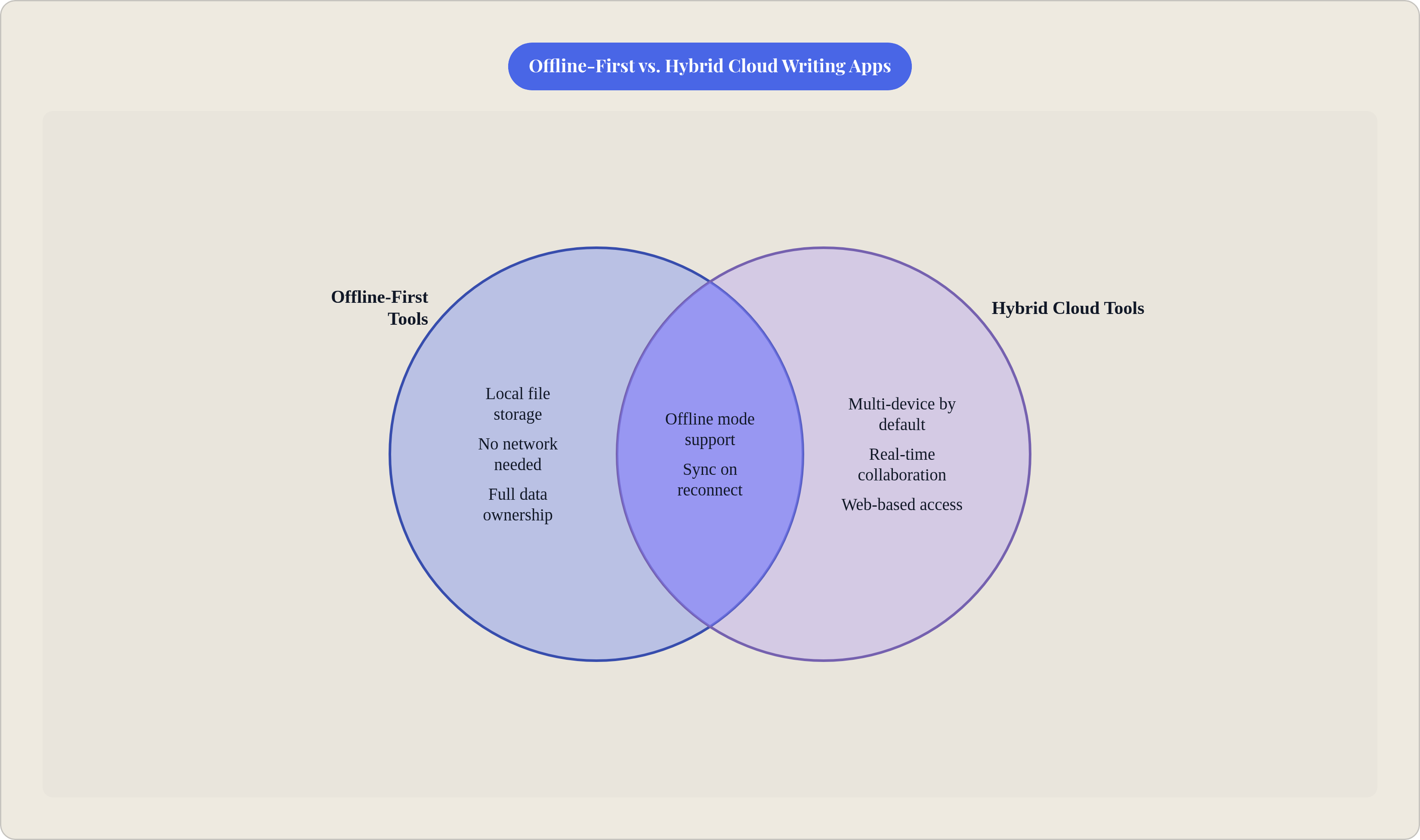
These are cloud tools that added offline capability. The distinction is not a criticism; it is a structural description with practical consequences.
Google Docs offline mode functions adequately when it has been configured in advance. The requirement to enable it while connected is a real failure point for writers who encounter unexpected disconnections. For writers already embedded in the Google ecosystem, it is a reasonable contingency for occasional drops; it is not a reliable foundation for work in environments where connectivity is unpredictable.
Notion shipped offline mode in 2025, arriving after years as one of the most requested features on the product roadmap. That timeline itself communicates something about how the company weighted it relative to other priorities. The implementation has specific, consequential limits. According to Notion's support documentation, only the first 50 rows of any database's first view sync offline. Writers who use Notion as a research database, maintaining large collections of notes, sources, or manuscript metadata, will encounter this ceiling. Free users must manually enable offline mode page by page; paid users get automatic syncing of recently visited and favorited pages. On mobile, offline content syncs over Wi-Fi only, not cellular data. Non-text properties — select fields, dates, relations — do not merge on reconnect. One version wins silently.
That last point deserves more attention than the feature announcement gave it. A writer tracking chapter status, revision stages, or submission deadlines in Notion fields will lose that metadata in a sync event without any notification. The prose survives; the organizational metadata does not reliably.
Zoho Writer handles the offline use case more reliably within a narrower scope. According to Zoho's documentation, the 20 most recently accessed documents sync offline automatically, as do any newly created ones. Sync on reconnect is fast. The 20-document ceiling is a real constraint for anyone managing a large manuscript across many files; but for writers who maintain a smaller active set, Zoho's offline behavior is noticeably more consistent than Notion's. Rich formatting and collaboration features make it a legitimate option for writers who regularly exchange documents with editors.
The common thread across all three: the moment of reconnection is when these tools are most likely to create problems. That is the next problem worth examining directly.
What happens when the signal comes back — how sync conflicts form and how different apps handle them
Here is the scenario. You edit a chapter on your laptop while offline at 30,000 feet. Your phone, which was last connected to the cloud an hour before you boarded, synced a different version of that chapter at that point. You land, both devices reconnect. Which version survives?
Does the app tell you what it decided, or does it simply decide?
Three resolution strategies are currently in use, each with a different risk profile for writers.
Last-write-wins uses timestamps to determine which version survives. It is simple to implement and can be catastrophic when it quietly discards creative work. The writer may never know a paragraph was overwritten. There is no conflict flag, no recovery prompt; just a timestamp arithmetic problem that the app solved without asking.
CRDTs, conflict-free replicated data types, are a more sophisticated mathematical approach that allows changes from multiple sources to be merged automatically without user intervention. Notion uses CRDTs for text changes, as described in their engineering documentation. Anytype uses them for peer-to-peer sync. For prose, this works well in practice. The limitation Notion has acknowledged is that CRDTs do not apply to non-text fields in their implementation; the structural metadata alongside the writing — the fields and properties — remains vulnerable to silent overwriting.
Manual resolution surfaces the conflict and requires the writer to choose. It is higher friction and, for creative work, often the most appropriate approach. No algorithm should decide which version of a paragraph is better. The writer should.
The trust dimension here is not really about data loss. Data loss is survivable, usually. What erodes trust is when the app gives no indication that a conflict occurred. Transparent sync status, indicators showing pending, synced, and conflict-flagged states, is increasingly the baseline expectation for tools serious writers rely on. An app that syncs silently and successfully is fine; an app that loses work silently is a different category of problem.
It is also worth considering the failure mode specific to local-first tools: if sync to a secondary device or backup fails quietly, writers will not discover the gap until a device is lost or damaged. The risk is not eliminated by going local-first; it is redistributed. You trade the cloud's conflict risks for your own backup discipline risks.
How working across multiple devices changes which app is right
Single-device writers have the simplest decision tree. Any fully local-first tool works. Backup is the only discipline required.
But what if you write on a laptop at home and an iPad on the train? The offline guarantee and the cross-device guarantee are frequently in tension with each other. Understanding that tension routes to a different tool than asking simply whether the app works offline.
Some local-first tools keep files free on a single device, while seamless cross-device sync costs extra through a paid add-on or requires a third-party service that the writer configures and maintains. Scrivener's cross-device story has historically been more complicated than its offline story; the same architectural decisions that make it trustworthy offline make it a less forgiving sync tool. iA Writer handles multiple Apple devices reasonably well through iCloud; mixed platforms require more legwork.
Anytype's peer-to-peer sync model is a worthwhile alternative. Devices sync directly to each other when on the same network, or through a relay when not. There is no central cloud server to go down, change its pricing, or become unavailable. The tradeoff is complexity: this model requires understanding when and how devices will find each other.
Hybrid tools invert the equation neatly. Notion, Zoho Writer, and Google Docs are effortlessly multi-device when connected. Their offline modes are the limitation, not their sync. A writer who experiences only occasional, brief disconnections and works across multiple devices will find that a paid Notion account with proactive offline setup serves them better than a more complex local-first configuration.
The practical question worth sitting with: how many devices do you write on, and how often are they on the same network at the same time? That answer routes to a different tool than any other single question.
Going offline as a focus strategy, not just a connectivity workaround
Research from Gloria Mark at the University of California, Irvine, published in her book Attention Span (2023) and in earlier peer-reviewed work, found that recovery time after an interruption can extend to over 20 minutes. The cost of one tab-switch, one notification badge, one instinct to check something, is not trivial. It compounds.
There is a meaningful difference between a "focus mode" and actual offline operation that rarely gets discussed. A focus mode in a cloud app dims the interface; it does not remove the network. A notification, a sync indicator, or a browser habit can still interrupt. The temptation remains available because the pathway to it remains open.
True local-first tools, run without network access, remove the pathway. There is nowhere to tab to. The distraction cannot arrive because the channel it would arrive through is closed. Choosing to write offline is less like closing a door and more like moving to a room that doesn't have one — the interruption was never an option.
iA Writer's focus mode, which dims everything except the active sentence, combines interface discipline with a local-first architecture to create something closer to enforced single-tasking than any cloud tool's focus feature. FocusWriter's full-screen interface with session goals operates the same way. Local-first Markdown tools in distraction-free view, with network disabled, create a similar environment.
One might argue that a disciplined writer can resist distraction regardless of architecture. That is probably true, occasionally. It is also true that we do not design offices with slot machines in them and then tell employees to exercise discipline. Removing the temptation tends to be more reliable than resisting it.
The overlap between "offline by necessity" and "offline by choice" is worth naming explicitly. Many writers who have reliable broadband at home choose local-first tools specifically because the connectivity benefit and the focus benefit are the same architectural decision. The app is offline-first for the writer in a rural dead zone and offline-first for the novelist in a fast-internet city who simply does not want to be reachable while writing. Same tool, same architecture, different motivations. Both valid.
Matching the right app to your actual situation
The decision is not about finding the best app in the abstract. There is no best app in the abstract. There is only the tradeoff set that fits the writer's actual conditions.
Three variables determine the answer more reliably than any other consideration.
How often and how severely connectivity drops. Occasional, predictable outages favor hybrid tools with solid offline modes: Zoho Writer for document-focused writers, Notion's paid tier for knowledge workers who stay within its 50-row sync limit. Frequent, unpredictable, or sustained disconnection demands a local-first tool where the network's behavior is irrelevant to the writing session.
How many devices you write across. A single device makes any local-first tool viable, and the sync question disappears. Multiple devices make sync architecture the deciding factor. iA Writer on Apple hardware and Anytype's peer-to-peer model each suit different platform configurations, while local-first Markdown tools may require a paid sync add-on or a third-party service depending on the platform mix. There is no universal answer here; there is only the one that matches your specific device mix.
How much setup friction you will tolerate. Scrivener and some local-first Markdown tools reward investment; both require time before they feel natural. LibreOffice and FocusWriter work immediately with no configuration. Anytype sits between: powerful, but its conceptual model requires internalization before it becomes fluent.
Routing by writer type:
Fiction writers who plan heavily belong in Scrivener, which is offline, organized, and proven at scale, or Manuskript if budget and open source principles are driving factors.
Non-fiction writers and researchers who want data ownership belong in a local-first Markdown tool with a reliable sync solution, or in Anytype if they prefer visual blocks over Markdown folders.
Writers whose primary need is clean, distraction-free prose belong in iA Writer.
Writers already embedded in Google or Zoho ecosystems who experience only occasional drops should enable offline mode proactively, understand its specific limits, and stop there. Writers focused on journaling specifically may find that a purpose-built tool like Joice, an app where you talk through your thoughts instead of typing and it responds conversationally, transcribes every entry, and surfaces recurring patterns across what you say, fits a different workflow altogether and is worth considering separately from the writing tools above. The complexity of migration may not be worth the gain.
Writers who need a working setup on any machine without installation belong in FocusWriter on a USB stick. That solution is notably underrated.
One discipline applies across every local-first tool listed above: backup. None of them enforce it. All of them require it. The app will not remind you; a hard drive will fail at the least convenient moment, which is a pattern most hard drives follow sooner or later.
The writer who picks a tool based on its offline architecture and then ignores backup has only solved half the problem. The other half is considerably less interesting to think about, and considerably more consequential to neglect.