Distraction-Free Typing on a Dedicated Writing Device
The real power isn't focus features—it's eliminating the distractions entirely.
Distraction-free typing on a dedicated writing device doesn't work because the device adds some clever focus feature. It works because it removes the entire architecture of distraction, no notifications, no browser tabs, no competing apps, so focus is no longer a discipline a writer maintains but the only option left on the table. That's the whole thesis, and the rest of this piece is really just testing it against the hardware, the DIY builders, and the software that tries to fake the same effect on a laptop. Distraction-Free Typing on a Dedicated Writing Device.
Writers on general-purpose computers are structurally set up to fail at focus
Start with an uncomfortable premise: the modern computer was never built to help anyone finish a chapter. They're the product working exactly as intended.
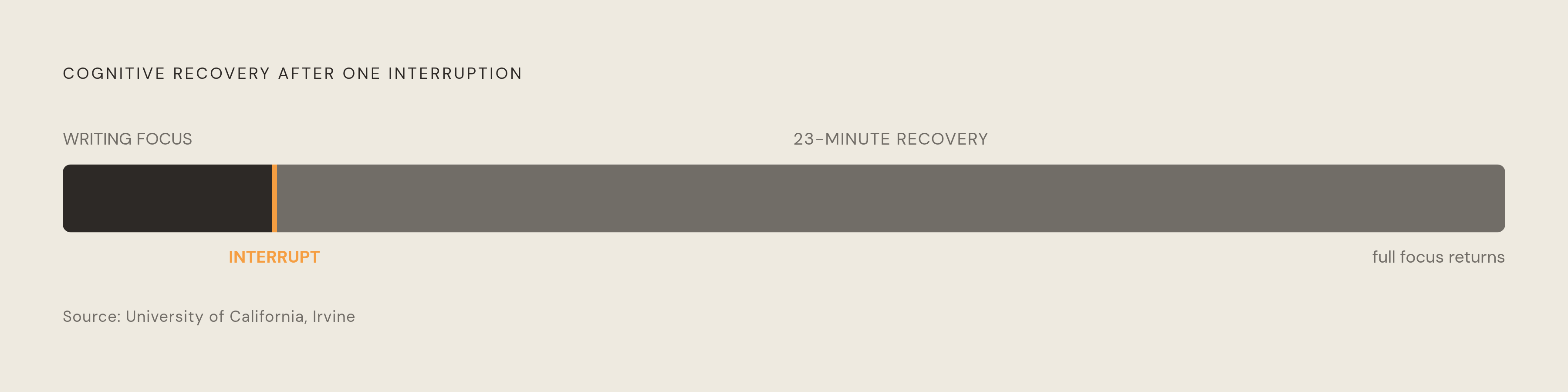
Writing asks for the opposite of that. It needs long, unbroken stretches of attention, the kind that doesn't recover the instant you look back at the screen. Research cited at cipherwrite.com, drawing on a University of California, Irvine study, puts the average recovery time after an interruption at 23 minutes, meaning even a single distraction can cost a writing session.
It's a design problem. The computer is doing its job. Writers are the collateral damage of a machine optimized for constant task-switching, and no amount of willpower changes what the hardware and software are built to do.
The market has clocked this, even if the framing usually misses the point. WiseGuy Reports' writing app market outlook projects the writing app space will grow at roughly a 10.6% compound annual rate from 2025 to 2035, and that kind of sustained growth is a decent proxy for how widespread trouble staying focused feels among people who write for a living or a hobby. An app layered on top of the same distracting operating system is treating a symptom, not the disease underneath it. The browser is still one tab away. The notification center still exists, quietly stacking. Which raises the obvious next question: what would it actually take to remove the disease instead of medicating around it?
What makes a dedicated writing device categorically different from a laptop with a writing app
A writing app installed on a laptop adds a layer of focus onto a system that was built for the opposite. A dedicated writing device skips the layering entirely and removes the distracting architecture itself. No browser. No notifications. No competing apps, no social media tab sitting one keystroke away. Not blocked, not hidden behind a setting you could toggle off in a weak moment. Simply absent, the way a toaster doesn't have a "resist checking email" mode because it was never capable of email.
That absence changes the writer's relationship to the machine in a way that's easy to underestimate. There's nothing else to do on it, so the question "should I check something?" never even gets asked. Compare that to an iPad with a folding keyboard, which looks like a dedicated device but isn't one: you can silence notifications, sure, but the apps are still installed, still one swipe away, still pulling on attention even while dormant.
A cognitive mechanism underneath this deserves a name. Working memory holds somewhere around four to seven items at a time, and unresolved notifications or open browser tabs occupy those slots even when the writer isn't actively glancing at them neurosity.co. The badge on the email icon doesn't need to be tapped to cost something. It just needs to exist, sitting in peripheral awareness, quietly eating capacity that could otherwise go toward the sentence being written. A device with zero competing demands removes that background load entirely: it's the absence of the temptation to be interrupted in the first place, which is a subtly different and arguably more valuable thing.
Call it the walled garden model, if you want a name for it: constraint as a feature rather than a limitation grudgingly accepted. The typewriter figured this out mechanically decades before anyone had to think about it, since once you're sitting at one, there's nothing else the machine is capable of doing. Dedicated digital writing devices are just replicating that same mechanical honesty in a modern, cloud-connected form. None of this is about nostalgia or some ascetic fantasy of suffering for your art. It's about matching the tool to what the task actually demands cognitively, and it turns out the task demands quite a lot less optionality than the average laptop offers.
The Freewrite line: what each device in the range offers
Freewrite, made by a company called Astrohaus, carries the most name recognition in this category by a wide margin. It started in Detroit in 2014, founded by Adam Leeb and Patrick Paul after a Kickstarter campaign for a device originally called the Hemingwrite. The underlying philosophy hasn't drifted much since: single-function, cloud-syncing, no browser, no apps.
The flagship is the Smart Typewriter Gen3, which pairs an e-ink screen with a frontlight to a full mechanical keyboard using Kailh Box Brown switches, backs it with embedded flash memory that stores up to a million words, and syncs over Wi-Fi kadavy.net rigorousthemes.com. It runs $699 and remains the original and most fully featured device in the line kadavy.net rigorousthemes.com. Below that sits the Traveler, a clamshell built around a non-backlit E Ink screen and a scissor-switch keyboard rather than a mechanical one, priced at $550 PCWorld. A PCWorld reviewer called it "threadbare in terms of actual hardware" and flagged the lack of a backlight as "a serious impediment if you want to use the device in anything but a well-lit room".
The Alpha takes a different approach, using an LCD screen with backlight and a mechanical keyboard in a polycarbonate shell, and it went on sale in January 2024 as a more affordable, more portable option. It's been described as a spiritual successor to the old AlphaSmart education devices, and Astrohaus apparently agreed enough with that framing to buy the AlphaSmart domain outright and redirect it to the Freewrite storefront. Then there's the Wordrunner, announced in 2025, which isn't a standalone writing device at all but a mechanical keyboard with a built-in word counter and productivity timer that connects to a host computer, putting it in a different category entirely from everything else on the list. Rounding out the lineup are a handful of special editions currently on the Freewrite storefront: the Hemingwrite Signature Edition with hand-polished aluminum and a leather case tied to a Hemingway estate collaboration, a Valentine Special Edition, and Alpha Cosmic, a backlit variant of the Alpha.
Firmware affects e-ink latency directly, and latency has been a recurring complaint since the original Hemingwrite. Sailfish firmware, rolled out for the Traveler and Smart Typewriter Gen3 starting November 19, 2025, claims 40% to 100% faster character appearance after a key press along with 30 to 50% less power draw, which directly answers the lag criticism that's dogged the line for years. Reviews across the board land on a consistent pattern: prices that look steep next to a comparable laptop, plastic construction on the Alpha and Traveler that multiple reviewers have called cheap, and consistent praise for keyboard feel and the metal build of the Smart Typewriter specifically. Those trade-offs are inseparable from the design intent behind the whole product line, and it would be dishonest to wave them away. The actual question for a prospective buyer is whether constraint is worth more to that particular writer than a longer feature list. Getting words off the device, at least, is close to frictionless: Freewrite's cloud sync covers Dropbox, Google Drive, OneDrive, and Evernote alongside its own service, so drafts capture automatically without the writer needing to think about it.
Four other dedicated writing devices worth knowing: King Jim Pomera DM250, reMarkable, Zerowriter Ink, and Micro Journal Rev.7
Retail price is $499, though early buyers who pre-ordered could lock one in for $349 techradar.com. Its 7-inch transflective greyscale TFT LCD screen connects over USB 2.0 Type-C for charging and data transfer, with WiFi 4 (802.11b/g/n) and Bluetooth 4.2 handling wireless file transfer through the Pomera Link app. The device's primary audience is Japanese businessmen, writers, journalists, and students, but English fiction authors have adopted it too, drawn by a balance of distraction-free writing with editing and file management, an area where it compares favorably to some Freewrite devices. For a writer who needs to open and revise an existing manuscript rather than draft cold every time, the DM250 makes a stronger case than devices built purely for first drafts.
reMarkable occupies its own lane, sold across two models, the reMarkable 2 and the newer reMarkable Paper Pro. The reMarkable 2 sticks to black-and-white e-paper and suits reading and marking up PDFs, while the Paper Pro adds a color screen that's better for drawing and annotation. Folio cases with physical keyboards are available for writers who want to type rather than write by hand, but the stylus-first design puts reMarkable closer to a paper tablet than a typewriter, useful for anyone who annotates source material or sketches an outline before drafting rather than typing a manuscript start to finish.
Zerowriter Ink is the scrappiest entry on this list, and that's meant as a compliment kadavy.net rigorousthemes.com. Created by developer Adam Wilk and originally funded through Crowd Supply, it's been shipping as of February 2, 2026. It's flat, deck-like, and 3D-printed, which keeps costs down but also means the finish trades some polish for accessibility. A follow-on design called the Zerowriter Fold entered crowdfunding in May 2026, addressing an ergonomic complaint from the original: the screen angle forced writers to crane their neck to read it while typing. It's a device for the DIY and open-source crowd, priced competitively against Freewrite, and best suited to writers who don't mind hardware that prioritizes function over finish.
Micro Journal Rev.7, announced March 24, 2025 and developed by Un Kyu Lee, is the latest in the Micro Journal line and the first to feature an E Ink display (4.76-inch), paired with a mechanical keyboard in a design meant for typing and pretty much nothing else liliputing.com. It's ultra-minimal and DIY-adjacent, aimed at writers who want the smallest possible footprint and are willing to accept a tiny screen in exchange. None of these four devices, the Pomera, the reMarkable line, Zerowriter Ink, or the Micro Journal, beats the others outright. Each trades portability against screen technology, editing power against price, and the right pick depends entirely on what a given writer actually needs from the thing. It was originally launched in Japan in 2022, with the US English version available for order starting February 18, 2025, featuring an English keyboard layout and a built-in dictionary. Its LCD screen is described as "far superior to the previously favored Freewrite Traveller, which faced critiques for its slow e-ink display," with a responsive interface that does not interrupt writing with lag. It features a 5.2-inch, 1280 x 720 pixel E Ink display, a mechanical keyboard, an ESP32 microcontroller, WiFi and Bluetooth, a 5,000 mAh battery, and open source software (liliputing.com).
The WriterDeck and DIY movement: when writers build their own distraction-free machines
Some writers look at all of the above and decide none of it goes far enough, so they build their own. The WriterDeck concept centers on stripped-down Debian-based Linux distributions running on ordinary 64-bit x86 hardware, with everything removed except the writing tools themselves. The community's own mantra sums it up better than any marketing copy could: no distractions, no internet, no apps, no games, no social media, just writing.
An active subreddit, r/writerDeck, has grown up around this approach, with members sourcing keyboards, displays, and single-board computers to assemble machines that exist for exactly one purpose. One concrete product to come out of that world is the BYOK device, short for Bring Your Own Keyboard, a pocket-sized writing display meant to be paired with whatever keyboard the writer already owns, covered by Liliputing on June 20, 2025.
What's interesting here is what the existence of the community says about the underlying itch. Commercial products like Freewrite serve writers who want something ready to use out of the box, while the WriterDeck crowd wants total control over what the device is and isn't capable of, but both groups are chasing constraint, deliberately engineered rather than left to willpower. That a self-organizing hardware community formed specifically around machines that refuse to connect to the internet says something about how acutely the distraction problem is felt, distraction by design, in nearly every general-purpose computer sold today.
Building a WriterDeck isn't for every writer, and there's a real floor of technical knowledge required before someone can solder a single-board computer to a keyboard and call it a manuscript machine. Not everyone wants to become a hobbyist electronics builder just to draft a novel, and that's a perfectly reasonable line to draw.
Writing apps on general-purpose devices: their limits
None of this is an argument against software. The best writing apps in 2026 genuinely reduce friction and visual noise, and they are the right answer for most writers, most of the time. It's earned App of the Year four times, was an Apple Design Award finalist in 2025, and has served more than two million writers since 2012 bestwriting.com. Its newest wrinkle for 2026 is authorship tracking, which visually dims AI-generated text to a faded grey while keeping the writer's own words in full color, described by one outlet as the anti-AI discipline tool for writers who care about that distinction bestwriting.com.
Ulysses stays locked to Mac, iPhone, and iPad, runs on subscription, and leans into organizational tools: daily word count goals shown as a visual ring, multi-scene stitching for longer projects, manuscript export formats, and fast iCloud sync. It's the strongest option for writers fully inside the Apple ecosystem who need project management bolted onto drafting, not just a blank page. Calmly Writer takes the opposite pricing approach, a flat $19 one-time fee covering up to three computers with lifetime updates, and WIRED called it "perhaps the best deal of the bunch if you're looking for a true distraction-free experience bestwriting.com." Its Focus Mode dims everything on screen except the paragraph currently being written, and it runs on the web, Windows, macOS, and Linux, plus Android through Google Play, though there's no iOS version bestwriting.com.
FocusWriter fills the free, open source lane: full-screen, customizable backgrounds, daily goal trackers, looking a bit dated at this point but still genuinely useful for Windows and Linux writers who don't want to pay anything. JotterPad remains the most cited option for Android writers working on screenplays, articles, or books, and Android remains the platform with the fewest strong native dedicated writing apps. ZenWriter rounds things out on the Windows side with a full-screen minimalist editor built around ambient soundscapes and customizable backgrounds, chasing a multi-sensory version of focus rather than a purely visual one.
Laid out platform by platform, the gaps get easier to see: Ulysses locked to Mac and iOS, FocusWriter as the strongest free option on Windows and Linux, Android still underserved across the board, and iA Writer covering the broadest ground for anyone writing across multiple machines. But every one of these apps, no matter how well designed, runs on top of the same operating system that delivers the notification, opens the browser, and keeps every other app installed and ready. The temptation persists regardless, resisted one click at a time, and a writer bored or stressed enough can always alt-tab away regardless of how good the Focus Mode looks bestwriting.com. That's the ceiling software hits and hardware doesn't, and it's the whole reason a category of dedicated devices exists in the first place rather than everyone simply installing a better app and calling it solved.