Freewrite Smart Typewriter for Distraction-Free Writing
A single-purpose typewriter designed to eliminate digital distractions.
The Freewrite Smart Typewriter's entire case rests on a wager that separating drafting from editing produces better first drafts than doing both at once, achieved through a single-purpose drafting device with no browsers, no email, no notifications, and no AI.
The Freewrite Smart Typewriter's origins
Astrohaus started in Detroit in 2014, founded by Adam Leeb and Patrick Paul, and the company's first product came out of a Kickstarter campaign for something called the Hemingwrite, later renamed Freewrite after a legal dispute over the name. The idea that drove the rebrand never changed: it aimed to build a single-purpose drafting device with no browsers, no email, no notifications, and no AI features bolted on for the sake of having them. That's a strange thing to advertise as an absence rather than a feature, but absence is the feature.
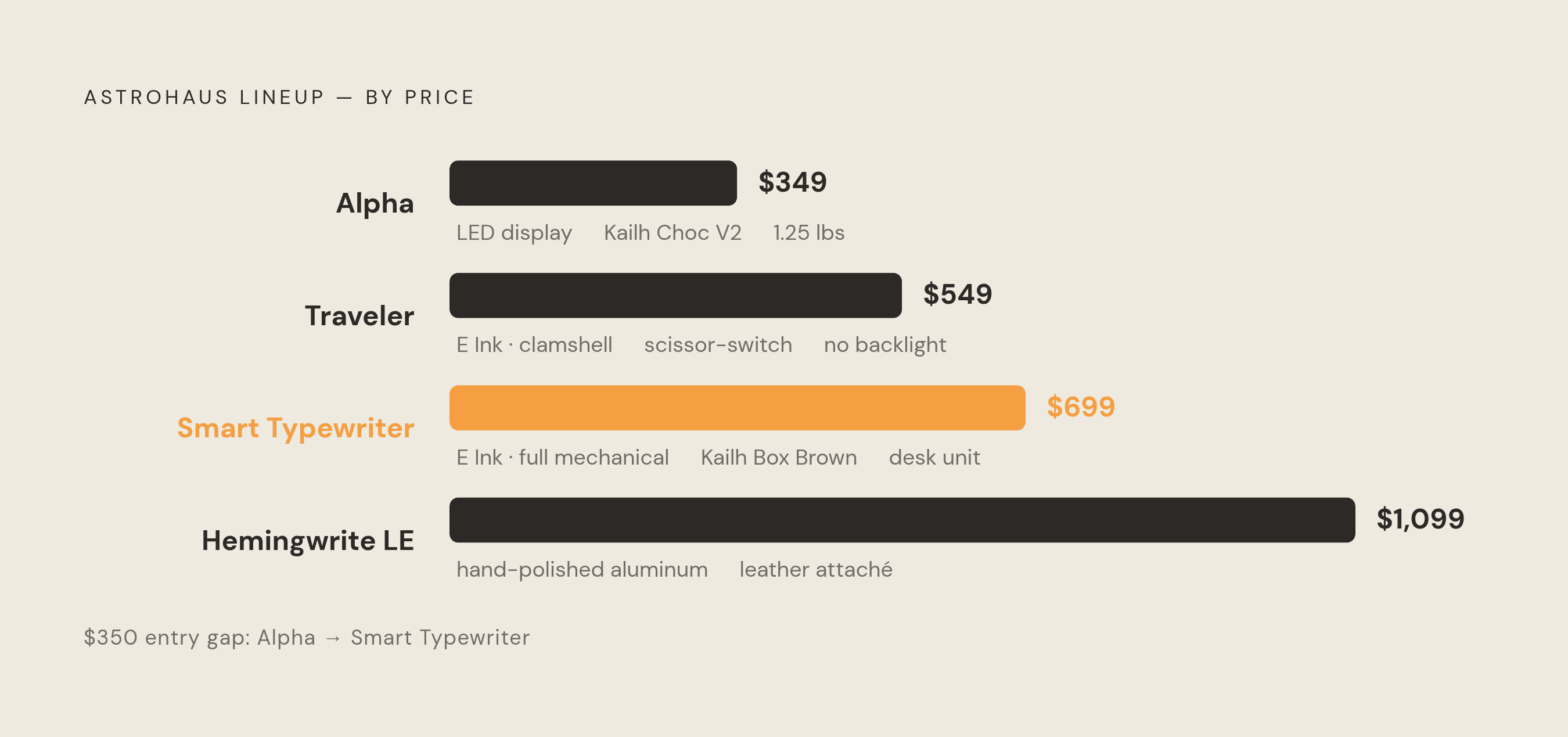
The lineup has grown into a small family of devices, and it helps to know where the Smart Typewriter sits among them before getting into what it actually does. The Traveler is the clamshell portable version at $549 PCWorld. The Alpha is the entry-level portable at $349 Astrohaus. Wordrunner, announced in 2025, is a mechanical keyboard built around document navigation rather than a standalone writing screen. And there's a Hemingwrite limited edition, a collaboration with Hemingway's estate, priced at $1,099.
Astrohaus states that customers have written more than 700 million words across roughly 50,000 users, and whatever one makes of the marketing framing, the fair question is how a single-purpose device holds up once the novelty wears off. Fifty thousand people paying several hundred dollars for a machine that can't check email is either a niche market working exactly as intended or a much larger appetite for constraint than the tech industry generally assumes.
Smart Typewriter Gen 3 hardware in detail, what you are paying $699 for
Picking the thing up makes the price start to make a little more sense, at least physically. The screen is a newer-generation E Ink panel with an adjustable frontlight, a 135-degree viewing angle, no blue light, and readable outdoors in direct sun, which matters more than it sounds for anyone who has tried to draft on a laptop screen at a picnic table 8 Best Digital Typewriters (August 2026) Trusted Reviews.
The keyboard is the part actual typists will fixate on. It's full-size and mechanical, built on Kailh Box Brown switches rated for 80 million presses, topped with thick PBT keycaps, and it supports 60 languages across 85 layouts, with a clicky-switch variant now available for anyone who wants more auditory feedback per keystroke. Storage is 8GB of internal flash, holding up to 1,000,000 words, with local save continuous and cloud sync over Wi-Fi to Postbox. Battery life runs approximately four weeks under normal use, and one reviewer confirmed a real device dropping from 100 percent to 71 percent over 14 days of mixed use, consistent with the manufacturer's claim 8 Best Digital Typewriters (August 2026) Trusted Reviews.
The most consequential recent change is not hardware. A firmware update called Sailfish, available November 19, 2025, delivers 40% to 100% faster key-press-to-character response and 30%–50% lower power consumption, described as the most significant performance improvement to the platform since Gen 3 launch. On a device whose entire pitch is tactile immediacy, shaving lag between finger and letter isn't cosmetic, it's the product working better at the one thing it's built to do. The Hemingwrite limited edition features hand-polished silver aluminum, dark green keys, a leather attaché case, and Hemingway's engraved signature for $1,099, though this edition is distinct from the original Kickstarter "Hemingwrite" name.
The Freewrite Workflow: From First Keystroke to Finished Draft
Turning it on requires no waiting around for it: boot time is under three seconds, no login screen, no app launcher, because the keyboard functions as the entire interface. Organization is deliberately blunt. Writers get three folders, each holding multiple documents, and switching between folders happens via a physical control rather than a menu dive.
The document, once open, moves in one direction. There's no copy-paste and no editing toolkit, an intentional design choice that keeps drafting forward-only and makes going back to polish mid-session basically impossible. That's the constraint, and it's also the point of the entire product.
Getting a finished draft off the device happens a few ways. Wi-Fi syncs automatically to Postbox when connected, and Postbox in turn links out to Google Drive, Evernote, Dropbox, and OneDrive. Internal storage stays read-only for archiving purposes, so every real archive lives in the cloud rather than on the device itself. The free Postbox tier is limited, and the paid tier at $3.99/month unlocks document upload, letting drafts started elsewhere, such as in Google Docs, continue on the device.
The practical loop looks like this: draft on the device, export through Postbox or a direct USB transfer, then paste the plain text into whatever word processor handles the actual editing. Wi-Fi sync held up reliably on home networks in testing but failed twice on a coffee-shop connection, which matters for anyone whose writing practice depends on café sessions rather than a fixed desk. Astrohaus also runs Sprinter, a free browser-based distraction-free typewriter, which extends this same philosophy to anyone not ready to spend on hardware.
The core experience argument, what distraction-free hardware changes about drafting
Stripped down, the argument is a friction problem. A writer on a laptop is fighting seventeen other things for attention at any given moment; a writer on a Freewrite is fighting one. A University of California, Irvine study puts a number on what that competition costs: about 23 minutes for the average worker to refocus after a single distraction, a figure that gives the whole single-purpose hardware pitch its sharpest edge.
Do the math on that and the stakes get clearer fast. The 23-minute refocus cost means even a single distraction per session can erase a meaningful writing window. One reviewer reported a 2-3x improvement in daily word count compared with writing on a laptop, which is anecdotal but consistent with the category's appeal.
The sensory design reinforces the behavioral one. E Ink and a mechanical keyboard together build an environment that reads as "writing" rather than "computing," tactile and visual cues doing quiet work to signal draft mode the way a specific chair or a specific pen might for some writers. But hold on, does that actually help everyone? Not quite. The device solves for hardware-level distraction, meaning temptation that lives in the browser or the notification tray. It does very little for a writer whose stalling is internal, the procrastination and ideation blocks that no amount of unplugging fixes, because those problems don't live in the machine to begin with.
Honest assessment of the tradeoffs reviewers consistently flag
Price appears in nearly every review as the sticking point, and it's hard to argue otherwise on paper: $699 buys a device that does measurably less than a $300 laptop, and the $549 Traveler pairs that same math with plastic construction and no backlight PCWorld. That's not a knock invented by critics looking for something to complain about; it's the arithmetic of paying more for less capability in exchange for capability you don't want.
E Ink lag becomes a real annoyance once documents run past roughly 15 pages, with the screen ghosting briefly on scroll, an issue that will bother heavy mid-session revisers most since the display itself becomes the bottleneck. PCWorld's review of the Traveler captured the ambivalence that seems to run through most serious coverage of the line: "overpriced, underpowered, and incessantly pleased with itself," followed almost immediately by an admission that it was "pretty darn good". Both things can be true of the same object, and reviewers keep landing there rather than picking a side.
The Traveler carries its own specific complaints beyond the shared ones PCWorld. No backlight on the original Traveler makes it unusable in dim environments without a separate light source, and its scissor-switch keyboard, rather than mechanical, is a meaningful step down in feel from the Smart Typewriter.
There's a structural limitation too, separate from any single model's quirks. The Freewrite only does drafting. Once a document leaves the device, its job is finished, and writers who need to reference research mid-session, or juggle multiple documents, or iterate quickly will bump against that boundary constantly. Add in that archiving routes exclusively through Postbox, with the free tier deliberately limited to nudge people toward the paid subscription, and the lock-in becomes part of the cost calculation too. Even the branding draws mixed reactions: PCWorld flagged the Traveler's oversized engraved logo and attention-grabbing white interior as "loud, which is almost ironic for something that's supposed to be small and dedicated to writing". The constraints that make this device useful to one kind of writer are the exact same constraints another kind of writer will find intolerable, and that split is really the whole story.
Who the Smart Typewriter Is Built For
The best fit is narrower than the marketing copy suggests, and that's fine, niche products are supposed to have narrow best fits. Novelists, essayists, and screenwriters running a daily drafting habit who want a fixed desk setup get the most out of it, especially if they already know from experience that they revise later rather than mid-sentence. The E Ink display and mechanical keyboard together create a sensory environment associated with writing rather than productivity computing, and the hardware argument is strongest for writers whose sessions are short and time-pressured, since even a single distraction per session can erase a meaningful writing window.
Poor fits are just as clear. Writers who revise heavily while drafting will fight the E Ink lag and the no-editing design constantly, because the device is actively working against an instinct they're not going to unlearn overnight. Research-heavy writers who need a second document or a source open beside their draft run into the single-purpose wall almost immediately. Casual journalers will struggle to justify the price for occasional use, and anyone hoping for a genuinely portable device should note that the Smart Typewriter, at 1.8 kilograms with a fixed 15-degree screen angle, is built for a desk, not a bag. A journal handed a specific job becomes a useful tool. Handing it several jobs at once makes it a mediocre one, and that logic applies just as well to a $699 aluminum box as it does to a notebook Astrohaus.
The Freewrite Line vs. Other Dedicated Writing Devices Available in 2026
The AlphaSmart Neo 2, originally built for classrooms, runs on three AA batteries, transfers over USB, and has no internet connection at all. One roundup named it Best Value, and by one estimate it delivers roughly 80 percent of the distraction-free benefit at about a quarter of the Smart Typewriter's price, which is a hard number to argue past if budget is the deciding factor.
King Jim's Pomera DM250 launched in the US on February 18, 2025, at $499, with a 10.3-inch LCD screen, no internet or social media access, a built-in English dictionary for spell-checking, and up to 20 hours of battery. A PCWorld reviewer found it had more functional depth than the Traveler but still preferred the Traveler for its narrower focus, despite criticizing both its keyboard and its E Ink screen. The Traveler is $549 with the clamshell E Ink screen, scissor-switch keys, and roughly four weeks of battery, the portable option in the family though one reviewers still find hard to justify given the plastic build and missing backlight PCWorld.
Newer entrants are worth watching. The Micro Journal Rev.7, from developer Un Kyu Lee in March 2025, is a DIY portable typewriter with a 4.76-inch E Ink screen and a mechanical keyboard, the first in its line to use E Ink, aimed squarely at writers who'd rather build than buy. The reMarkable Paper Pro, paired with its Type Folio keyboard case, gets tested by design publications as a distraction-free option too, though it's a stylus-first device that leans toward handwriting and note-taking rather than keyboard drafting.
What separates the Smart Typewriter from all of it comes down to build quality, the Kailh Box Brown mechanical keyboard, dual E Ink screens, and the most developed cloud pipeline in the category through Postbox. It remains the most polished desk solution among these options, and that polish is precisely what the $699 is buying. The Freewrite Alpha, priced at $349 and weighing 1.25 pounds, offers a mechanical keyboard with Kailh Choc V2 switches, an LED (not E Ink) display with backlight, up to 100 hours of battery life, and polycarbonate construction, best characterized as a first-draft device rather than a complete writing device. The Zerowriter Ink, which began shipping February 2, 2026, is an open-source E Ink word processor featuring a 5.2-inch 1280×720 E Ink display, a mechanical keyboard, an ESP32 microcontroller, Wi-Fi and Bluetooth, and a 5,000 mAh battery running open-source software, notable as the first credible open-source competitor in the E Ink writing device segment.
Software alternatives for writers who want distraction-free drafting without dedicated hardware
None of this requires spending on hardware. One writing app offers sentence- and paragraph-level focus modes on a lightweight markup base that runs across platforms. Ulysses, Mac and iOS only, gives a clean writing interface with WordPress integration built in, and the $39.99 annual plan covers Mac, iPad, and iPhone together. Scrivener goes a different direction, built for long-form project management with a binder, a corkboard, outlining tools, and a compile function, a $59.99 one-time license for macOS or Windows aimed at writers who want structure alongside the drafting space. JustWrite pushes the constraint furthest of any software option, enforcing forward-only writing with no ability to go back and polish mid-draft, essentially the software version of the Freewrite's most radical rule. Writers leaning more toward notes and research alongside drafting have options at that end of the market too.
Astrohaus's own Sprinter, free and browser-based, is the lowest-friction way into this whole philosophy without spending a cent on hardware. Software wins on cost, portability, ecosystem integration, and editing power. Hardware wins on physical separation from the internet, the actual feel of a mechanical key under a finger, E Ink's comfort over long stretches, and the simple psychological weight of owning a device that exists for one reason. What it comes down to, then, is not a feature comparison. Writers who need a hard physical wall between themselves and the internet won't be satisfied by a software mode they can click their way out of in half a second, no matter how well-designed that mode is. The Freewrite's distraction-free drafting mode is approximated by several writing apps.
Weighing the $699 Single-Purpose Drafting Device
One issue does most of the work here: is the focus limitation hardware-level or habit-level? A $699 device solves one problem but does not solve the other. Nobody buys a mechanical keyboard to fix procrastination, in the same way nobody buys a treadmill to fix a scheduling problem, the object was never the obstacle.
Before committing actual money, there's a cheaper way to find out which category applies. Spend two weeks running drafts through Sprinter or JustWrite, both free or nearly so, and pay attention to whether the forward-only constraint feels like relief or like fighting a straitjacket. The answer to that small experiment is a fairly reliable preview of how $699 worth of aluminum and E Ink would actually get used, sitting on a desk, three folders deep, one keystroke at a time.
Sources
- Astrohaus
- 8 Best Digital Typewriters (August 2026) Trusted Reviews
- Freewrite Traveler review: I hate how much I like it | PCWorld
- Discover Freewrite Smart Typewriter - Freewrite Store
- Smart Typewriter (Gen3) - Freewrite Store
- Always Advancing: Freewrite Smart Typewriter's New Dual Upgrade - Freewrite Store
- Everything You Need To Know About Freewrite Smart Typewriter (3rd Generation) - Trotons Tech Magazine - Technology News, Gadgets and Reviews
- Best Distraction-Free Writing Devices (Compared) | BYOK