Journaling Apps with End-to-End Encryption
Only E2EE on by default truly protects your secrets from app companies.

There is something almost comically intimate about a journaling app. You hand it your 2 a.m. fears, your medical anxieties, the things you would not say out loud to anyone, and in exchange the app offers you a clean interface and, somewhere in the fine print, a privacy policy. Most people evaluate journaling apps the way they evaluate notebooks: feel, aesthetics, whether the thing syncs reliably. Almost nobody reads the encryption documentation before writing their first entry, and that includes users of voice-based approaches like Joice, a conversational journaling app where you speak your thoughts aloud and it responds in real time rather than asking you to type, who may assume talking feels private without ever asking how recordings are stored.
That is worth examining, because the journaling app market is not small or stagnant. Valued at roughly $6.07 billion in 2025 and expanding at nearly 9.57% annually, it represents a growing volume of extraordinarily personal writing stored on servers operated by private companies. The question most users never ask is not whether their app is "secure" in some general marketing sense. The question is: who, besides you, can read what you wrote?
Before evaluating any specific app, that question requires a precise vocabulary. Because without it, the word "encrypted" is nearly meaningless.
Encryption Type Is the Whole Argument
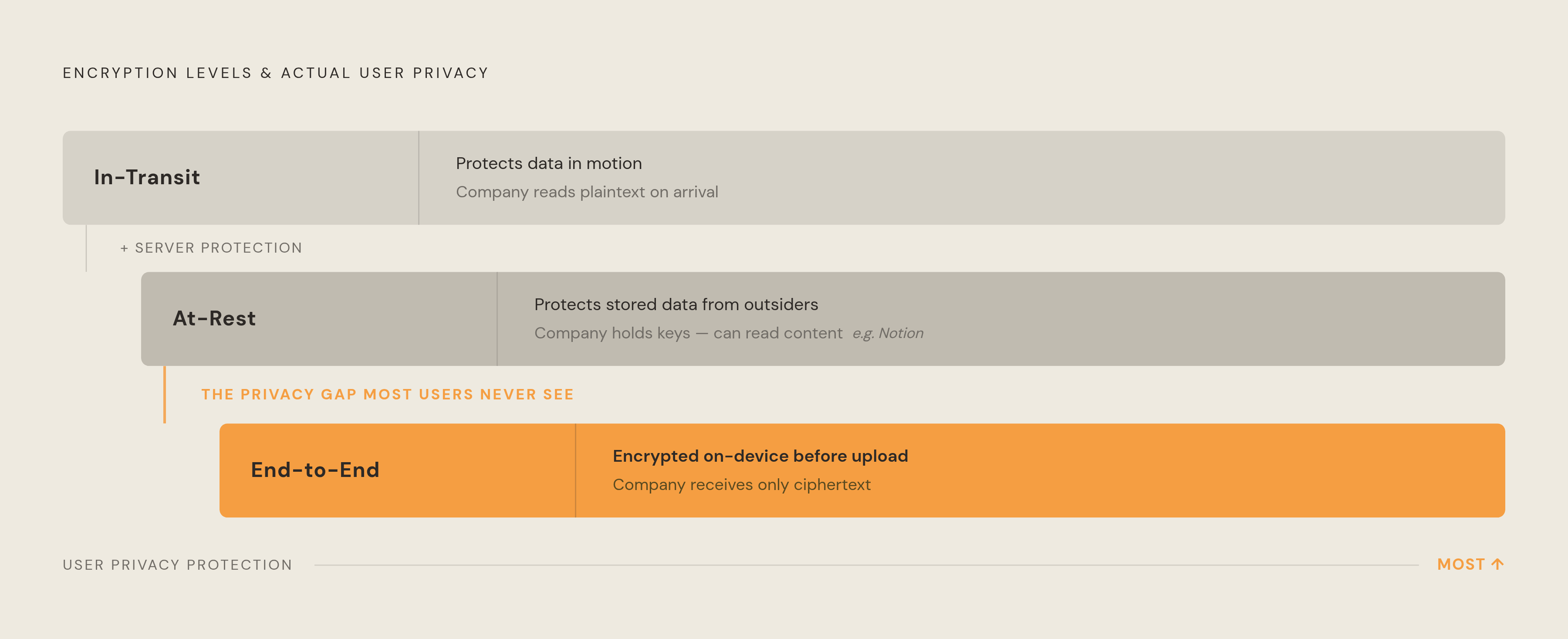
To understand why this works, we must first look at what encryption actually does in each of its three common forms, because the differences are not subtle. They are the entire argument.
In-transit encryption, the standard HTTPS/TLS that governs most internet traffic, scrambles your journal entry as it travels from your device to a company's server. It protects against interception on the network. It does not protect the entry once it arrives. The company receives it in readable form.
At-rest encryption protects data sitting in a database from external attackers. If someone breaches the server, they encounter encrypted files. This sounds reassuring until you notice who holds the decryption keys: the company. Notion is among the most frequently cited examples of a journaling-adjacent app that uses at-rest encryption, meaning the company can technically read what its users write. Some companies' support employees explicitly access customer content for troubleshooting. The privacy policy promises restraint; the technical architecture offers none.
End-to-end encryption is the only model where the architecture enforces the privacy guarantee. Entries are encrypted on your device, using a key only your device possesses, before they leave. The company's servers receive ciphertext. The company's engineers cannot read your entries — not voluntarily, not under legal compulsion, not in any circumstance where the key remains with you.
The clearest practical test: if the company could not read your journal even if a court ordered it to, that is E2EE. If the company promises not to read it, that is a privacy policy. One is a technical guarantee; the other is a social contract with a compliance team behind it.
Most apps that describe themselves as "encrypted" or "secure" are offering the first two types. The genuine E2EE tier is small.
The Freemium Burial Problem
But what if an app does offer E2EE, and still most of its users aren't protected? That is not a hypothetical. It is the current state of the market, and it operates through two structural mechanisms.
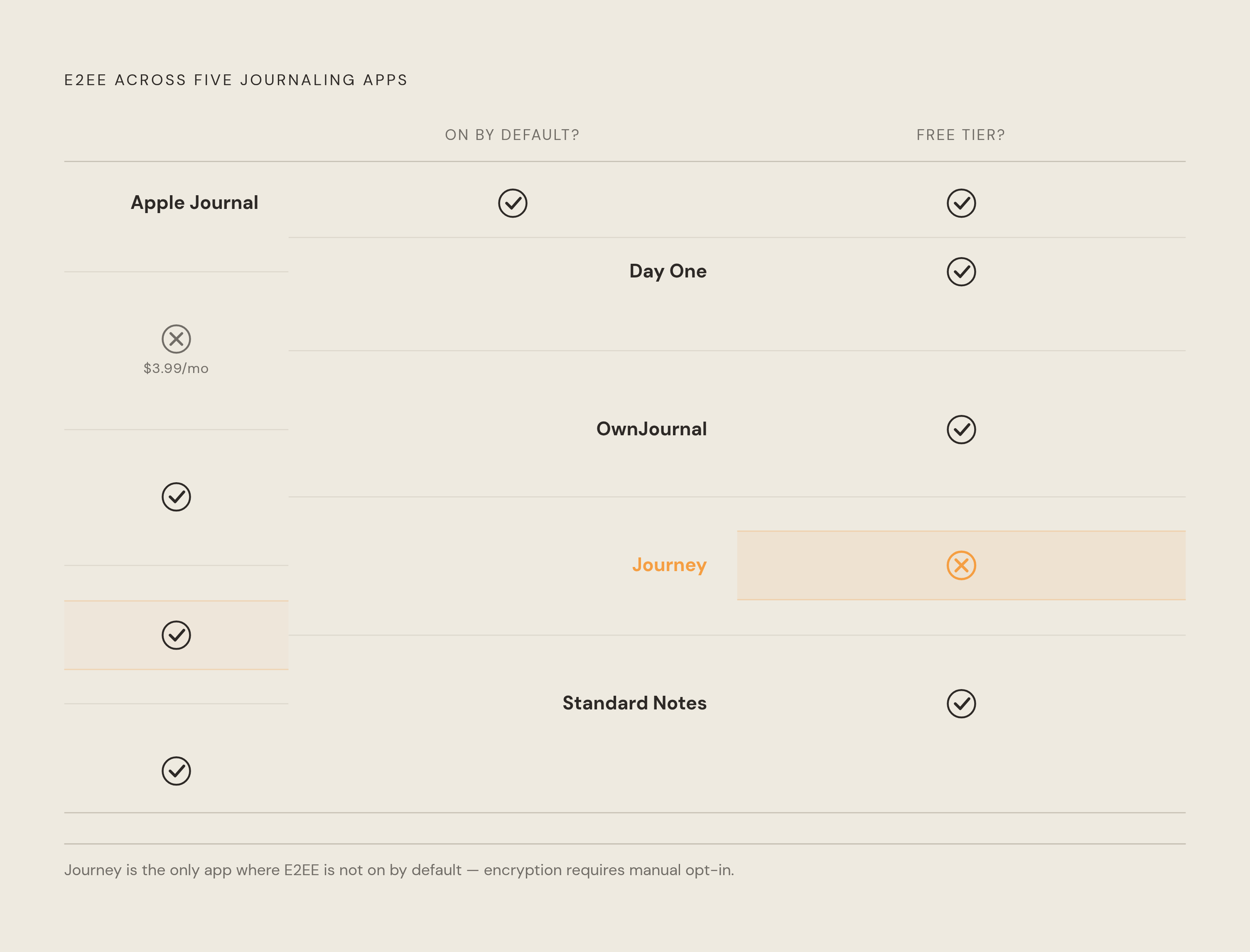
The first is E2EE gated behind a subscription. Users on the free tier write without it, often without any visible indication that encryption is tier-dependent.
The second is E2EE available to everyone but disabled by default. The feature exists; the typical user never encounters it.
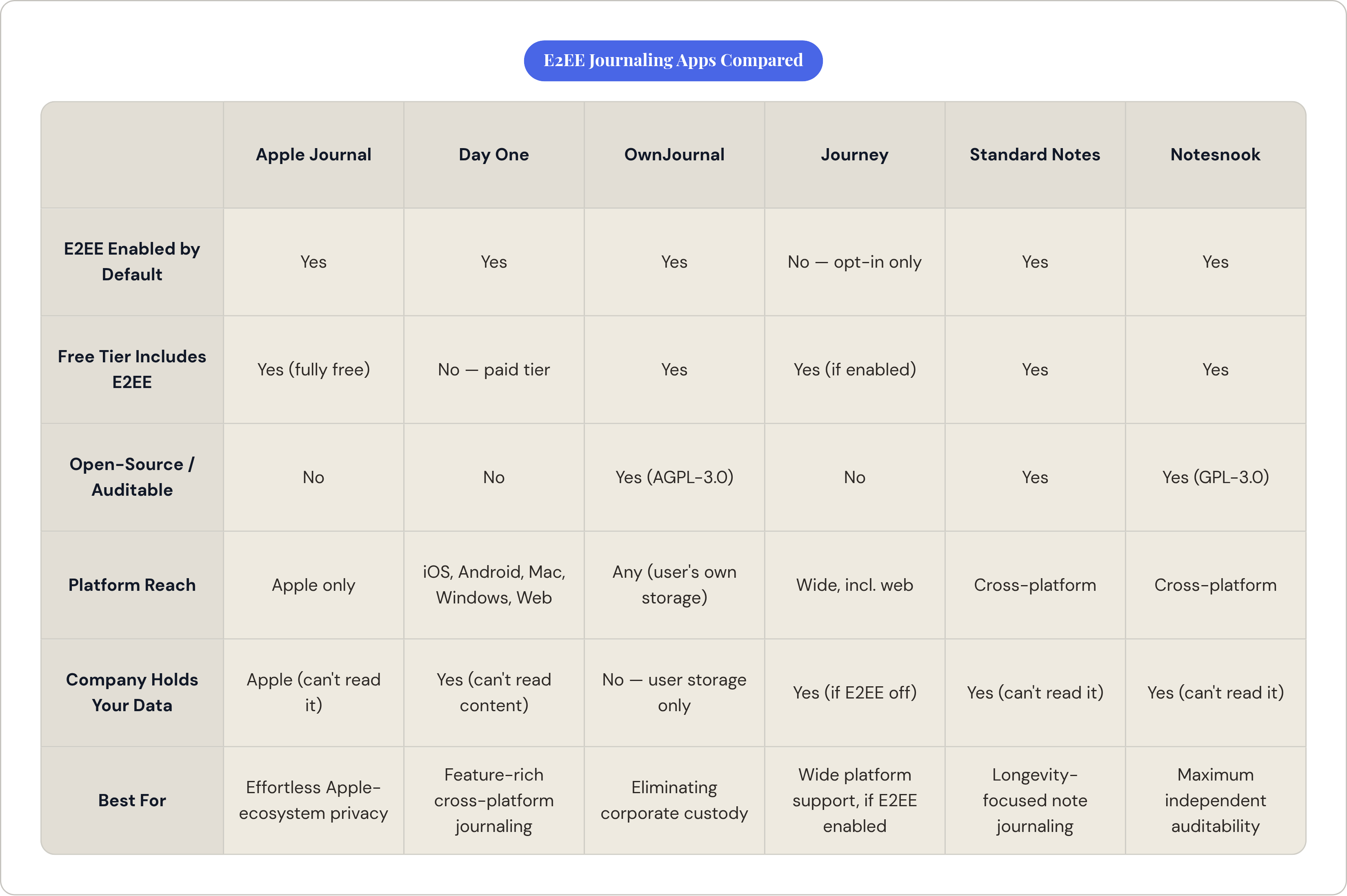
Of the journaling apps with well-documented E2EE implementations, three enable it by default. One, Journey, does not. That single design choice, opt-in versus opt-out, likely determines the actual encryption status of the majority of Journey's user base, regardless of what Journey's feature page advertises.
"End-to-end encrypted" in an app's marketing warrants exactly two follow-up questions: on which pricing tier, and is it enabled by default? Without satisfactory answers to both, the claim is incomplete.
Apple Journal: Friction-Free, Ecosystem-Bound
Apple Journal represents the most elegant E2EE implementation for the straightforward reason that it requires nothing from the user. No toggle to find. No premium tier to unlock. No setting to enable before writing.
Apple's documentation is explicit: with standard two-factor authentication and a device passcode active, all Journal entries are end-to-end encrypted in iCloud. Even Apple cannot read them; the decryption keys live only on trusted devices. Journal data sits in the same encryption tier as Health data and passwords, which is about as serious a commitment as Apple makes about anything.
The feature set has matured considerably since the app's 2023 iPhone launch. By 2025, it expanded to iPad and Mac, carrying consistent encryption across all three platforms. Multiple journals, mood tracking integrated with Apple Health, audio recordings with transcription, location-based map views of entries, and intelligent suggestions surfaced from photos, workouts, and music are all available, all free, all encrypted without effort.
The trade-off is substantial and by design: no Android, no Windows, no web browser access. For anyone outside the Apple ecosystem, this option does not exist. For users fully within it, Apple Journal is the lowest-friction path to genuine E2EE in this category, and it costs nothing.
More than a decade of product history has produced the strongest multimedia support among E2EE journaling apps: photos, voice entries, video, location data, import and export options, and now, since March 2025, a Windows client that gives it the broadest platform reach of any E2EE journal. iOS, iPadOS, macOS, Android, Windows, and web access, all with E2EE on by default.
That is the headline. Here is the subtext.
Entry text and personal journal content are end-to-end encrypted. Certain synchronization metadata are not: timestamps, image dimensions, device information, and aggregate counts. For most users, this gap is inconsequential. For anyone with a serious threat model, metadata patterns — when you write, how often, from which device — can be revealing even when every word of the content is protected.
The AI feature adds another layer to consider. It is opt-in, and when used, selected content is decrypted on-device and transmitted over HTTPS to a model service, then deleted after processing and not used for training. Some functions run on-device through Apple Intelligence on supported hardware. It is a deliberate trade-off, not a hidden compromise, which is exactly how it should be disclosed.
Pricing is $3.99 per month or $34.99 per year for the premium tier, which unlocks unlimited journals, audio entries, and video support. The free tier exists but is limited.
OwnJournal: Eliminating the Trust Problem Entirely
One might argue that even well-documented E2EE still requires trusting a company's implementation claims. OwnJournal's answer to that argument is architectural: it removes the company from the equation.
Encrypted entries sync directly to the user's own Google Drive, Dropbox, iCloud Drive, or self-hosted Nextcloud. OwnJournal the company holds nothing — not ciphertext, not keys, not metadata. If the company ceased operations tomorrow, every entry would remain intact in the user's storage of choice.
The full codebase is open-source under AGPL-3.0, meaning the encryption claims are independently auditable. You do not have to take the marketing page at its word; you can read the code. The company is headquartered in Sweden and operates under GDPR, though that jurisdictional fact is somewhat academic when the company never touches the data in the first place.
The free tier handles daily journaling. AI analysis and polished export formats are behind a Plus tier at $19.99 per year.
OwnJournal appeals specifically to writers who want to eliminate corporate custody of their writing, not merely trust that a company's custody is well-intentioned. That is a different thing.
Journey: An Honest Accounting of the Opt-In Gap
Journey has genuine strengths: the widest platform support in its category, structured coaching programs with progressive prompts, fitness and calendar integration.
It also offers E2EE. That sentence requires immediate qualification.
E2EE in Journey is opt-in. A user who installs the app, sets up sync to Google Drive, and begins writing is not, by default, getting end-to-end encryption, even though the feature is available to them. Journey is the clearest illustration in this roundup of the distinction between an app having E2EE and an app protecting your entries with E2EE for a typical user. Those are not the same thing.
The Singapore jurisdiction matters at the margins for users whose threat models include government data access requests, though it becomes less relevant if E2EE is properly enabled.
Practical guidance is straightforward: Journey is usable for privacy-conscious writers, but only if E2EE is explicitly enabled in settings before any entries are written. The sequence matters. Writing first and encrypting later does not retroactively protect entries that were already synced.
Standard Notes and Notesnook: Note-Taking Apps That Earn Their Place Here
Both of these apps arrived at E2EE from a different direction than the purpose-built journals above. They are note-taking applications that happen to implement encryption more rigorously than most dedicated journaling apps, which is either an indictment of the journaling app market or a straightforward argument for using them.
Standard Notes encrypts every note by default using AES-256-GCM. No tier dependency; no toggle required. It operates on an explicit longevity principle, a stated ten-year operational commitment, designed for notes to outlast the churn of app market trends. Its acquisition by Proton, the Swiss privacy company whose core business is encrypted communications, adds institutional backing from an organization with genuine skin in the privacy game. Swiss jurisdiction provides a strong legal baseline, though E2EE makes jurisdiction largely theoretical when the company cannot access the content anyway.
The free tier is genuinely functional: unlimited notes, basic editors, three days of note history. Professional features are priced higher. The limitation for journaling is simply that Standard Notes is a note-taking app. There are no prompts, no mood tracking, no activity suggestions. The writer supplies their own structure.
Notesnook uses XChaCha20-Poly1305 with Argon2 key derivation, which is considered a stronger key-hardening approach than most competitors in this space. It is fully open-source under GPL-3.0 and includes Vericrypt, an offline tool that allows users to independently verify their own encrypted data without relying on the app at all. That is the most auditable option in this entire field. Its community momentum, meaningfully larger GitHub star count than Standard Notes, suggests faster-growing developer adoption and power-user interest.
Pakistan jurisdiction is worth noting for users in specific geopolitical contexts, though the same E2EE logic applies: the company cannot produce what it cannot read. Pro pricing is $4.99 per month or $49.99 per year.
Joplin also merits mention for technically inclined users: free, open-source, Markdown-based, syncs through Nextcloud or Dropbox with E2EE. No subscription required. No journaling features whatsoever. The self-hosting option for writers who want total control and are willing to build their own context around it.
Reading Encryption Claims Without Being Misled
That raises an important question: given that most users are not going to read encryption whitepapers before choosing an app, what is the minimum viable due diligence?
Four questions, asked in order, cover most of the terrain.
First: is it E2EE or at-rest? Can the company read your entries, or have they merely promised not to? The technical architecture and the privacy policy are different documents with different weight.
Second: is it enabled by default, or must you find and activate it? Journey demonstrates why this question matters. The feature existing and the feature protecting you are not the same condition.
Third: is it available on the free tier, or locked behind a subscription? Writing for months before discovering that your plan doesn't include the encryption advertised on the marketing page is a failure mode with real consequences.
Fourth: is the encryption implementation open-source and independently auditable, or is it taken on the company's word? OwnJournal, Standard Notes, Notesnook, and Joplin all allow independent verification. That is categorically stronger than a company's claims about its own implementation.
It is also worth considering the metadata question, which most apps do not address transparently. Most do not. Even genuine E2EE can leave timing, frequency, and device metadata unprotected. For most writers, this is an acceptable residual risk. For anyone with a serious threat model, it is a meaningful one.
The AI integration question is newly relevant for every app in this category. Any feature that sends content to a remote model, even with deletion promises and training exemptions, temporarily breaks E2EE for that specific content.
Where that leaves a writer evaluating options is roughly here: Apple Journal for the lowest-friction E2EE path within the Apple ecosystem. OwnJournal for anyone who wants to eliminate corporate custody of their writing entirely. Notesnook or Standard Notes for maximum auditability with note-taking flexibility. Journey, but only after manually enabling E2EE before writing a single entry.
A journal is one of the most intimate documents a person creates. The architecture holding it deserves at least one careful question before the first entry.