Evernote vs Notion for Journaling

Journaling is not generic note-taking with a date stamp. It has a distinct cognitive profile, and that profile makes demands no feature spreadsheet will ever capture.
The core job is externalization: getting something out of working memory and onto a surface before the thought dissipates, reorganizes itself into something more comfortable, or simply vanishes. This is a time-sensitive operation. The window between having something authentic to say and losing the precise texture of it is short. Friction in that window is not a minor UX complaint; it is a direct threat to the cognitive state the whole activity depends on.
Then there is retrieval: finding what you wrote weeks later, recognizing patterns, rereading entries with enough context to actually derive something useful. Less urgent than capture, but ultimately where journaling earns its reputation as a reflective practice rather than an expensive diary.
And then there is a third job, optional, that most comparison articles treat as universal: structural cross-linking, connecting entries to goals, habits, themes, and active projects. Some journalers need this architecture. Others find it suffocating. Assuming everyone needs it produces recommendations that are technically feature-rich and practically unusable for half the people reading them.
These jobs map directly onto methods. Morning pages and free-writing are almost entirely capture-and-release operations; structure actively impedes them. Gratitude journals and prompted journals need light, consistent scaffolding, not a relational database. Bullet journaling and goal-tracking journals, by contrast, treat structure as the point, and if the tool cannot support repeating formats, tagging logic, and cross-referencing, it tends to fail.
That raises an important question: if the cognitive demands vary this much by method, why does nearly every comparison article evaluate Evernote and Notion against a single universal journaling rubric? Probably because a feature grid looks authoritative, and symmetrical comparisons are easier to write. The problem is that it answers the wrong question with great confidence.
Four axes actually matter: capture ease, retrieval power, structural flexibility, and friction. Everything that follows runs through those four lenses, and the conclusions are less balanced than most reviews would have you believe.
How Evernote's capture-first model works in practice
Evernote was built around one behavioral priority: get something captured fast, find it reliably later. Every design decision in its original architecture reflects that, and for a certain kind of journaler, that orientation is exactly right.
A new note is one click away. The editor is immediately ready. No architecture decisions are required before you start writing. For someone whose primary need is low-resistance capture, this is not a small convenience.
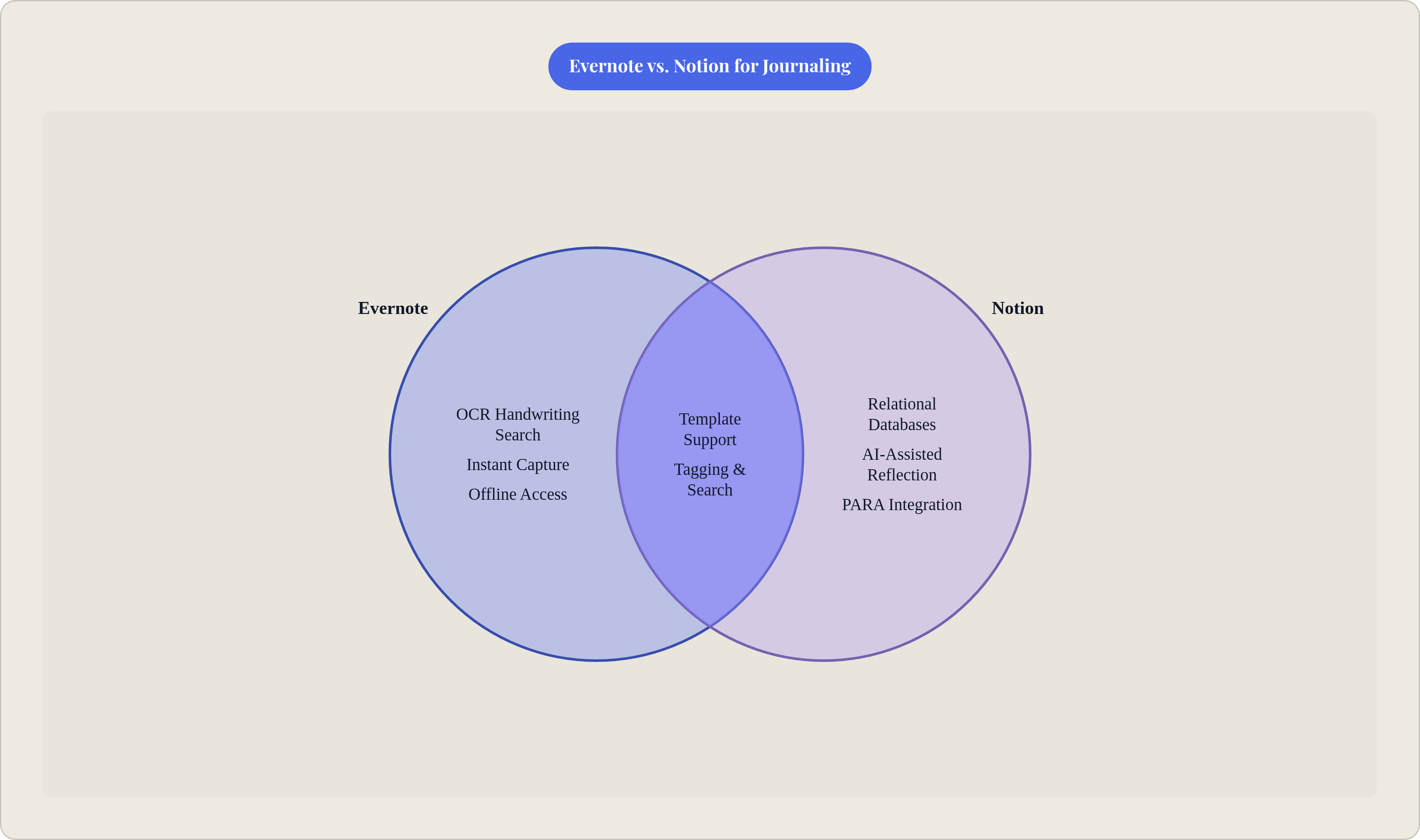
The more technically interesting feature is OCR-powered search. Evernote reads handwriting inside images, parses scanned documents, and indexes rough cursive photographed on a phone camera. Practically, this means a journaler who writes in a physical notebook can photograph each spread and retrieve any entry later by searching a single word it contained. If you have ever tried to maintain a handwritten practice while also wanting the recall power of digital search, this feature tends to be the deciding factor, not a nice-to-have.
Organization is notebook- and tag-based: flat by modern standards, but that flatness stays out of the way during capture and provides enough structure to sort entries by date, mood, topic, or project when retrieval becomes the job. Offline access is available on paid plans, which matters more for journaling than for most other use cases because the habit tends to happen in transit, at night, or in places where connectivity is unreliable.
But Evernote's capture model has a ceiling, and journalers hit it in predictable places.
The template ecosystem is modest. Journalers who want richly structured repeating prompts will exhaust it quickly. More critically, Evernote's free plan has been materially restricted since Bending Spoons acquired the company in 2023: note counts are capped, device sync is limited to two, monthly uploads are capped at 60 MB, and upsell interruptions require multiple dismissals before the editor loads. Building a friction-sensitive habit inside an app where the core capture experience is interrupted by upsell prompts works directly against the conditions that make the practice sustainable. That is not an incidental annoyance; it is a structural contradiction.
How Notion's structure-first model works in practice
Notion was designed around an inverse priority: build a system first, then populate it. Every page exists within an architecture the user defines before writing begins, and the implications for journaling are significant and consistently underappreciated.
Consider what structured journaling actually requires: repeatable templates with consistent fields, the ability to filter and review entries by property, and connections between daily reflections and the broader goals or projects they relate to. Notion provides all of this at a depth Evernote does not approach. A Notion journal can surface every entry tagged with a particular theme, render a calendar view of entries written during a specific project, or filter a month of gratitude entries by mood rating. That is retrieval by relationship, categorically different from keyword search.
The template ecosystem is large, with thousands of options across the community library, including Bullet Journal adaptations, PARA implementations, daily review frameworks, and habit trackers. Notion's relational database architecture suits these methods well, and the community has built accordingly.
Notion AI adds a layer Evernote does not have: summarizing entries, generating prompts, drafting structured reflections. These capabilities sit on the paid tier, but for journalers who want AI-assisted reflection embedded in the tool, the option exists in a way it does not in Evernote.
But where does Notion's model create friction rather than resolve it? The blank-page problem is real. Notion's architecture demands decisions before any writing happens, and for a new journaler or someone returning after a lapse, this is where abandonment most often occurs. The setup cost is theoretically a one-time investment; in practice it recurs every time the workspace needs restructuring. Search is limited to full-text within typed content with no OCR capability for images or handwriting. Offline access is materially constrained: only essential blocks function without connectivity, which is a genuine failure mode for a habit that often occurs precisely when internet access is unavailable. And a complex Notion workspace loaded on a phone mid-thought carries latency that a simple new-note experience does not.
Pricing and what each tier actually unlocks for a journaler
Pricing in this comparison is more lopsided than a feature grid suggests, and the gap matters particularly for a use case that is almost always solo.
Notion's free plan is functional for individual journalers: unlimited pages, databases, templates, and core features with no note-count cap. A person can build and maintain a complete journaling system, including relational databases and templated daily entries, without paying anything. Whether this generosity is sustainable as a business model is an open question, but it is the current reality.
Evernote's free plan is, at this point, a trial-grade product. Note counts are capped, sync is limited to two devices, uploads are restricted to 60 MB per month, and upsell friction is embedded in the core experience. To use Evernote as a journaling tool without that friction, the Personal plan is effectively required: $10.83 per person per month billed annually, or $14.99 billed monthly, per Evernote's published pricing as of 2024. The Professional tier, at $14.17 per person per month annually, raises upload limits and adds Slack and Microsoft Teams integrations that most solo journalers will rarely touch.
Notion's Plus plan runs $10 per seat per month; the Business plan is $20 per seat per month, per Notion's published pricing as of 2024.
For a solo journaler, the entry-level comparison is straightforward: Notion requires no payment to be fully usable; Evernote requires a paid subscription to remove friction that actively disrupts habit formation. At the paid tier, monthly costs are roughly equivalent, and the decision returns to mental model fit rather than price.
The cost gap is not a verdict on quality. But it does signal which product is currently designed with individual users at the center of its business model and which one is not.
Which journaling methods belong in which tool
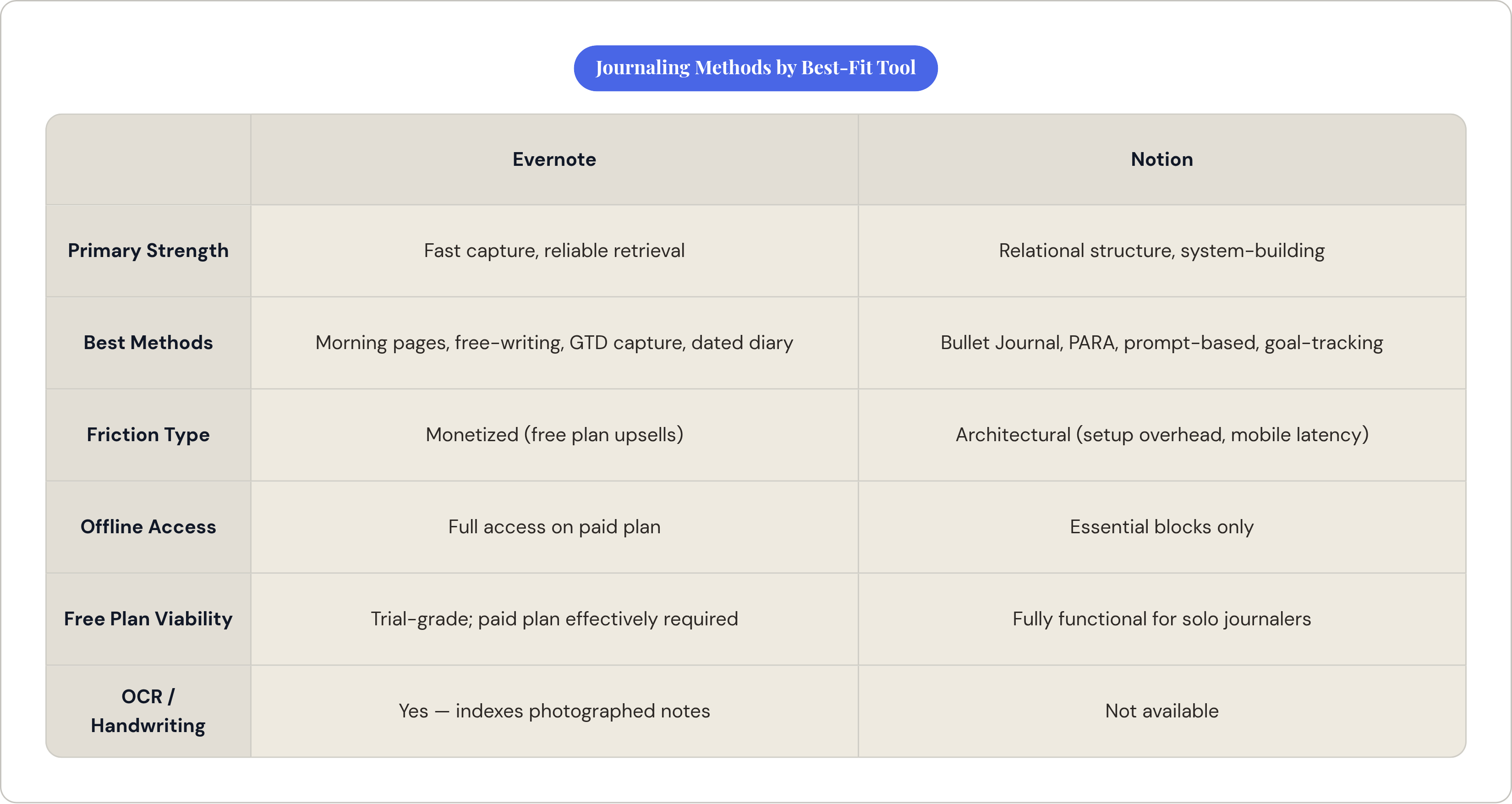
The capture-versus-structure axis maps directly onto the major journaling methods. Mapping your practice onto it is the fastest path to a defensible choice.
Evernote fits morning pages and free-writing, where any setup overhead is the enemy; mixed analog/digital practice, where OCR search is the deciding feature rather than a bonus; simple dated diary entries, which require nothing from a tool except that it stay out of the way; and GTD-style thought capture, which relies on fast input and powerful retrieval rather than predefined structure. That last use case was, essentially, Evernote's original design brief.
Notion fits digital Bullet Journaling, where database properties replicate the symbol-and-migration logic of the system better than any flat note structure can; PARA-integrated journaling, where the journal connects actively to projects, areas, and resources in a unified workspace; structured prompt-based journaling, where consistent fields become queryable data rather than buried text; and goal-tracking and habit journals, where linking entries to goal records is a capability Evernote does not have.
One method sits in the middle: gratitude journaling. Notion's template ecosystem makes daily entries structurally consistent; Evernote's low friction makes them more likely to actually happen. The bigger risk for a given person is inconsistency of format or inconsistency of practice, and that is the question that determines which tradeoff to accept.
The friction question that most comparisons skip
Feature comparisons treat every capability as equally available. In practice, friction determines whether a tool gets opened at all.
Journaling's value depends on capturing thought before it reorganizes itself into something safer. The window is short, and anything that interrupts the act of writing, whether an upsell prompt requiring multiple dismissals, a setup screen demanding architectural decisions, or a loading spinner on a mobile workspace, breaks the mental state the activity depends on.
Evernote's friction points on the free plan are concrete: upsell interruptions appear before the editor loads. Paying resolves most of this, but it means the friction cost is also a monetary cost. That changes the calculus for someone who is not yet sure the habit will stick, which describes most people when they start.
Notion's friction points are architectural rather than monetized. The first-use setup problem is real and recurring: new journalers often stall at system design and never write a first entry. Loading a complex workspace on mobile mid-thought adds latency. And in low-connectivity environments, Notion is not writable at all. For journaling, which often happens in transit or at night, this is a hard failure mode rather than a soft inconvenience.
The practical implication: the tool that wins on a feature grid is often the tool that loses in actual writing conditions. A commuter journaling on the subway needs offline access and instant open; Evernote, on a paid plan, fits that context. A weekly reviewer building a personal knowledge system needs relational structure; Notion fits that context. Friction is not a secondary consideration once you accept that mental model fit is the right frame. It is the practical test of whether the fit is real.
How to decide between them without testing both for three months
Three questions. Answer them honestly and you probably do not need a trial period.
What is your primary journaling job? If the answer is capture and release, morning pages, quick entries, or any practice where uninterrupted flow is the goal, Evernote's mental model fits and Notion's overhead works against the habit. If the answer is structure and review, habit tracking, goal journaling, or PARA-integrated reflection, Notion's architecture is not optional. It is the point.
Do you mix handwriting and digital? If yes, Evernote's OCR search tends to be the deciding factor. No other major app in this comparison has this capability for analog/digital workflows, and if that workflow describes you, the conversation is largely settled. If no, the advantage disappears and other factors govern.
Are you willing to pay for the tool before the habit is established? If no, Notion's free plan is fully functional for solo journaling; Evernote's is not. If yes, the entry-level paid costs are roughly equivalent, and the choice returns to mental model fit.
One further consideration worth naming: if your journal is likely to grow into a broader personal knowledge system, one that connects to project work, active goals, and reference material, Notion's relational database architecture has a long-run structural advantage that Evernote's current architecture does not replicate. That gap is architectural, not a matter of Evernote shipping a feature update.
Neither app is a universal journaling tool. Evernote is a capable capture-and-retrieval journal. Notion is a capable structured-system journal. Choosing the wrong one is not really about missing features; you will find workarounds for features. It is about building a friction-dependent habit inside an environment that is working against the cognitive work you are actually trying to do.