Journaling AppsLong read
Journaling Apps with Mood Tracking Features
Mood tracking and journaling are different tools—and most apps confuse them.
Correspondent · · 13 min read

Journaling apps with mood tracking have quietly split into two different products wearing the same interface. One kind logs how you feel; the other helps you figure out why. Most people assume these are the same job because both involve a daily check-in and some version of an emoji. Mistaking one for the other is why so many people download a journaling app, use it for eleven days, and quietly let it die on their home screen.

That's the thesis of this piece: mood tracking and reflective journaling are functionally distinct activities that happen to share a UI pattern, and the apps that understand this difference (and design for both without collapsing one into the other) are the ones worth your attention. Everything below is an attempt to walk through what each job actually requires, cognitively and mechanically, and then look at where specific apps land on that spectrum.

## What happens in the brain when you write about a feeling versus when you tag one

Here's the part almost nobody thinks about before picking a journaling app: naming an emotion in language is an intervention, not a neutral act of description.

Psychologists call this affect labeling, and the research on it is fairly consistent: when you put a feeling into words, activity in the amygdala (the brain's threat-detection alarm) tends to quiet down, while regions in the prefrontal cortex, the part responsible for reasoning and regulation, become more engaged. Some of the storm's electricity gets rerouted through a part of the brain built for analysis instead of alarm.

Writing does this on a sustained basis, sentence after sentence. Every clause you write about a bad day is another small rep of prefrontal regulation working against amygdala reactivity, and that's before you even get to the content of what you write. James Pennebaker's decades of research on expressive writing found something more specific: people who wrote about difficult experiences in narrative form showed measurable shifts in how those memories seemed to get stored, an effect that went beyond simply labeling the emotion. Fragmented, emotionally charged material gets pulled into something more organized and contextualized, a process that recruits the hippocampus alongside the prefrontal circuits doing the regulating. Writing appears to reorganize how experience gets stored, in addition to calming you down in the moment.

Tapping a mood icon is a real action with real value, though its mechanics are much narrower. It doesn't touch Broca's area, doesn't require narrative construction, doesn't force you to choose a verb. You're producing a data point rather than a sentence. There's limited cognitive reappraisal involved, since there's little to reappraise; you picked "anxious" from a menu of six faces and moved on with your day.

What mood data is genuinely good at is revealing patterns you'd never notice from inside any single day, which is something writing struggles to do on its own. You don't feel the six-week slump while you're living it. You see it on a chart. That's a legitimate, distinct use case, and it sets up the entire rest of this piece: mood tracking and reflective writing are two different tools that happen to get sold in the same box, and the apps that know this build for both instead of pretending one covers for the other.

## The spectrum of apps: from pure mood loggers to full reflective journaling

Line up the major journaling apps and a rough spectrum appears. On one end sit logging-first apps, where mood tracking is the entire interaction and writing is a bonus feature nobody's required to touch. On the other end sit reflection-first apps, built around long-form writing, where a mood tag is metadata attached to an entry after the fact. In between, in theory, sit hybrid apps that treat mood data and reflective writing as genuinely equal partners.

In theory is the operative phrase. Nearly every app on the market claims hybrid status because "mood tracking plus journaling" is now the standard marketing pitch, the wellness-app era having made mood check-ins a default feature regardless of whether the app's underlying design was ever built to support one. Claiming hybrid status and earning it are different things, though, and there's a simple test to tell them apart: does the mood data ever feed back into the writing experience, surfacing a pattern, prompting a question, nudging you toward the page? Or does it just sit in a chart, disconnected from everything you actually wrote?

Most apps fail that test. The engineering isn't particularly hard; integrating the two well simply requires the product team to actually think about what each function is for, rather than shipping a mood picker because the last three competitor apps had one.

This section isn't ranking anything yet. It's just naming the categories, because you can't evaluate an app fairly until you know which job it was actually built to do.

## Daylio: what a logging-first app does well and where it stops

Daylio's whole design philosophy fits in one sentence: you should be able to log your day in two taps, no writing required. Pick a mood, pick the activities that filled your day (gym, work, saw friends, whatever), and you're done. The app was built explicitly around the idea that journaling shouldn't require words.

And it delivers on that premise better than almost anything else in the category. The friction is close to zero, which matters enormously for habit formation, especially for people who prefer quick physical actions over sitting down to write. The pattern data on the back end is genuinely rich too: mood charts, activity correlations, a "Year in Pixels" grid that turns 365 days into a mosaic you can actually scan for trends, plus weekly and monthly stats. If the job is documentation, Daylio does the job thoroughly. Its privacy model is also worth a nod: data lives locally on your device by default, with optional encrypted backup, no mandatory account or server upload. Writing exists in Daylio too (notes, templates, voice memos, photos can all attach to an entry), but it functions more as an add-on, with the mood log as the engine.

Here's where it stops, though, and it's worth sitting with this because it's the whole argument of this piece in miniature: Daylio will happily tell you that you logged "sad" three times this week. It will not ask you why. There's no mechanism that takes a pattern like that and turns it into a prompt, a nudge, a question worth sitting with for five minutes. The reflective layer exists (you can absolutely write in Daylio if you want to), but it stays passive; you have to bring the reflection yourself, since the app doesn't build it into the flow.

None of that makes Daylio worse. It makes it honest about what it's for. People who want a consistent emotional record and genuinely respond better to low-commitment taps than blank pages are being served exactly right here, and that's a real use case in its own right. Worth flagging: Daylio is mobile-only, no desktop client, which matters if your reflective habit (whenever you have one) happens at a keyboard rather than on a couch with your phone.

## Day One: reflection-first with mood tracking bolted on

Flip the priorities and you land somewhere in Day One's territory. Its core strength is a mature, long-form writing environment: text entries, photos, audio, video, location tagging, templates, robust search, and an "On This Day" feature that resurfaces old entries you'd otherwise have forgotten. This is an app built by people who assumed users would actually write.

Mood tracking exists here too, but it's a metadata field attached to an entry rather than the primary interaction. You can filter by mood later, review patterns, tag an entry as a rough one. It's useful, but it's clearly secondary; the writing prompts aren't built around your mood history the way a fully integrated hybrid app's would be. This is the mirror image of Daylio: where Daylio nails the logging job and treats writing as optional, Day One nails the reflective job and treats mood data as context you can reach for, not a feature the app leans on.

Its platform reach is broad, spanning iOS, macOS, Android, web, and Windows (the Windows version arrived more recently), making it one of the wider footprints in this category. Android users should know a handful of signature features, like video entries, voice notes, the home screen widget, and Apple Watch support, are built iOS and macOS first; the core writing experience travels, but the full feature set doesn't quite make the trip yet.

One more thing worth knowing if local-first storage matters to you: Day One was acquired by Automattic in 2021, and the product has moved toward account-based cloud sync since then. That's a meaningful shift for anyone who picked a journaling app specifically because it kept data on-device.

## Journey and Apple Journal: two different takes on making both jobs accessible

Two apps answer the "how do we make both jobs accessible" question in almost opposite ways, and comparing them side by side says a lot about how many roads lead to the same destination.

Journey was built Android-first, using Material You design language, and its cross-platform reach is genuinely wide: Android, iOS, Mac, Windows, Linux, web, even Chrome OS. Its most distinct feature is Wear OS support, meaning you can log a mood or a quick reflection from a Galaxy Watch or Pixel Watch, which matters because the gap between noticing a feeling and forgetting to write it down is exactly where most journaling habits go to die. No other major app in this space offers that particular convenience right now. Journey positions itself as a true hybrid, treating mood tracking and reflective writing as co-equal features rather than one propping up the other, and it's one of the more credible attempts at actually threading that needle rather than just claiming to.

Apple Journal takes the opposite bet. It ships free with recent iOS versions, meaning it reaches an enormous number of iPhones without anyone having to decide to download anything, which is a significant distribution advantage for a default app. Its standout feature is on-device machine learning that surfaces context-aware prompts from your photos, workouts, music, and location: "you went for a run near the lake on Tuesday, want to write about it?" That's clever, genuinely so. Apple Journal, though, skips mood tracking entirely. There's no mood picker, no chart, no pattern data at all. It's also deliberately minimal in other ways: iPhone-only, no iPad or Mac or Apple Watch app, no tags, no search, no export. The privacy architecture is strong (end-to-end encryption, on-device processing, nothing leaving your phone for a server somewhere), but the lack of export is a real lock-in risk if you ever want your years of entries to leave the walled garden.

So you get two different philosophies answering the same underlying question. Journey tries to hold both jobs at once, while Apple Journal drops mood tracking and doubles down on making the writing prompt itself smarter. Neither is wrong; they're just optimizing for different users.

## Where voice journaling fits when neither typing nor tapping feels while

Both ends of this spectrum, tapping and typing, share a friction problem that doesn't get discussed enough: they both require a deliberate mode-switch. You have to unlock your phone, open the app, choose a mood from a grid, or sit down and stare at a cursor blinking in an empty box. That switch is small, but small frictions are exactly what kill daily habits over months, not days.

Speaking is a different entry point entirely, and it's worth asking why, since most people don't think of talking as a "journaling" method at all. Developmentally and cognitively, conversation comes before writing for nearly everyone; thinking out loud is often how people process an experience the first time, well before they'd ever choose to write it down. Voice removes the blank-page barrier while preserving the reflective act itself, because speaking about a feeling still requires language, still requires some structure, some sequencing, some version of narrative. You can't talk about your day without doing at least a little bit of affect labeling along the way.

Joice builds its entire premise around this. It's prompt-guided voice journaling: you talk through your day, your thoughts, whatever's sitting heavy, and the app turns that spoken reflection into a written record. It's aimed squarely at people who think better out loud than on the page, and who find the commitment of opening a blank text field higher-friction than it's worth, even if they'd genuinely benefit from reflecting more. Because the prompts guide the conversation, reflection gets built into the structure rather than left for the user to manufacture from scratch, which is a real design advantage over apps that assume you'll bring your own depth.

Where does this land on the spectrum laid out earlier? Closer to the reflection-first end, honestly, since the act of speaking already does more cognitive work than tapping a face ever could. It manages that, though, with a friction level low enough to actually survive as a daily habit, which is the exact combination that most writing-heavy apps struggle to pull off.

## How mood data becomes useful only when it connects back to reflection

A chart that shows your mood dipping every Wednesday for six straight weeks is interesting. On its own, though, it's also fairly inert. Interesting and useful are not quite the same thing, and the gap between them is where most mood-tracking features quietly fail to earn their place in your day.

Genuine integration looks specific, not abstract. It looks like an app noticing you've logged low energy three mornings running and asking, directly, "what's been on your mind lately?" It looks like a mood tag showing up next to the journal entry from that day, as context you can actually read against, rather than sitting in a separate tab that nobody opens after the first week. Above all, it treats a logged mood as an opening move in a longer conversation, rather than a completed transaction you can now forget about.

This connects back to something concrete in the emotion regulation literature: cognitive reappraisal, the practice of consciously reframing how you're interpreting an emotional experience, ranks among the more effective self-regulation strategies researchers have identified. Journaling is unusually well-suited to reappraisal because writing lets you draft an emotional narrative and then, mid-sentence or mid-paragraph, revise it. You start writing "I'm furious at my coworker" and by sentence four you've usually talked yourself into "actually I think I'm just exhausted and he was an easy target." Mood tracking alone rarely gets you there; there's little room for revision when the entire input is a single tap.

So here's a fair test for any app claiming to do both jobs: does the mood data feed forward into what you write next, or does it only feed a chart that lives on its own, disconnected from everything else? Apps that manage the former are doing the harder design work, and it shows.

## Choosing the right app based on which job you're actually hiring it for

This is really about which job you're hiring the app to do, and that's a question worth answering honestly before you download anything.

If the goal is building a low-friction emotional record over time, something like Daylio is the straightforward answer; it was built for exactly that, and pretending it should also be a deep reflective writing tool sets you up to be disappointed by a product that never promised that in the first place. If the goal is sustained reflective writing with mood data as supporting context, something like Day One fits, or a genuine hybrid like Journey if you want both jobs held with more balance. If writing itself is the obstacle, if the blank page is where your good intentions go to die, voice journaling through something like Joice removes that specific friction while keeping the reflective substance intact. And if you're already deep in the Apple ecosystem and want something with zero setup, Apple Journal is a reasonable place to start, with the clear understanding that mood tracking and data export aren't part of the deal.

Here's the factor most people underweight when picking between these: the best app is the one you'll actually open tomorrow, and feature count on an App Store screenshot has little bearing on that. Habit research consistently points to friction and cue-routine-reward loops as far better predictors of consistency than feature depth. A simple app opened every day beats a sophisticated one opened every ten days, and that gap compounds over a year in a way that makes the fanciest feature list irrelevant if nobody's actually using it.

So ask yourself one question before you pick: do you want to remember how you felt, or do you want to understand why you felt it? That answer points you toward one end of this spectrum or the other, and it's probably the only question in this entire piece that actually matters.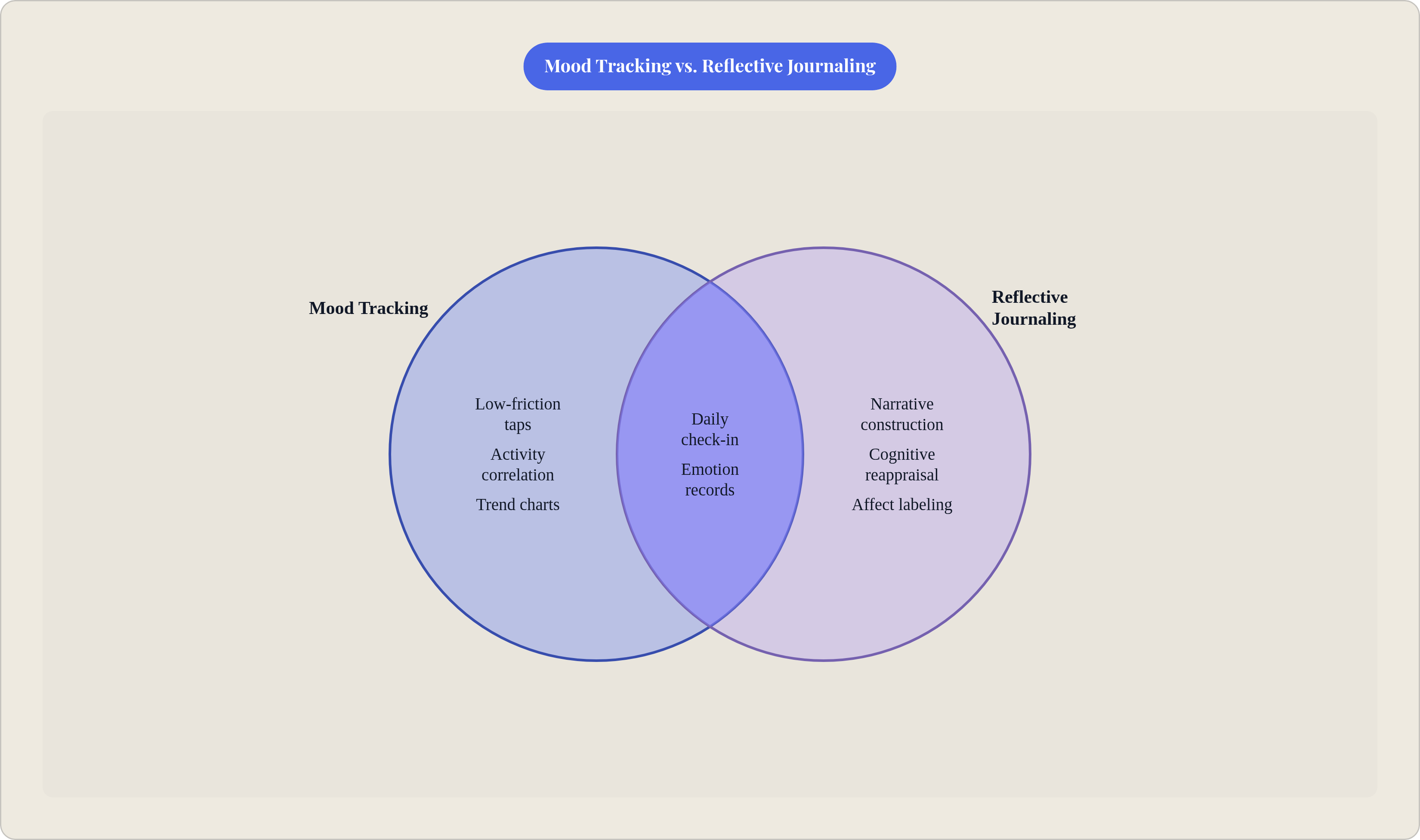
Sources
Filed underJournaling Apps