best journaling apps for privacy-focused users in 2026
Every journaling app claims to be private—here's how to tell which ones actually are.
"Private" is the most abused word in journaling app marketing, and most apps that claim it don't mean what you think they mean. This piece breaks down what actual privacy requires, technically and structurally, and ranks the apps that hold up in 2026 against ones that just have good copywriting.
What "private" usually means, and what it should mean
Here's the uncomfortable baseline: most journaling apps store your entries as plain text on a company's servers, protected by nothing more than a login screen. A login screen is a lock on the front door of a house with glass walls. Anyone with the right access, whether that's an employee, a hacker who got in through a misconfigured database, or a government with a subpoena, can read what you wrote about your divorce, your diagnosis, or your 3 a.m. spiral about work.
Three technical distinctions separate real privacy from the appearance of it.
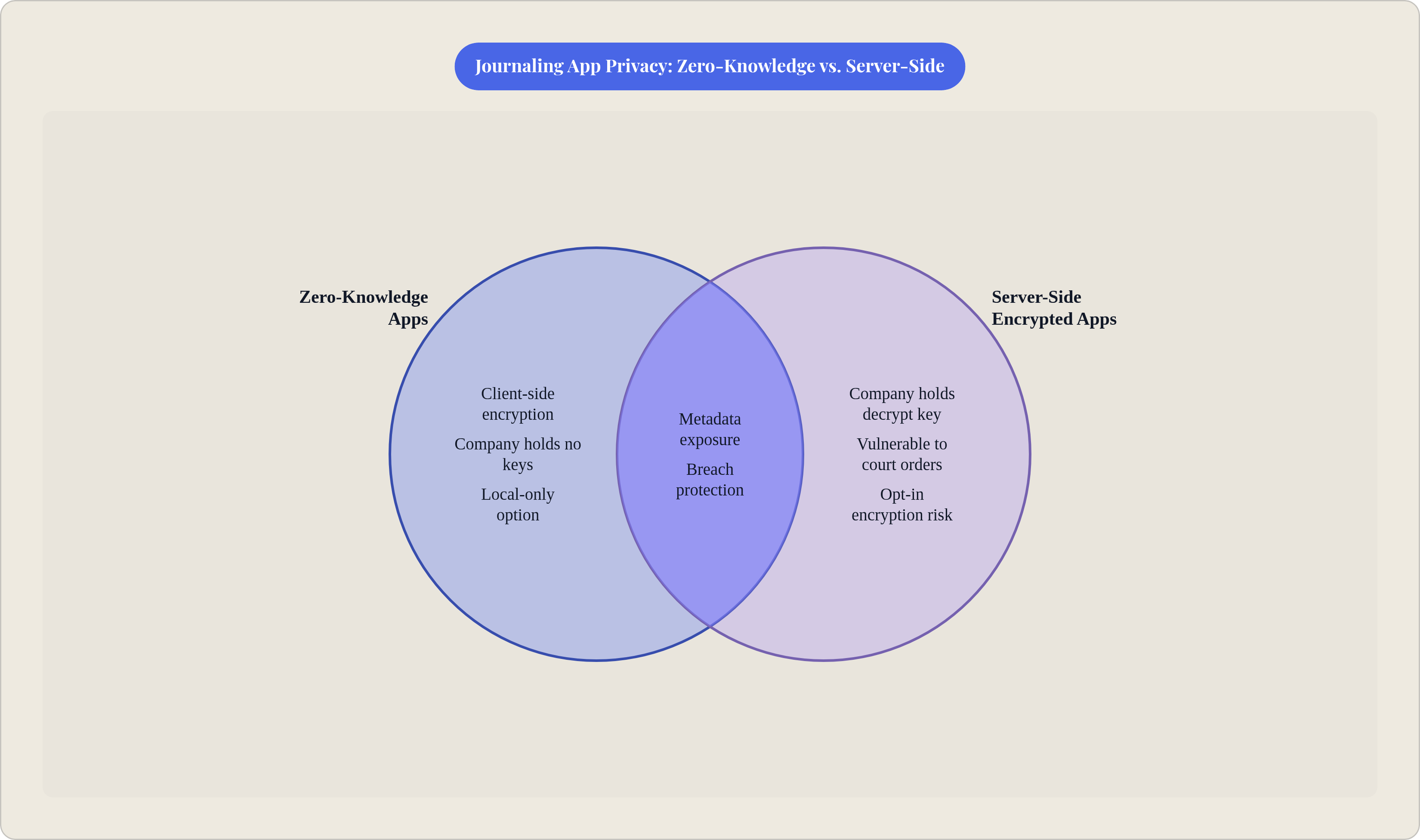
First: server-side encryption versus client-side, or "zero-knowledge," encryption. Server-side means the company encrypts your data after it arrives on their servers, which also means they hold the decryption key. They can technically read your journal whenever they want, whether that's for a support ticket, a legal request, or curiosity. Zero-knowledge means your entries get encrypted on your device before they ever leave it. The company never has the key. Even if they wanted to read your journal, or a government forced them to hand it over, all they'd have is scrambled data. Who holds the key determines everything else downstream.
Second: metadata exposure. Even a genuinely end-to-end encrypted app can leak information about you without ever touching the content of what you wrote. A service that can see when you journal, how often, and how long each entry runs, has a behavioral fingerprint. Journaling every night at 2 a.m. for eleven minutes tells its own story, encryption or not.
Third: business model. Apps funded by ad revenue or built to train AI models have a structural incentive to look at what you write. That's just how the incentives are built. Privacy and monetizing your content sit in permanent tension, and no amount of marketing copy resolves that.
That brings us to the language itself. A real no-data-sharing policy says something specific and falsifiable, like "entries are encrypted on your device and we cannot access them." A vague policy leans on phrases like "to improve our services" or "to personalize your experience," which are the industry's polite way of saying your content might get looked at, aggregated, or fed into a model.
One more cost that's easy to overlook: requiring an account at all. The moment you register with a name and email, your entries stop being tied to an anonymous device and start being tied to an identity. That's a meaningful privacy cost even before you get to encryption standards.
Six criteria run through every evaluation in this guide: encryption standard and type, whether local-only storage is possible, presence of third-party trackers, how easy it is to export or delete your data, whether an account is even required, and the underlying business model.
The privacy spectrum: four meaningful categories these apps fall into
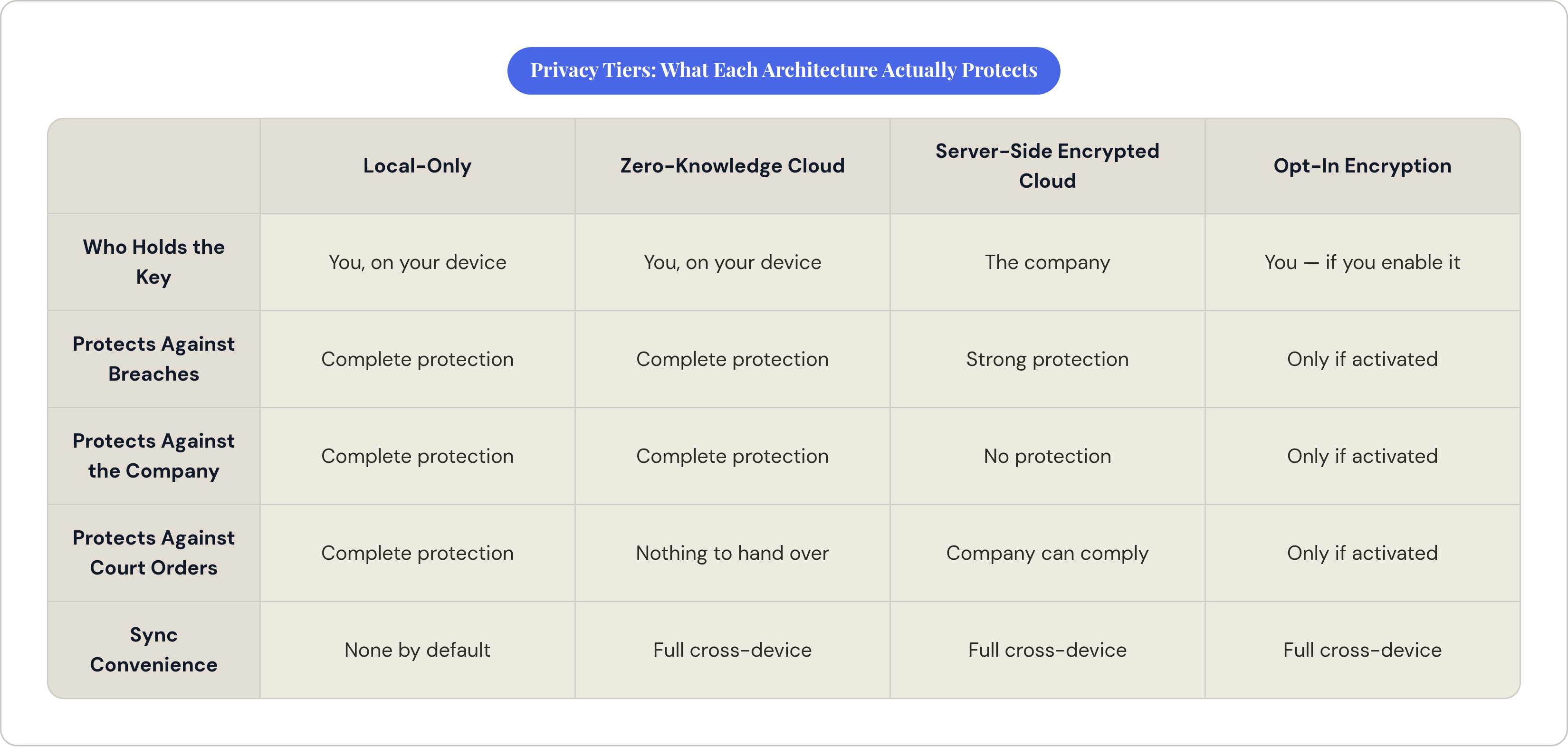
Every journaling app needs a slightly different level of privacy depending on the person using it, and it helps to know where you actually sit before you start comparing feature lists.
Local-only apps, with no server and no account, sit at the top of the spectrum. Nothing syncs unless you build that yourself, which means maximum privacy but zero convenience out of the box. Below that sits zero-knowledge cloud storage: your entries get encrypted before they leave your device, and the company holds no keys at all. This is the strongest sync option available, because you get cross-device access without handing anyone the ability to read your journal.
Then there's server-side encrypted cloud, where the company encrypts your data on their end but retains the key. This protects you meaningfully against a data breach, since a hacker who breaks in still hits encrypted data, but it does nothing to protect you against the company itself, or against a court order compelling them to decrypt it.
Last is opt-in encryption: available, but not switched on by default. This shifts the entire burden onto the user. If you never find the settings toggle, you're journaling in plain text without realizing it.
AI features complicate all four categories at once. Cloud AI models are too large to run on a phone, so any cloud-based AI feature requires decrypting your content at some point before or during processing. This is a structural fact about how large models work in 2026, worth naming plainly rather than treating as a gotcha against whichever app you're currently reading about.
Two more signals worth checking before anything else: is the code open source, and has the company submitted to an independent security audit? Open source means the code is publicly available for anyone with the skill to check it, so a privacy claim is verifiable rather than just asserted. Closed-source apps ask you to trust them; open-source apps let you check their work. An independent audit takes that a step further: it means a third party actually tried to break the encryption and published what they found, rather than the company just asserting it's secure.
Standard Notes: the zero-knowledge benchmark every other app is measured against
Standard Notes is the app privacy researchers point to when they want an example of what doing this right actually looks like. End-to-end encrypted by default, open source, independently audited, with no third-party trackers running in the background. That's the strongest privacy posture of any syncing journal covered here, full stop.
The free tier is a fully working journal, not a trial with a countdown clock. That matters more than it sounds, because it means genuine privacy isn't something you pay to unlock later.
There's also a long-term ownership guarantee that a lot of apps skip entirely: Standard Notes keeps an offline copy of your data and gives you an offline decryption tool, so if the company vanished tomorrow, you could still get your writing back. Most journaling apps don't offer a clear answer about what happens to your years of entries if the company shuts down.
The honest tradeoff is the interface. Standard Notes is a text editor, without prompts, mood tracking, or AI features layered on top. It's spartan by design. That makes it the right choice for anyone whose main requirement is wanting no one to ever read their entries but them, including writers working through genuinely sensitive material, people documenting things for legal or safety reasons, or therapists keeping personal notes separate from client files. It's the wrong choice for someone who needs more structure to stay motivated to write.
Local-first apps that never touch a server unless you tell them to
There's a category of journaling app that sidesteps the entire cloud privacy question by refusing to use a server at all unless you explicitly set one up. Everything lives on your device as plain text files. No account, no data transmission, nothing sitting on a remote server for a hacker to breach.
One popular option in this category stores notes as plain Markdown files that you own outright; you can open them in any text editor, on any machine, with or without the original app installed. There's no account system required for core use, and no personal data collected in local mode. An optional paid sync service exists for people who want cross-device access, and it's end-to-end encrypted for those who choose it. As of a 2023 change, the core app itself became free even for commercial use, so you're only paying for extras like sync, not for the privacy itself. The real-world limitation shows up on mobile: startup time can lag, sometimes by several seconds if you've installed a handful of plugins, and that kind of friction is exactly what kills a daily journaling habit before it forms.
A second option in this space, built around outlining rather than linear writing, opens by default to a daily journal page and organizes everything as nested, linked bullets instead of paragraphs. That's a genuinely different writing model, suited to people who think in fragments, connections, and half-formed ideas rather than complete narrative sentences. Its privacy posture in local mode matches the Markdown-based option exactly: nothing leaves your device unless you decide otherwise.
The shared tradeoff across both is setup friction. These aren't apps you open on day one and start writing in immediately; they reward people willing to spend an afternoon configuring folders, plugins, or templates before the daily habit clicks into place.
A full-featured app with strong encryption and real audits behind it
For most people who want privacy without giving up a polished journaling experience, the sweet spot is an app that's end-to-end encrypted by default using a modern standard like AES-GCM-256, and has been independently audited to confirm that claim holds up. That combination, strong encryption plus a real feature set, is rarer than it should be in 2026.
The best examples cover iOS, Android, Mac, Windows, and web, with sync that stays genuinely cross-platform without giving up encryption along the way. Rich media support, daily prompts, and "on this day" memory features round out a journaling experience that feels built for the purpose, not a bare text box with encryption added afterward.
There's a nuance worth knowing before you trust any of these claims fully: entry text and personal content are usually protected end-to-end, but sync metadata (timestamps, device identifiers, aggregate entry counts) often isn't. That's the kind of detail buried in a company's own encryption documentation, and it's worth actually reading rather than skimming.
AI features in this category tend to be opt-in rather than default, with selected content decrypted on the device, sent over HTTPS to a model service, processed, and then deleted rather than retained or used for training. That's a reasonably honest architecture as these things go. If your goal is zero server exposure, period, leave AI features off entirely; opt-in only protects you if you know it's there to opt out of. On Apple hardware specifically, some AI features can run through on-device processing instead of a cloud round-trip, which is the stronger privacy path for that subset of features.
Ownership matters here too. A company under stable, privacy-conscious ownership since the early 2020s is a better long-term bet than one that's changed hands three times in five years, though ownership can always shift again, so it's worth revisiting periodically rather than assuming it forever. Free tiers in this category usually cover single-device use, with paid plans unlocking multi-device sync and media storage.
Strong alternatives for specific user profiles
Different users need different apps, and two options in particular serve narrower but very real use cases.
For iPhone users already living inside Apple's ecosystem, the built-in journaling option keeps data on-device by default; nothing leaves your phone unless you turn on iCloud sync. Turn on iCloud's Advanced Data Protection setting, and your journal syncs end-to-end encrypted too. It pulls entry suggestions from Health and Photos data, and because that processing happens entirely on-device, it doesn't create the privacy exposure you'd expect from that kind of integration. It's free, native, no subscription required, which makes it the lowest-friction entry point available if you're already an iPhone user. The catch is that it's iPhone-only, thinner on features than dedicated journaling apps, and offers no path for Android or Windows users at all.
The second option worth naming here is open source on both the client and server sides, which is unusually thorough; most apps that claim "open source" only open up the app you see, not the backend infrastructure processing your data. It's end-to-end encrypted by default using XChaCha20-Poly1305, a modern cipher, with encryption covering cloud storage, data in transit, and on-device storage alike. It also offers an offline verification tool that lets you confirm your stored data is actually encrypted, rather than just taking the company's word for it, which is a genuinely rare accountability mechanism in this space. The interface leans toward general note-taking rather than guided journaling, so it suits someone who wants a secure notebook more than someone looking for prompts and structure. A free tier exists, and it's a solid pick for anyone who distrusts closed-source software on principle, audits or not.
Apps with weaker privacy postures that still serve real journaling needs
Some good journaling apps trade away privacy strength for other benefits, and that's a reasonable choice as long as you know what you're trading.
One cross-platform option covers more ground than almost anything else in this category, including Linux and Chrome OS, which is rare. It offers end-to-end encryption, but you have to turn it on manually; it's not the default. That's a meaningful distinction, because most users never touch default settings. Built-in mood tracking and guided coaching programs make it a more complete journaling experience than most privacy-first tools, and it's a solid choice for someone who values cross-platform continuity and a polished interface, and who's willing to take responsibility for flipping the encryption switch themselves.
Another app structures its prompts around the actual journaling habits of Stoic philosophers: evening reflections on what went well, what needs improvement, and what you're grateful for. It doubles as a mood and habit tracker, with weekly and monthly reviews that surface patterns in how you've been feeling. Its security, though, is limited to a device-level biometric lock; there's no end-to-end encryption, so your content is technically accessible to the company in the event of a breach or legal demand. If structured philosophical reflection is what you're after and privacy is a secondary concern, this is a legitimate pick. If the priorities are reversed, it isn't.
A more intellectually ambitious app in this space packs in mental models, cognitive bias detection, AI mentors, and voice journaling, clearly built for power users who want deep structural analysis of their own thinking. Its encryption posture, though, isn't clearly documented anywhere available, which is itself a red flag; apps confident in their security tend to say so explicitly. It's premium-priced with a real learning curve, making it a niche pick rather than a broad recommendation.
Finally, one option worth mentioning runs as a non-profit, built by a research team out of Yale, which removes the usual commercial incentive to monetize your data. No ads, no premium tier, no upsell ladder; the business model itself is the privacy signal here, a different kind of trust than technical encryption provides. It's narrowly focused on emotional tracking rather than expressive writing, so it works best as a companion to a text-based journal rather than a full replacement.
AI journaling features and privacy: what actually happens to your entries when you use them
Large AI models don't run on a phone. That's a hardware constraint, not a policy choice any company is making. Any cloud-based AI journaling feature necessarily involves decrypting your content at some point and sending it to a server somewhere.
There are two real architectures here. Cloud AI, which covers most apps offering this kind of feature, decrypts your content, sends it to a model service, and returns a response. The privacy question at that point isn't whether decryption happened, it did, but what the provider does with your content afterward. On-device AI keeps everything local: processing happens on your phone using its own chip, nothing gets transmitted anywhere, and the tradeoff is a less capable model than what a data center can run.
One clear on-device example runs voice transcription, sentiment analysis, and mood tracking entirely through Apple's Core ML and Natural Language frameworks, right on the device. The analysis won't be as sharp as what a large cloud model could produce, but nothing about your voice or your words ever leaves your phone.
A more sophisticated middle path uses confidential computing: the AI request and response get encrypted between your device and a secured, attested server enclave, which is a meaningfully stronger setup than a plain HTTPS connection. Even there, though, things like record identifiers, dates, word counts, and general usage metadata typically remain visible outside the encrypted portion. Some residue always remains.
Before turning on any AI feature, ask three questions. Does the provider say plainly that your content isn't used to train their models? Is your data deleted after the request finishes processing? And is there an on-device alternative available instead? If you can't get a clear answer to any of these from the app's own documentation, the safest default is to leave AI features off.
Voice journaling as a privacy-preserving alternative to cloud-dependent AI
Here's a friction problem the privacy-first apps in this guide tend to ignore entirely: security doesn't help you if you never open the app. A blank text editor, however well encrypted, is still a blank page, and blank pages are why most journaling habits die within a couple of weeks.
Voice journaling attacks that problem from a different angle. Speaking is simply lower-effort than typing, especially for a quick entry squeezed in during a commute or right before bed when your hands are full and your eyes are tired. The privacy question doesn't disappear here, though; it just shifts. Where does the audio go? Where does transcription actually happen, on the device or on a server? And what's the retention policy for the raw audio file itself, separate from the text it becomes?
Joice takes a conversational approach to this, guiding you through prompts and letting you journal by talking rather than typing, which suits people who think better out loud or find a blank page more paralyzing than motivating. Because journaling happens through speech rather than text sitting on a server, entries can be encrypted on the device before they're ever transmitted, with no searchable content stored server-side, a model that sidesteps a lot of the infrastructure risk that comes with traditional text-based storage.
The rule for evaluating any voice journaling app is the same rule that applies everywhere else in this guide: find out whether transcription happens on-device or in the cloud, and read the retention policy for audio specifically, not just for text. On-device voice processing lands in the same privacy tier as local-only text apps. Cloud-based transcription carries the exact same disclosure questions as any other cloud AI feature discussed above; starting as speech instead of typed text doesn't change what happens to it once it's on a server.
How to choose based on your actual threat model, not the most impressive feature list
The right question has always been "what am I actually protecting against, and from whom?" rather than "which app has the best privacy?"
If your worry is a data breach, a hacker, or some company's server getting compromised in a leak, server-side encryption is probably enough protection, and a full-featured encrypted app with a good audit history covers that case fine. If your worry is the company itself, whether through an employee snooping, a change in leadership, or a legal demand to hand over your data, only zero-knowledge encryption actually protects you, because in that architecture, there's simply nothing for the company to hand over.
That distinction should drive your choice more than any feature comparison chart ever will. A journal with mood tracking and AI insights offers little value if it hands your entries to someone you never intended to read them, and a bulletproof zero-knowledge editor offers little value if it's so unpleasant to use that you stop journaling after four days. The honest move is figuring out which risk actually keeps you up at night, and picking the app built for that risk specifically, rather than the one with the most convincing marketing page.