Daylio App for Mood and Journal Tracking
Logging a mood takes ten seconds, but writing about it takes you further.

Daylio strips journaling down to a mood tap and a couple of icons, ten seconds and you're done. That premise alone has pulled in over 20 million users, which says something the journaling industry doesn't love admitting: the blank page is a significant journaling killer.
So what does that trade get you? This piece walks through what Daylio tracks, where its data holds up, and the exact point where two taps stop being enough and you need to actually write, or talk, to get further.
How the app tracks mood and what it does with that data over time
One input runs the whole app: a five-point mood rating, tapped in at the start of every entry. Everything else, the activity icons, the optional note, a photo if you're feeling ambitious, is built on top of that single score.
The flashiest output is "Year in Pixels," a calendar of color-coded dots that turns 365 mood entries into one mosaic you can actually scan at a glance. Daylio didn't invent this, for what it's worth. It's a straight lift from a bullet-journaling habit that's been around for years, the only innovation being that you no longer have to color in a grid by hand.
Underneath that, there's a stats engine hunting for correlations between what you logged and how you felt. Log "exercise" next to a string of good moods often enough, and Daylio will hand that pattern back to you on a chart. That's pattern detection, full stop. It notices that two things move together. It has no opinion on why, and it's not going to ask you to sit with that question.
To keep you tapping daily, Daylio does what every habit app does: streaks, push notifications, little badges for showing up. Whether that motivates you or feels unnecessary is a personal call, but the mechanism clearly works on enough people to matter.
Privacy-wise, there's nothing to overthink. Data sits on your device by default, backup to Google Drive or iCloud is opt-in and encrypted, and that's the whole story. For a mood diary, that's a sound architecture.
Free versus premium: what the paywall actually changes
Free Daylio does the actual job: log a mood, tap some icons, build a streak, export to CSV. Rows and columns, no frills, which is fine if all you want back is your own numbers.
Premium runs $4.99 a month or $35.99 a year, seven-day trial included. What you're buying is resolution: mood broken down by specific activity, unlimited custom moods and icons instead of the stock set, automatic cloud backup, a PIN lock, and on Android, no more ads interrupting your feelings. The export also jumps from CSV to a full-color PDF that actually looks like the app instead of a spreadsheet someone forgot to format.
That PDF matters more than it sounds like it should. CSV serves your own data, your own spreadsheets nobody else will ever open. PDF is for somebody else, specifically a therapist, and it's the only piece of this entire app designed with another human reader in mind. If you're bringing a mood log into a session, that PDF is the whole reason to pay.
And people seem to think it's worth paying for: 4.8 stars across 45.7K ratings on the App Store, 4.8 stars across 393K ratings on Google Play. Two very different user pools landing on the exact same number is a notable consistency.
The personality and goal types Daylio fits — and the ones it doesn't
Before downloading anything, ask yourself something simple: do you want to write, or do you just want a record that you existed on a given Tuesday? Daylio is built entirely for the second answer.
It fits people who find writing genuinely effortful, or who've never called themselves writers and have no plans to start now. It fits people with fifteen seconds to spare but not fifteen minutes, and it fits anyone who gets more value out of a correlation chart than a well-turned paragraph. It's also a legitimate clinical tool: I came across a user who'd logged mood daily for a bipolar diagnosis, five-plus years running, using the pattern data to flag shifts worth raising with a doctor. That's the app doing exactly what it was built for.
Where it falls apart is anyone who actually wants to write. The note field is small by design, and it resists reflective journaling by nature. There's no desktop or web version at all, so if your life splits between a laptop and a phone, half your devices are locked out. And for anyone dealing with something heavier than day-to-day mood swings, tracking is not treatment. Confusing the two isn't just a category error, it's a potentially costly one.
Daylio looks like a journal and functions like a log. That distinction, more than any feature list, decides whether it'll actually meet you where you are.
What mood logging can and can't do compared to expressive writing
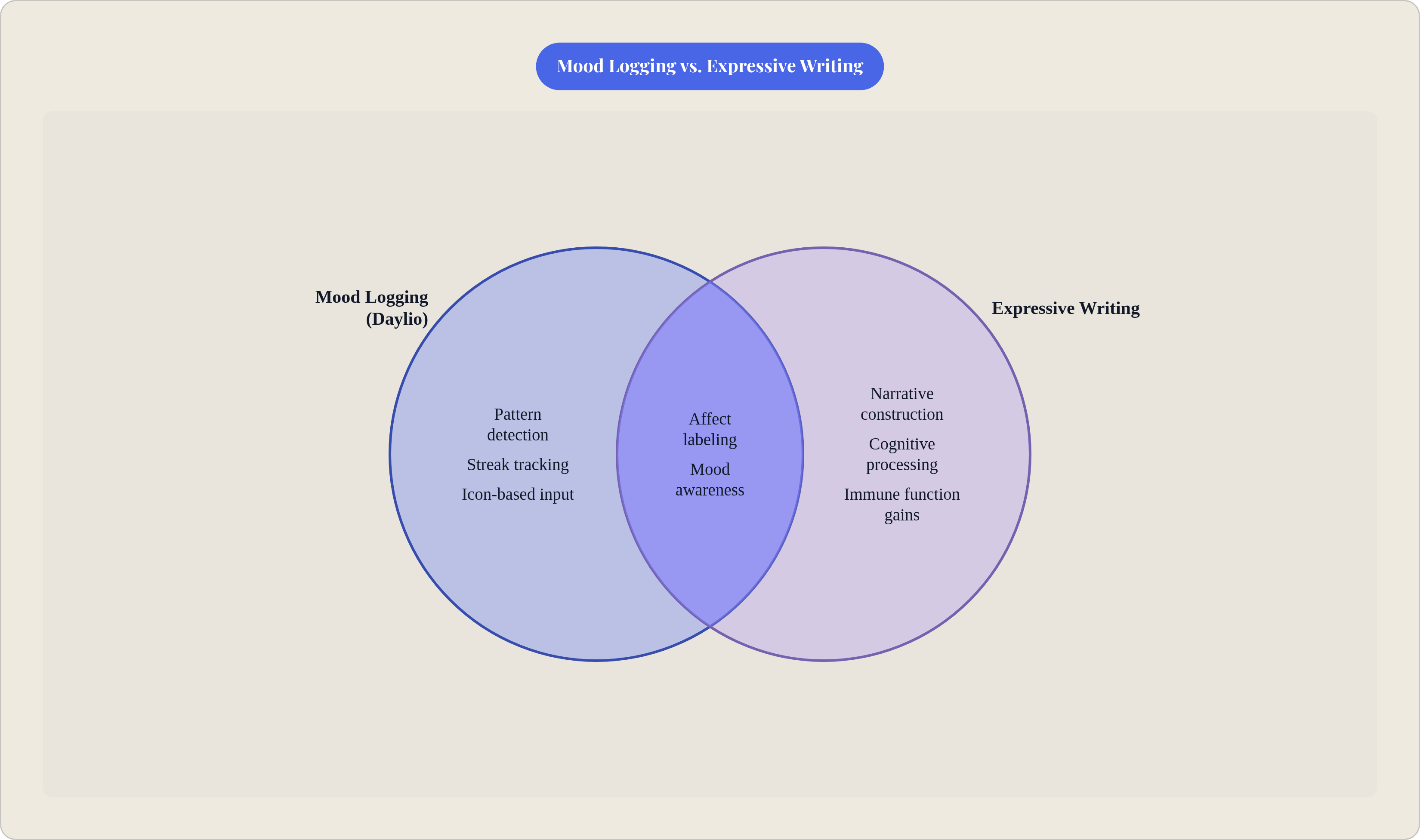
There's a real mechanism behind why even tapping a label helps. Lieberman and colleagues, in a 2007 study in Psychological Science, found that putting feeling into words, what researchers call affect labeling, dampens amygdala activity tied to that emotion. Name the thing, and the thing gets a little quieter. Tapping "anxious" instead of "content" is a stripped-down version of that same act. Real benefit, just a shallow one next to actually writing a paragraph about why you're anxious.
That's the ceiling, and it shows up fast. James Pennebaker's expressive writing research, built on more than 200 studies at this point, traces the actual benefit back to narrative construction: turning a messy pile of feeling into something with shape and sequence. People who vented on paper without organizing any of it saw no measurable gain. The work happens in the structuring, not in the venting.
An icon tap builds no structure. Daylio can tell you your mood dips in weeks with less sleep logged, but the app found that pattern, not you; you didn't sit with the data and work it out yourself. That's a different mental event entirely from writing your way to the same conclusion.
Pennebaker's protocol calls for 15 to 20 minutes of structured writing and it's been tied to measurable gains in immune function, mood, and cognitive performance. A two-tap entry was never built to touch that, and it doesn't need to. Daylio surfaces the pattern. Writing processes it. Expecting a mood log to deliver what a therapy-adjacent writing practice delivers is setting yourself up for a letdown the app never promised.
How Daylio compares to Day One, Journey, and voice-based journaling
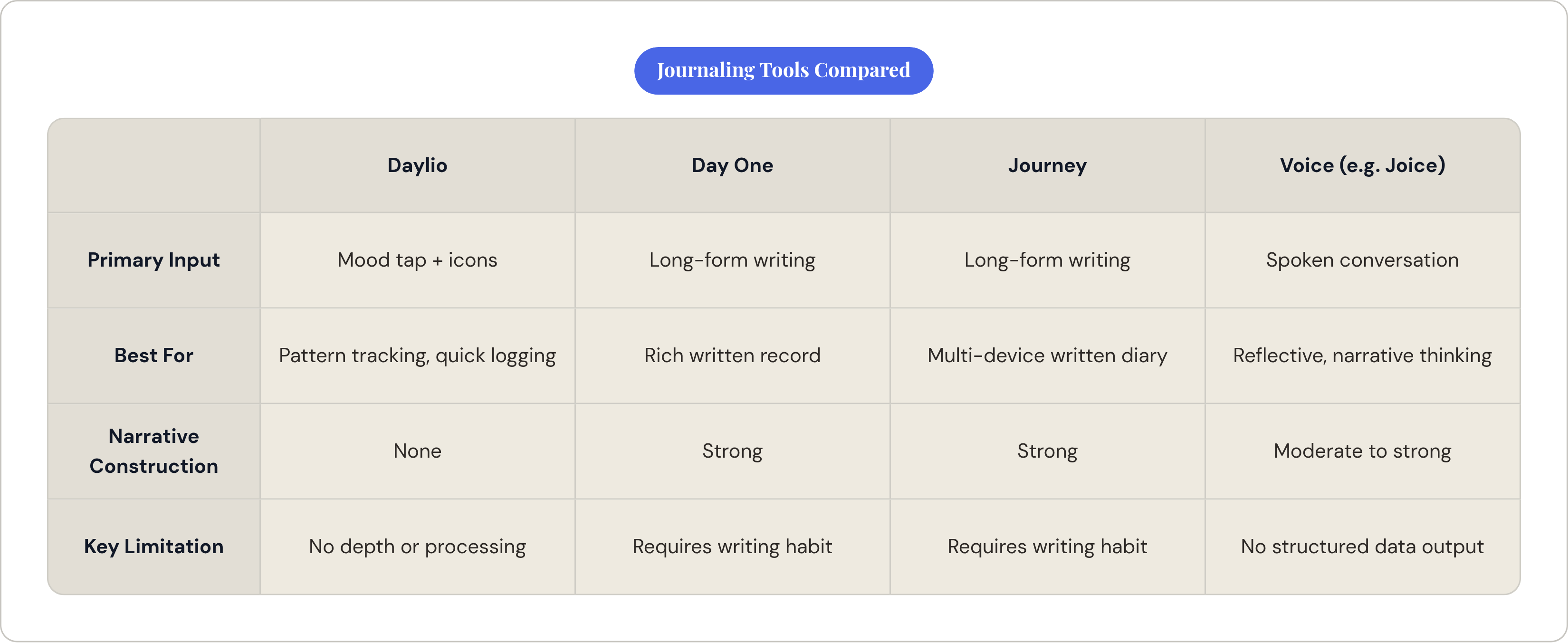
This isn't a competition with a winner. It's closer to a map: which tool fits which person, because "best journaling app" is an incomplete question until you finish the sentence with "for what."
Put Daylio next to a writing-first app like Day One and the trade is obvious immediately. Daylio wins on speed, no contest, two taps against sitting down to actually compose something. Day One wins on depth: a real writing surface, automatic location and weather stamps, the texture of an actual written life. Both apps serve different relationships with your own head, and which one you reach for says more about you than about either product.
Stack Daylio against Journey and the split gets sharper. Journey leans all the way into long-form entries, formatting, multi-device syncing. Daylio strips writing out; Journey builds the whole thing around it. Want data? Daylio's your tool. Want an actual written record you could hand your future self? Journey gets you there and Daylio doesn't.
Then there's voice journaling, which sidesteps the whole writing problem from an angle neither app touches. Daylio swaps writing for taps, but you're still boxed into categories you picked ahead of time; it's screen-mediated no matter how fast the taps are. Voice swaps writing for speech, and the reflection happens conversationally instead of through a dropdown menu. Something like Joice pushes further still, using prompt-guided conversation so you talk through your day in a natural, conversational way, which claws back some of that narrative-construction benefit tapping never gets near. If your thinking happens better out loud than it does in preset menus, voice is a genuinely different, more expressive interface.
Worth a quick word on the mobile-only limitation too, since it trips people up. It's a category norm; mood tracking apps skew mobile-first across the board, and plenty never bother with desktop at all. Annoying if you live on a laptop, unsurprising if you've used more than one app in this space.
How to get real value from Daylio if you decide to use it
Change the icons immediately. The defaults are generic by necessity, built to fit as many users as possible, which means they fit approximately no one's actual week. Swap them for your specific job, your specific social patterns, your sleep, your workouts, whatever your days are actually made of. Vague inputs get you vague charts. That's just how correlation works.
Use the note field even when you don't feel like it. One sentence is enough to turn a bare number into something with texture, and it nudges you slightly closer to the affect-labeling benefit that icon-tapping alone doesn't quite reach.
Check the stats weekly, not just the streak daily. The streak counter is a hook; the actual insight needs entries to pile up before any pattern means anything, and a weekly glance is what turns a wall of dots into something you can act on.
If a therapist is in the picture, the premium PDF export justifies the subscription on its own. Showing up to a session with a clean visual month of your mood beats trying to reconstruct it from memory, and it's the one feature in this whole app built for somebody besides you.
Then know where the app stops. Daylio builds awareness; it does not process what that awareness means, and it was never going to. Notice your mood tanks every time a specific person or situation shows up? Good, the app did its job. What you do with that, whether it's a long journal entry, a conversation with a therapist, or talking it out loud into something like Joice, happens entirely outside Daylio's four corners. Pair the tracking with something that actually processes, and you get both halves of the thing tapping a mood icon was never built to do alone.