Day One vs Journey App Comparison
Day One archives your life in polish; Journey guides your emotional growth through structure.

Day One and Journey both call themselves journaling apps, and both will happily take your subscription fee, but they were built to solve different problems. One started as a polished, Apple-first way to archive everyday life in detail; the other started as a self-care platform meant to guide emotional health. That difference sounds like marketing copy until you've actually used both apps daily for a few weeks, at which point it stops being academic and starts explaining every design choice you run into.
Most comparisons of these two apps run through feature checklists, tick versus tick, without asking why the features diverge in the first place. I'd rather trace the differences back to what each app was actually trying to be when someone first sketched it out. Two different starting points, and you get to decide which one matches the job you actually need done.
Platform availability and which users each app actually reaches
Day One spent most of its life as an Apple-only product. Android and Windows came later, added well after the initial launch rather than designed in from the start. That order still shows up in daily use. The Android build gets consistently lower marks from users than the iOS version, and the Windows app, which didn't launch until early 2025, is missing features the Mac and iOS versions have had for years. No passcode lock at launch tells you exactly how young that build still is.
Journey went the other direction. It launched cross-platform: iOS, Android, macOS, Windows, web, Chrome OS, Linux, the whole spread. That's about as wide a native footprint as a journaling app gets, and the Android version isn't some afterthought port either; it's a genuine strength, built with the same attention as everything else.
If you live inside the Apple ecosystem, iPhone in your pocket, Mac on the desk, Day One's ten years of polish shows up in small interface decisions you'll feel every day without noticing why they feel right. If you're Android-primary, or your household runs a mix of devices, or you're the person running Linux on a home server for reasons only you understand, Journey removes friction that Day One hasn't gotten around to removing yet.
Writing experience and media capture, where Day One's decade of refinement shows
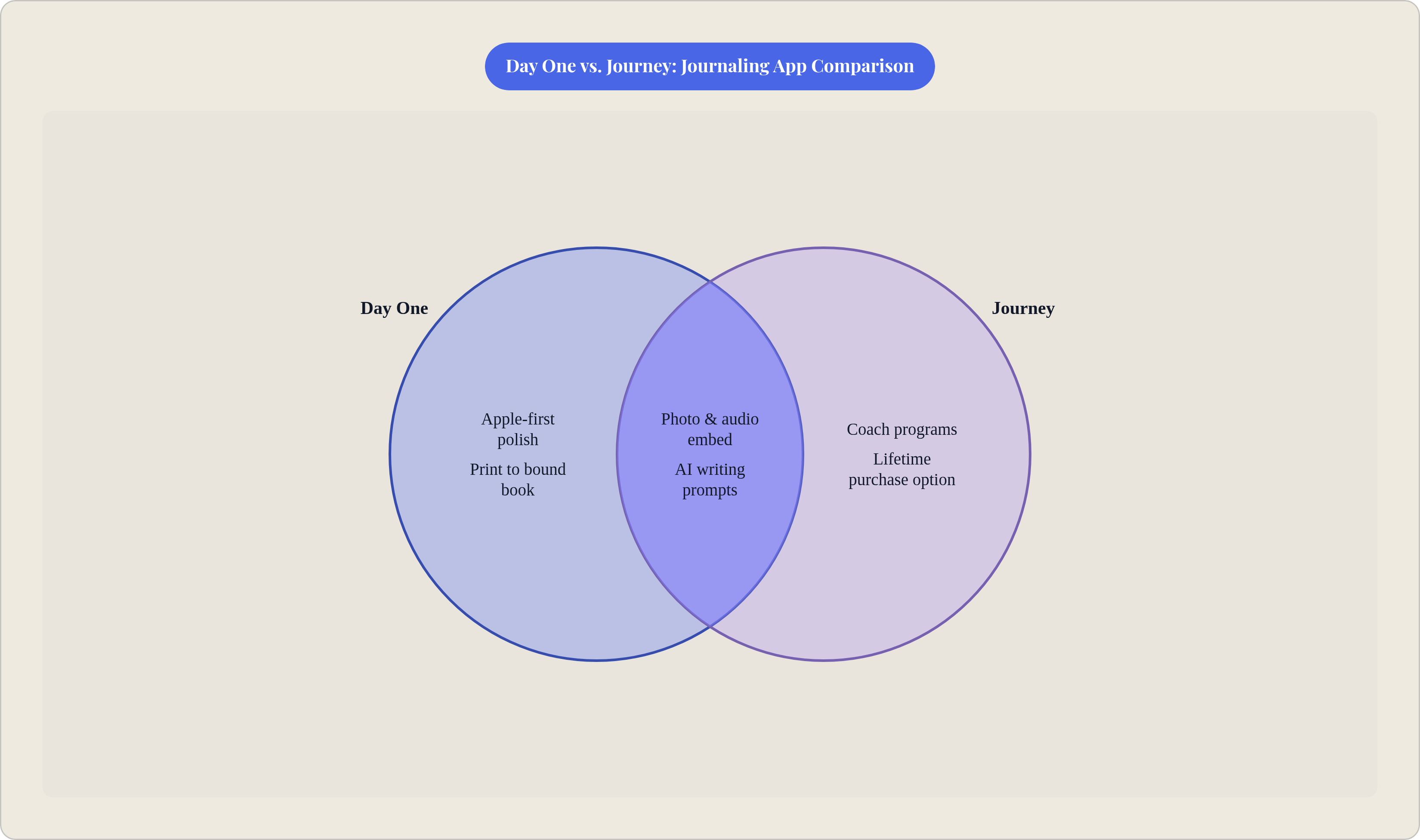
Ten years is a long time to sand down an editor's rough edges, and Day One shows it in ways that go past just typing text into a box. Photos, video, and audio embed cleanly. The app logs weather, location, even the song playing while you wrote, all automatically, no extra taps required.
A few features push Day One past "journal" into something closer to a personal archive. On This Day surfaces old entries from the same calendar date across every year you've used the app: sometimes a nice bit of nostalgia, sometimes a reminder of exactly how bad your life was going three Aprils ago. Map view and timeline browsing turn your entries into a searchable, geographic record. Multiple journals, tags, and templates let you keep different parts of life separate instead of one giant scroll of everything. And then there's the feature nobody else really offers: you can print your entries into an actual bound book, real paper, something you could hand to your kid someday instead of a subscription that may or may not exist in thirty years.
Journey covers the same basic media types, text, photos, video, audio, plus automatic weather and location tagging, and its paid tiers let you attach multiple files per entry. It's capable. But media clearly isn't where Journey puts its design hours. If you want your journal to feel like a family record more than a diary, Day One's decade of refinement gives it the real edge here. Journey is building toward something else entirely, which is the next section.
Guided journaling and prompts, where Journey is doing something Day One is not
Day One offers daily prompts and templates to get you past the blank page. They work fine for that one job. They're lightweight on purpose, meant to get a pen moving rather than tell you what to actually think about once it's moving.
Journey's Coach programs are a different animal. These are structured, multi-day reflection exercises built around specific themes: self-care, gratitude, mindfulness, building a more positive outlook, and they were developed with people who work in wellness coaching, not app developers guessing at what sounds therapeutic. You pick a program and follow it over days or weeks. It reads closer to a guided course than a prompt library you dip into when you're stuck. That structure is basically Journey's whole identity: a self-care platform first, a writing tool second.
Journey also runs a Reflections feature that asks follow-up questions on entries you've already written, processed on your own device rather than sent off to a server somewhere. The effect nudges you toward depth instead of just logging what happened.
If you already know what you want to write and just need a quiet place to put it, Day One's prompts do that job fine. But if you want the app itself to guide your reflection, especially around emotional health or a growth goal you're actively chasing, Journey's structure offers something Day One doesn't really try to replicate.
Worth mentioning here: this tracks with decades of research on expressive writing, going back to psychologist James Pennebaker's work linking journaling to health outcomes, which found the real benefit comes from meaning-making, actually processing an event, rather than just describing what happened. Prompts built around "why did this affect me" instead of "what happened today" are chasing that exact mechanism.
AI features in both apps and what they're actually useful for
Day One's Gold tier bundles in a Daily Chat feature, "Go Deeper" prompts that respond to what you actually wrote instead of firing off something generic, entry summaries, title suggestions, and AI image generation. Daily Chat in particular feels conversational, more back-and-forth than static suggestion box, and it's built for people who already journal regularly but want more out of each entry. Day One says AI content gets processed only at the moment of use and isn't fed back into training models. Take that claim for what it's worth to you; I can't audit their servers any more than you can.
Journey's AI shows up differently. Coach AI generates prompts inside the structured programs, and Odyssey AI unlocks on higher tiers, but neither one holds a conversation the way Day One's does. It works more like a prompt generator than a dialogue partner. The one real edge: Journey processes its Reflections follow-up feature on-device, which is a genuine privacy distinction if that's something you care about.
Day One's AI is more conversational and woven deeper into daily use. Journey's is more limited but wins the privacy argument on that one specific feature. Both come with the same caveat: AI is the newest, fastest-moving part of either app, so whatever's true this month might not hold by the time you read this. The core journaling experience underneath both is the steadier thing to actually judge your decision on.
Privacy architecture and data ownership, where the two apps take meaningfully different approaches
Day One offers end-to-end encryption starting with its free tier, a strong default you set once and never think about again. That's the point of good security: you shouldn't have to manage it. Your data does sit under a broader content license, though, and as of this writing Day One hasn't published a separate AI policy, a gap some privacy-conscious users will want to keep an eye on.
Journey takes almost the opposite approach to ownership. Instead of syncing to its own servers, it syncs entries through your own Google Drive or OneDrive account. That matters more than it sounds on first read: your data lives somewhere you control, independent of the journaling app itself. If Journey the company vanished tomorrow, your entries wouldn't vanish with it. Its EULA also claims no content license on what you write and rules out using entries to train AI models.
So you're really choosing between two flavors of trust. Day One's encryption is the stronger technical guarantee in the moment; Journey's Drive and OneDrive setup is the stronger guarantee against the app itself disappearing on you. If you trust the app's own infrastructure and want strong encryption without configuring anything, Day One fits. If you're worried about getting locked into a system you can't easily leave, Journey's sync model wins that argument.
How pricing works in practice and where the value breaks differently for different users
Day One runs three tiers: free, Silver, and Gold, all subscription-only. There's no monthly-only cheap plan, and no lifetime purchase at all, full stop. The free tier gives unlimited text entries but locks you to one device, which sounds generous until you remember you own more than one screen. Silver unlocks multi-device sync, unlimited photos and video, audio with transcription, email-based journaling, and that book-printing feature. Gold adds the full AI suite on top of Silver. The jump from Silver to Gold is a real price bump for features that are entirely about AI, so if chatting with your journal holds zero appeal, there's no reason to pay for it.
Journey's pricing is more flexible and, frankly, more of a puzzle to work out. The free tier is genuinely limited: capped storage, no text formatting, no desktop access, restricted Coach programs. Premium is a one-time purchase, but only for one platform at a time; buy it on iOS and it doesn't follow you to Android. Membership, the subscription tier, unlocks everything across every platform, including Odyssey AI and unlimited cloud storage, and pricing shifts depending on where you buy it (notably cheaper through Google Play than the iOS App Store). There's also a lifetime option through some channels, which matters if another recurring subscription is the last thing you want.
An Android user buying Journey Membership through Google Play gets a genuinely strong deal for a fully-featured app. An iOS user pricing out both apps at full sticker will find the gap narrows quite a bit. Meanwhile Day One's total absence of a lifetime option is a real limitation if you'd rather own software outright than rent it indefinitely.
User sentiment beyond the star ratings, what people actually complain about
Day One has built a genuinely strong reputation over the years. The New York Times has called it out as a legitimately private digital space, and it carries a large installed base with a long track record of just working. The complaints that do surface cluster in two spots: some users think the AI push feels like more marketing than journaling app, and the price jump to Gold draws its fair share of grumbling about value for money.
Journey's Android experience earns real, unprompted praise. Android Police called it native, beautiful, and focused, which isn't a compliment Android users get to hand out often. Its cross-platform reputation holds up well too. But the complaints run a different direction: reviews on Trustpilot flag in-app upsells showing up constantly, and a sense among longtime users that priorities have drifted toward monetization over polishing what's already there. The word "adware" shows up more than once in those reviews, a strong word, probably unfair applied broadly, but it tells you something real about the frustration underneath it.
Here's the pattern worth noticing: Day One's friction is mostly about cost and how AI gets marketed, separate from whether the core app actually works. Journey's friction runs deeper, into trust, into a worry that the experience quality erodes over time as upgrade prompts stack up. Neither complaint should sink either app on its own. Still, you'll want to know about both before you sink a few months of daily habit-building into one.
Matching each app to the journaler who will actually stick with it
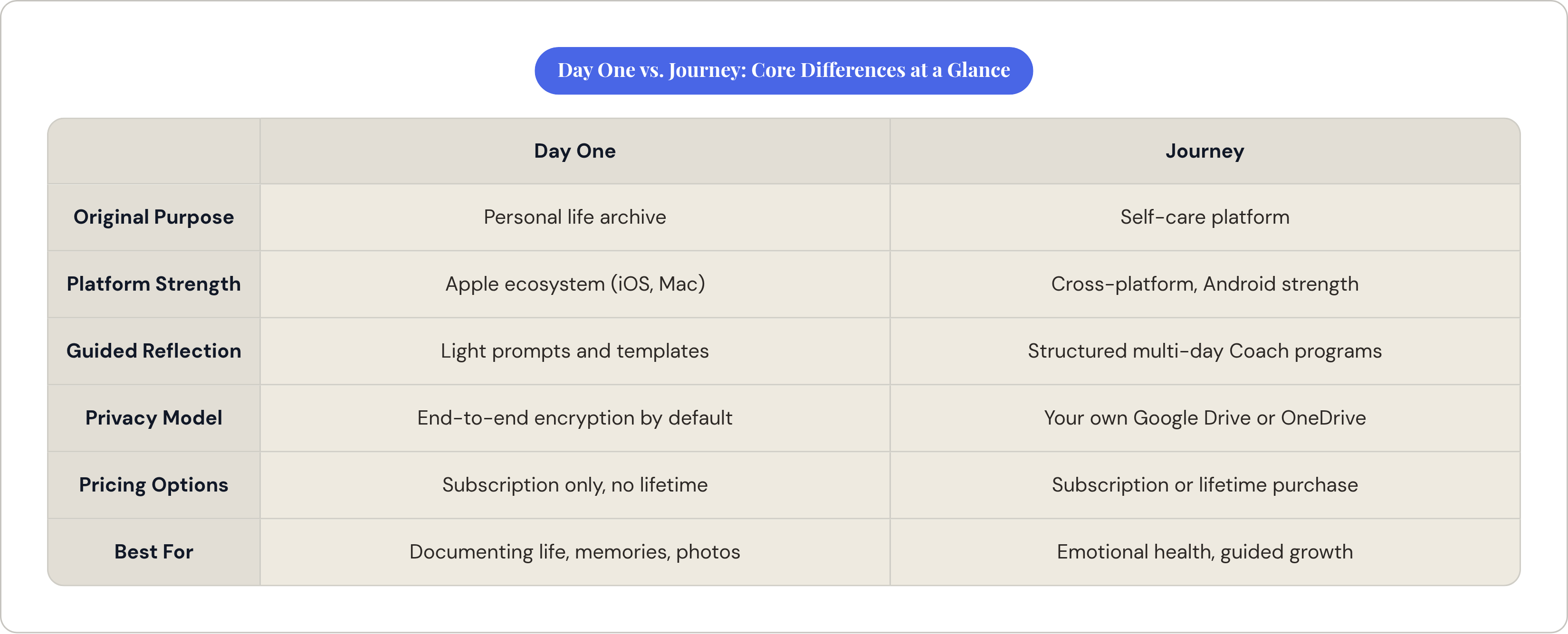
Day One fits if you're deep in the Apple ecosystem and want something polished across iPhone, iPad, and Mac with no rough edges to work around. It's the stronger pick if your real goal is documenting a life: moments, photos, locations, memories, all searchable later, maybe bound into an actual book someday. And if strong encryption matters but you don't want to think about configuring it, Day One hands you that by default.
Journey fits better if you're Android-primary, or you bounce across enough devices and operating systems that platform parity changes your day-to-day experience. It's the stronger pick if the goal is emotional health, self-care, or guided growth rather than documentation, since the Coach programs offer a kind of structure Day One doesn't try to replicate. Add the appeal of owning your data through your own Drive or OneDrive account, independent of any one company's servers, plus the option of a lifetime purchase instead of a forever-subscription, and Journey carves out its own lane.
One group neither app serves particularly well: people who think better out loud than on a page. Both apps assume you'll type, tap, and format your way into reflection, and for plenty of people, that approach doesn't match how their brain actually works through a day. Apps like Joice take a different angle entirely, letting you speak your entries while it transcribes and responds in real time. It's a different problem than either app is solving, and it's worth naming instead of skipping past. Whichever app you end up choosing, the underlying question is the same one you'd ask about any habit you're trying to build: does the format match how you actually think, or are you fighting the tool every time you sit down to use it?