Best Writing Apps for Android Phones
This app review ranks Android writing tools by what actually matters for long-form work.

What actually separates a useful Android writing app from one that falls apart mid-project
Most app reviews go straight to feature lists. That is the wrong place to start. Features are irrelevant if the underlying architecture cannot handle what you actually need the app to do.
Start with keyboard support. Android writers increasingly work on Bluetooth keyboards, external monitors, and Samsung DeX setups. An app designed for thumb-typing reveals that immediately when you attach a physical keyboard: broken shortcuts, sluggish cursor behavior, scroll lag that compounds over a long session. That is not a bug to be patched; it is a structural limitation baked into how the app was conceived. An app that only works with thumbs is, functionally, a notes app wearing a novelist's costume.
Performance at scale is the filter most casual reviews skip entirely. Every app I have tested handles five thousand words without complaint and quietly disintegrates at twenty thousand. Slow scrolling, delayed keystroke response, crashes that eat unsaved paragraphs: these are symptoms of an app that was never architected for long-form work. For novelists, this is a hard stop. If an app bogs down before you clear the first act, it is not a writing tool.
Then there is offline capability, which sounds basic until the plane takes off or the coffee shop router dies. The operative question is not whether an app technically supports offline work; it is whether that offline mode is reliable enough that you would trust it with three hours of uninterrupted writing somewhere with no signal. Those are very different bars, and every app I have evaluated tends to clear only the first one.
Finally, voice typing. Android's native voice input works across most writing apps and can sustain speeds exceeding 150 words per minute for practiced users. Writers who have deliberately tested it find it can handle long dictation sessions. Many still dismiss it, and that assumption is worth correcting before you count it out.
Why does writer type matter so much here? Because the features essential for one kind of writer are actively counterproductive for another. A novelist needs chapter organization, character tracking, and world-building infrastructure. A student needs formatting fidelity and clean export. A researcher needs clipping, tagging, and fast search. These are different problems, not variations on the same problem. The evaluations below are organized with that in mind.
Google Docs: the default Android writing app that earns its place for most writers
Docs is the writing app equivalent of a reliable commuter car. Not the choice that generates enthusiasm, but the one that starts every morning, survives every condition, and does not develop mysterious new problems the week before a deadline.
The core case is hard to argue against. Autosave, version history, real-time collaboration, live comment threads, compatibility across every Android device without configuration. Gemini AI features are now integrated for drafting assistance and organizational suggestions, at no additional cost. For co-authors, bloggers, ghostwriters, and students submitting work to editors, that combination, for free, is a difficult offer to decline.
But what if your project outgrows what Docs was designed for? Performance degrades noticeably around fifteen thousand words: scrolling slows, typing response lags, the experience becomes effortful in ways that accumulate over a long session. There is no chapter organization, no character tracking, no structural scaffolding for narrative work. The grammar checking is serviceable, but it is clearly incidental to what this app was actually built to do.
Here is what I think gets underacknowledged, though: most Android writers are not managing a novel. They are drafting articles, sending documents to clients, collaborating across time zones, maintaining a blog. For those use cases, Docs is not a compromise; it is the right tool. The only real hazard is discovering its ceiling mid-project rather than before you start.
Microsoft Word for Android: the choice when formatting consistency and professional compatibility matter
Word's value has almost nothing to do with what it feels like to write in. It has everything to do with what survives after you stop.
Consider the practical chain: a manuscript formatted on a phone, opened on a desktop client, emailed to a publisher running Word 2019, eventually sent to layout. Heading styles, footnotes, embedded tables, page structures: these either survive that journey intact or they do not. Word's proposition is that they do. For academic writers, professionals producing formal reports, and authors submitting to publishers who specify.docx, that fidelity is not a nice-to-have.
OneDrive keeps files synchronized across devices. Students with institutional Office 365 access get full Word functionality at no additional cost, which makes the decision fairly obvious for that group.
That raises an important question, though. Does Word add anything to the writing process itself, beyond formatting and compatibility? Not really. Like Docs, it has no novel-specific structural tools. Its grammar and style suggestions are less capable than dedicated editing applications. The value is not in how Word feels to write in; it is almost entirely in where the output lands.
This gives Word an unusually clear mandate. If you are delivering work to clients who expect a specific format, or writing anything where professional formatting fidelity is non-negotiable, it is a strong choice. If you are drafting for yourself or for platforms that accept any format, it offers almost no comparative advantage over cheaper alternatives. That clarity is actually useful. Most tools are murkier about what they are for.
Grammarly: what the editing layer adds — and where the Android app frustrates
Over 40 million individual users and 50,000 organizations rely on Grammarly. Whatever its flaws, something real is being solved at that scale. The Android version delivers real-time grammar, punctuation, spelling, and style suggestions through a floating widget that works across any app where you are typing. The Pro tier extends this to AI-powered sentence rewrites, plagiarism detection, and brand compliance features, at roughly $12 per month billed annually.
The floating widget is where things get complicated, and I want to be specific here because the aggregate rating of 2.9 out of 5 on the Google Play Store does not appear without cause. Recurring user complaints concentrate on two issues: the widget obscuring content on screen, and bugs severe enough to require full reinstallation to resolve. Grammar checking itself works. The delivery mechanism is unreliable, and unreliable delivery of a real-time tool is not a minor inconvenience; it is a fairly fundamental problem with the product.
It is also worth considering what Grammarly actually is versus how writers sometimes deploy it. It is an editing layer, not a drafting environment. Drafting and editing simultaneously inside the Grammarly app misunderstands how the tool is architecturally positioned. The more defensible workflow is drafting in a separate app, then applying Grammarly as a finishing pass on completed text. That approach sidesteps most of the widget frustrations because you are working inside the Grammarly app directly rather than typing through a floating overlay while trying to hold a thought.
Is the Android experience worse than on other platforms? Yes, noticeably. Is it useless? No. Writers who stage it correctly in their workflow will find meaningful value. Writers who expect a frictionless real-time companion will be disappointed, and the Play Store reviews suggest many people find this out the hard way.
LivingWriter and Reedsy Studio: purpose-built fiction drafting for Android
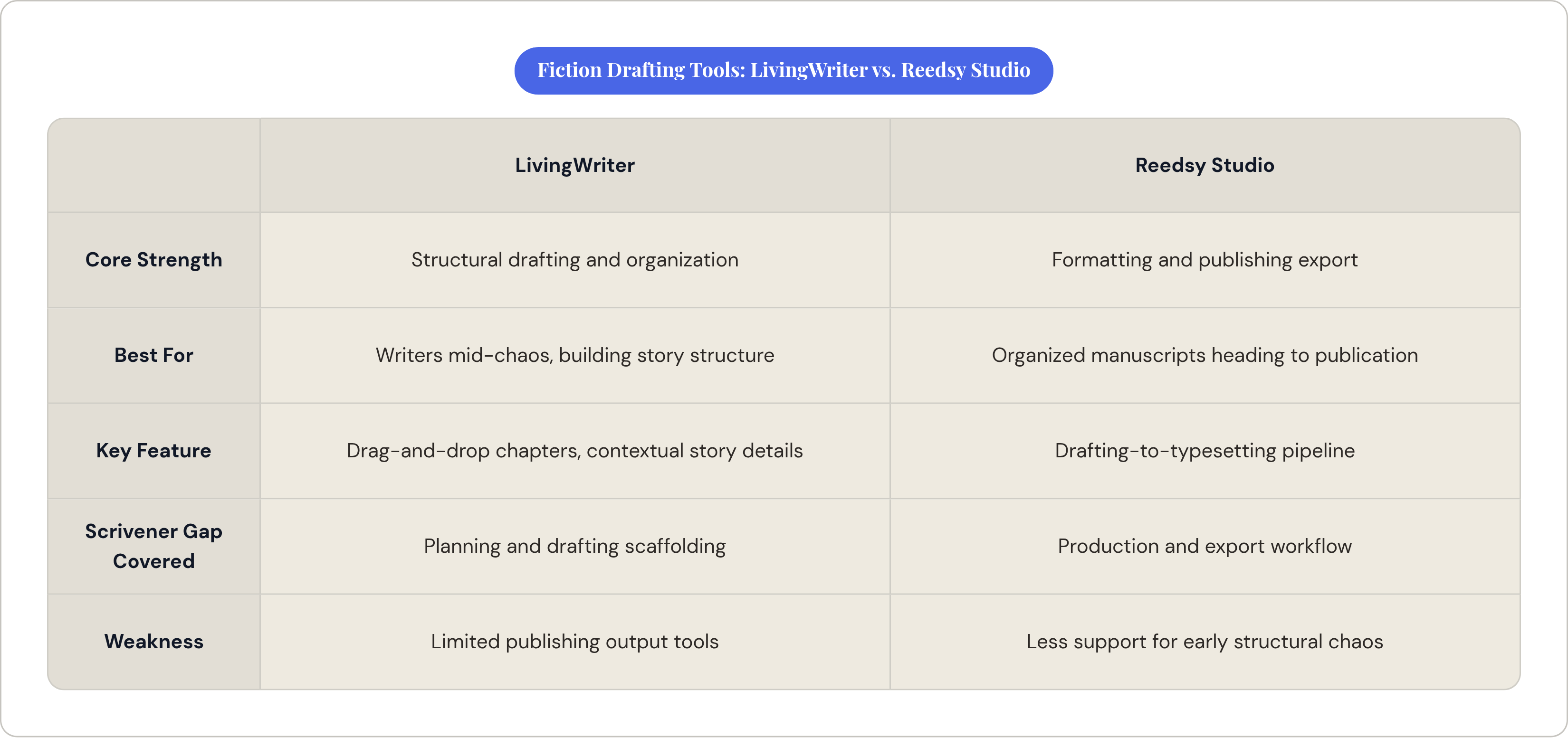
The honest starting point for this section is Scrivener's absence. Scrivener remains the benchmark for novel-writing software, the tool against which everything else in this category gets measured, and it has no official Android application. That is a genuine gap. LivingWriter and Reedsy Studio each cover portions of what Scrivener does. Neither fully replicates it, and pretending otherwise would be a disservice.
LivingWriter's core strength is structural accessibility without superficiality. Chapter and element organization is drag-and-drop; story details like character names surface contextually as you write, so you are not constantly tabbing out to check a note from three weeks ago. Built-in support for frameworks like the Hero's Journey provides scaffolding for writers who want it without imposing anything on those who do not. Writers who found Scrivener's learning curve prohibitive tend to find LivingWriter's equilibrium between structure and simplicity more habitable.
Reedsy Studio approaches the same problem from the opposite end of the manuscript's lifecycle. Where LivingWriter focuses on drafting and organization, Reedsy extends through formatting and typesetting to produce a publishing-ready export. Over 50,000 authors use it monthly. For a writer heading toward self-publishing, the integration of drafting and production tools in a single application is a practical advantage that is easy to undervalue until you have experienced the alternative: finishing a manuscript in one tool, then spending two weekends reformatting it in another.
The choice between them depends largely on where in the writing process you need the most support. Writers who struggle with structure during drafting will find more traction in LivingWriter. Writers whose manuscripts are reasonably organized and who are beginning to think about what the finished product looks like will find Reedsy's export pipeline the more compelling proposition. I lean toward LivingWriter for anyone still figuring out their story; the structural scaffolding is useful when you are mid-chaos.
Notion and Evernote: organizing research and story planning when the writing itself happens elsewhere
Neither of these is primarily a writing environment. Both are organizational systems that make a writer's work more coherent when deployed alongside a dedicated drafting app. Recommending them without that clarification would be actively misleading, and I have seen writers spend considerable time trying to draft inside Notion before concluding, reasonably, that it is not working. It is not working because they are using a database as a text editor.
Notion's particular utility is its ability to structure relationships between disparate information. Character profiles, location details, plot events, and timeline entries can be organized in linked tables, filtered, and sorted in ways a traditional document editor cannot accommodate. For writers managing complex multi-book projects or research-heavy non-fiction, that relational organization is the difference between a project that is under control and one that is quietly burying you. Notion crossed 100 million users worldwide by 2024 and offers a free tier with unlimited pages and databases. Per-page offline access, added in August 2025, removed what had been a genuine friction point for mobile-first Android users.
Evernote's situation is harder to assess. Following its acquisition by Bending Spoons and subsequent staff reductions, the platform's trajectory looked uncertain for a period. Annual downloads fell substantially over several years, the free tier was cut to a restrictive limit, and users who had organized years of research inside the platform faced an uncomfortable choice. The company released over 200 improvements in 2025 and launched a new version with AI features in early 2026: signs of active development, not abandonment. But for a writer not already invested in the Evernote ecosystem, the case for choosing it over Notion today is weak. For a writer with years of organized research inside Evernote and a workflow that functions, migration has real costs. Those costs are nothing to dismiss, and anyone recommending a clean switch without acknowledging them is not being straight with you.
JotterPad, Novelist, Novlr, and yWriter: the distraction-free and Android-native alternatives
JotterPad
JotterPad's defining characteristic is unusual breadth within a minimalist interface. The distraction-free drafting environment is the baseline, but a plugin ecosystem extends it meaningfully: screenplay formatting, footnotes, mindmaps, and music composition tools are available, making it one of the more flexible options for writers who work across formats. Exports cover DOCX, PDF, Markdown, and HTML, with cloud sync across Google Drive, Dropbox, and OneDrive. A Pro Cloud subscription runs approximately $3.33 per month.
The limitation worth knowing before you commit: version history is inconsistent across documents. For writers who rely on the ability to recover earlier drafts, this is not a minor quibble. Building in Google Drive backup is therefore strongly advisable rather than optional. Writers who understand this upfront and build accordingly will find JotterPad useful. Writers who discover the unreliable versioning after losing significant work will be justifiably unforgiving, and that reaction is completely fair.
Novelist
Novelist tends to get underrepresented in these comparisons, probably because its user base is smaller than LivingWriter's or Reedsy's. Smaller footprint is not a reliable indicator of quality. Autosave, find and replace, version history restore, split-screen reference panels, daily progress tracking, and export in EPUB, ODT, and HTML. It is optimized for large screens, includes a companion web app and Google Drive backup, and was last updated on the Play Store in July 2025, signaling active maintenance.
Crucially, it was built specifically for Android rather than ported from another platform, and that architectural decision shows in how it handles the platform's native behaviors. Whether that distinction matters to you depends on how much you notice the difference between an app that was designed for a platform and one that was reluctantly adapted for it. I notice it. The ported apps have a particular kind of friction that is hard to articulate until you use something that does not have it.
Novlr
Novlr requires no app installation. It runs in any Android browser, which is either a genuine convenience or a meaningful constraint depending on your offline habits. Its strongest offering is habit infrastructure: writing streaks, daily word count goals, and progress tracking are well-implemented and motivating for writers who struggle with consistency. The ceiling for structural fiction work is low; world-building, character management, and complex plot organization are minimal. Novlr is best understood as a clean drafting environment with accountability scaffolding, not a novel-writing suite. Know which one you need.
yWriter
yWriter is free, was built by a working novelist, and does one thing well: it breaks novels into chapters and scenes with minimal interface overhead. It has a loyal niche of users who prefer its focused approach to the feature accumulation of more ambitious competitors. Sometimes the right answer is the tool that does not try to do everything. yWriter is that tool, and it costs nothing to find out whether it works for you.
Matching the right app to the way you actually write
The right question is not "which app is best" but rather "which app was built for the problem I actually have." These are different questions, and confusing them is how writers end up managing a novel in Google Docs or spending six months learning Notion to draft blog posts.
A blogger or content writer gets the most practical value from Google Docs, with Grammarly staged as a finishing pass rather than a real-time companion. A student or academic writer needs Word's formatting fidelity, unless the institutional context allows format flexibility, in which case Docs is sufficient and cheaper. A fiction writer who finds complex tools prohibitive should look at LivingWriter for drafting, with Notion alongside it for planning; that pairing covers most of what Scrivener does on Android, imperfectly but well. A fiction writer heading toward self-publishing should evaluate Reedsy Studio's drafting-to-export pipeline before committing to a separate tool for each stage. A writer who wants an Android-native experience built for the platform rather than translated onto it should take Novelist seriously. Poets, screenwriters, and writers who work across formats will find JotterPad's plugin range the most accommodating. Research-heavy non-fiction writers need Notion for organization, not drafting; the distinction matters. Writers focused primarily on building a sustainable daily habit, without requiring complex structural scaffolding, will find Novlr's streak and goal-tracking system worth the browser-based trade-off.
One practical note that cuts across all of these: if you compose on a Bluetooth keyboard or Samsung DeX, test any app you are considering at manuscript length before committing. Performance at scale eliminates more candidates than any feature comparison, and it is rarely mentioned in app store listings. Some apps take a different approach to self-expression altogether: Joice, for instance, is a conversational journaling app built around speaking rather than typing, you talk, it responds in real time and transcribes everything, which sidesteps keyboard concerns entirely.
The platform gap between Android and iOS is real. Scrivener is not here. Some boutique tools remain iOS-exclusive because that is where the revenue concentrates. But the gap is narrowing, and every workflow described above has at least one well-maintained Android option. The more consequential question is not which platform has better writing apps in the abstract. It is which specific app was built, or has evolved, to accommodate the way you actually work, and whether you are honest enough with yourself about how that actually is.