Distraction-Free Writing Devices for Writers
Choose between typing and handwriting—they're solving different writing problems.

Two product types have emerged from the same frustration, and they are not interchangeable. Understanding why requires some clarity about what that frustration actually is.
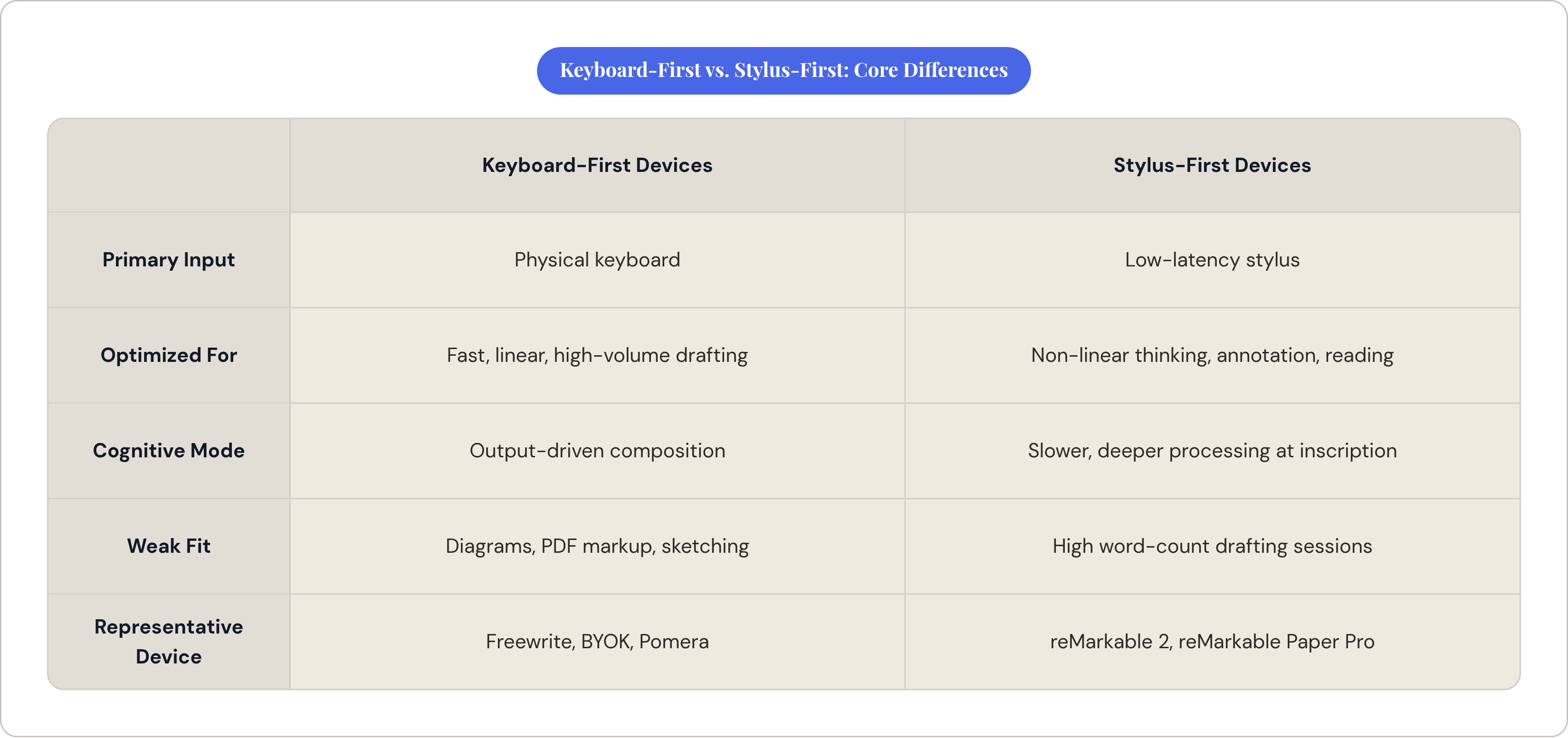
The first type is the keyboard-first word processor: physical key input, e-ink or LCD screen, optimized for fast, linear text output. Drafting and journaling are its native modes. The second is the stylus-driven e-ink note-taker, a handwriting-first tablet suited to annotation, non-linear thinking, and reading workflows that require markup.
The mistake most buyers make is evaluating both categories on the same criteria: portability, price, cloud sync, screen size. Those criteria matter, but they're downstream of a more fundamental question. Which input mode do you actually default to when writing is going well?
A device that attempts both, a keyboard folio bolted onto a stylus tablet, expands capability at the cost of the focused identity that makes dedicated hardware worth owning at all. Generalism is exactly what these devices are supposed to cure — like a Swiss Army knife that gets invited to every meal but never quite masters dinner.
Google Trends records a +336,900% rise in queries for "reMarkable" and a +140% climb for "Freewrite" as distraction-free writing terms. The absolute volumes remain modest, but the directionality is not accidental. What began as a software problem, solved by apps like iA Writer and full-screen focus modes, has matured into a hardware category. Somewhere along the way, that category quietly split into two things that look alike on a shelf but behave very differently in your hands.
What Keyboard-First Devices Are Built to Do
The design philosophy of keyboard-first writing devices is austere by intention: remove everything that is not writing. No browser, no notifications, no multitasking. The only output is words.
E-ink screens in this category are a deliberate material choice, not an aesthetic one. Battery life extends to weeks. Eye strain across long sessions is reduced. There is no backlight flicker competing for attention at the periphery. The screen communicates, architecturally, that this device has one job.
The workflow model is linear and draft-oriented. These devices are not built for organizing a manuscript or editing at the paragraph level; they are built for getting words out. Cloud sync and USB transfer are consequently real usability questions, because the draft has to move somewhere. A device that produces text with no graceful exit path is a frustration waiting to happen.
The physical keyboard is load-bearing in a way that most other specs are not. Key travel, layout, and tactile responsiveness determine whether the device gets used or stays in a bag. A 2025 paper from the Computers & Writing Conference makes a related point, reading Freewrite through Peter Elbow's freewriting theory: the device's intentional linearity, its resistance to editing backward through large passages, is not a missing feature. It is a compositional stance. The hardware enforces a drafting mode that the theory recommends. Whether that stance suits a given writer is a real question, but it is at least a coherent one.
Freewrite's Product Line: What It Offers and What It Costs
Astrohaus makes a family of e-ink keyboard devices, from the full-size Smart Typewriter to the clamshell Traveler, positioned as digital typewriters with cloud sync via a dedicated Postbox service. The price range runs from several hundred to roughly a thousand dollars. Most writers resist this, loudly, on first encounter.
The resistance is understandable. But a November 2025 firmware update called Sailfish addresses the most persistent technical objection directly. Typing latency was reduced by 40 to 100 percent, measured from key press to character appearing on screen, and power consumption dropped 30 to 50 percent. The complaint that e-ink keyboards feel laggy was the dominant criticism in early adopter reviews and has been substantially answered. Anyone who tested an older unit and dismissed it should probably test again.
Real constraints remain worth naming. Freewrite organizes work into only three folders, which is fine for a writer with one active project and genuinely constraining for someone juggling five. Transfer works via USB as plain text files or via an on-device send key that emails the draft. Both options are workable; neither is effortless.
That friction compounds. A writer who finishes a session, forgets to sync, and has to reconstruct a workflow from scratch will likely stop using the device altogether. The question is whether the drafting experience is good enough to absorb that friction. For many writers it is. But knowing that in advance requires honesty about your own habits, not optimism about the ones you intend to develop.
BYOK and Pomera: The Flexibility and Simplicity Alternatives
Two alternatives occupy the same keyboard-first category with meaningfully different design logics.
BYOK takes a modular approach. The device pairs with virtually any wireless or wired keyboard, so the writer supplies their own typing feel rather than accepting the manufacturer's. A magnetic mount separates the screen from the keyboard, enabling ergonomic positioning that no all-in-one device can match. Core features, including two-way sync, remain free. BYOK is built to fit into an existing workflow rather than replace it, which is a fundamentally different proposition than what Freewrite is selling. Its best fit is a writer who already has a preferred keyboard and wants distraction-free output without committing to a single hardware ecosystem.
The Pomera D250US arrives via Kickstarter after years as a Japan-only product. Its 10.3-inch LCD screen and scissor-switch keyboard produce a form factor closer to a stripped-down laptop than a typewriter homage. No internet access, no social media, no email: distraction-free by omission rather than by philosophical design, which is a different and more pragmatic approach. Battery life runs up to 20 hours. Folder management and copy/paste are included, giving it more organizational headroom than Freewrite's three-folder system.
That organizational headroom is easy to overlook in a spec comparison and consequential in daily use. A writer managing one draft at a time will not notice it. A writer with three active projects and a fourth in revision will notice it immediately, and probably at an inconvenient moment.
What Stylus-First E-Ink Devices Are Actually Optimized For
Handwriting on glass with a low-latency stylus is neurologically distinct from typing, and the distinction is not trivial. A 2024 study in Frontiers in Psychology using high-density EEG found that handwriting activated more complex neural connectivity than typing, particularly in regions associated with memory and learning. The slower pace is not a limitation; it is a mechanism. It tends to force deeper cognitive processing at the moment of inscription.
That makes stylus devices well-suited to non-linear thinking: diagrams, annotated PDFs, margin notes alongside text, reading and review workflows where pen-on-document markup is integral. For a writer whose process involves extensive pre-writing, sketching, or reading alongside composition, a stylus device offers a genuinely different cognitive environment, not merely a different tool. Think of it as the difference between carving a path through a forest and following a road: both get you somewhere, but only one lets you change direction mid-step.
What they are not optimized for is fast, high-volume word output. A writer targeting a high word count in a session will find a stylus device slow and fatiguing relative to any keyboard alternative. The keyboard folio option, a case with an integrated keyboard available on several stylus tablets, is a secondary mode grafted onto a handwriting-first platform. It works. It is not the device's native expression. And using a device against its native expression is a reliable way to end up blaming the hardware for a workflow problem you created.
reMarkable Paper Pro and reMarkable 2: The Leading Stylus Devices for Writers
The reMarkable 2 is a black-and-white e-paper display built around reading, handwriting, and PDF annotation. Its strengths are well-documented: a distraction-free environment with no ads or notifications, clean PDF import, and a handwriting experience that is closer to paper than most alternatives currently on the market.
The reMarkable Paper Pro adds a color screen, which matters for drawing workflows and color-coded annotation. For writers whose output is prose, it matters considerably less. Paying a premium for color when your work is black text on white background is a spending decision, not an upgrade. Worth saying plainly.
The Type Folio is the keyboard option for reMarkable, a full-size keyboard integrated into a protective case. Wallpaper has described it as "high-tech," which is fair. But the keyboard remains a secondary surface on a pen-first device. Writers who choose reMarkable primarily for keyboard drafting are working against the device's grain, and at reMarkable's price point, that is an expensive way to be contrarian.
Where reMarkable makes a strong case is for writers who also read heavily, annotate source material, and sketch or diagram during process. The hybrid of handwriting and typing is possible. The device is just clearest about what it was built to do first.
The Legacy Tier: AlphaSmart Neo2 and the Vintage Typewriter
The AlphaSmart Neo2 was originally manufactured for school use, which is either a recommendation or a warning depending on your perspective. It stores up to eight text files, runs on AA batteries for an almost absurd duration, 700 hours by widely cited user reports, and is light enough to carry without noticing. AlphaSmart no longer exists as a company. Units are secondhand only, available on eBay and similar marketplaces, with no manufacturer support and no firmware updates forthcoming.
For writers who want the lowest-cost entry into dedicated hardware and can tolerate the limitations honestly, the Neo2 remains a legitimate option. Eight-file storage is constraining for anyone with an active, multi-project practice, but for a writer who wants one draft at a time and values portability above most else, the calculus is hard to argue with.
Vintage mechanical typewriters occupy a distinct category: devices that eliminate the internal critic by making backward editing physically impossible. Some writers find this productive; the arguments for it are not frivolous. But the transfer problem is real and unromantic. Everything typed must be manually re-entered or scanned before entering a digital workflow. For most writers, that friction ends the experiment within weeks. The typewriter becomes decor. Better to admit that before the purchase than after.
How to Match Device Type to Writing Practice
The core diagnostic is not "which device is most capable" but "how do you actually write when it is going well." Not how you intend to write. How you actually write.
Fast, linear, high-volume drafting points toward a keyboard-first device, whether that is Freewrite, BYOK, or Pomera. Slow, reflective, non-linear thinking involving diagrams, annotation, and reading alongside composition points toward a stylus-first device like reMarkable. Maximum portability at minimum cost points toward a secondhand Neo2, constraints and all. Analog-only drafting points toward a typewriter, but only for writers who can genuinely absorb the re-entry step rather than use it as an eventual reason to stop writing on it.
Secondary filters apply in a specific order. Keyboard feel: if typing is how you think, test the keyboard before committing, or choose BYOK and bring your own. Sync and transfer: where does the draft need to go, and how quickly? Each device handles this differently, and the answer has to fit the actual workflow, not an idealized one. Organization needs: Freewrite's three-folder limit is fine for one active project and constraining for five. Price tolerance: the $500 to $1,000 range for Freewrite presupposes that writing is load-bearing work; BYOK and Pomera offer meaningful alternatives at lower cost.
Joice, an editorial resource focused on writing tools and journaling practice, treats this distinction as foundational: keyboard support and reliability matter far more than feature count, and a device given a specific job becomes useful, while a generalist device trying to do both tends to excel at neither. That tracks with what you find in practice.
The better question before purchasing is not "which device has the features I want" but "which device has the constraints I need." That requires a clear-eyed accounting of how writing actually goes, not how you intend it to go. The right device is generally the one whose primary mode matches your primary practice — other considerations are secondary, and getting the order of filters wrong tends to produce the wrong device sitting unused on a desk.