Notion vs Dedicated Journaling Apps
Notion's flexibility creates friction that dedicated journaling apps eliminate through design.

Notion is a capable piece of software. Pages, databases, multiple views, task integrations, calendar and gallery layouts, an AI layer that can summarize your workspace and run autonomous agents across connected tools. It is, by design, a general-purpose productivity environment. Its journaling appeal is almost entirely gravitational: people already live in Notion for work, and the prospect of consolidating everything into one system is seductive. One app, one subscription, one search bar to rule them all.
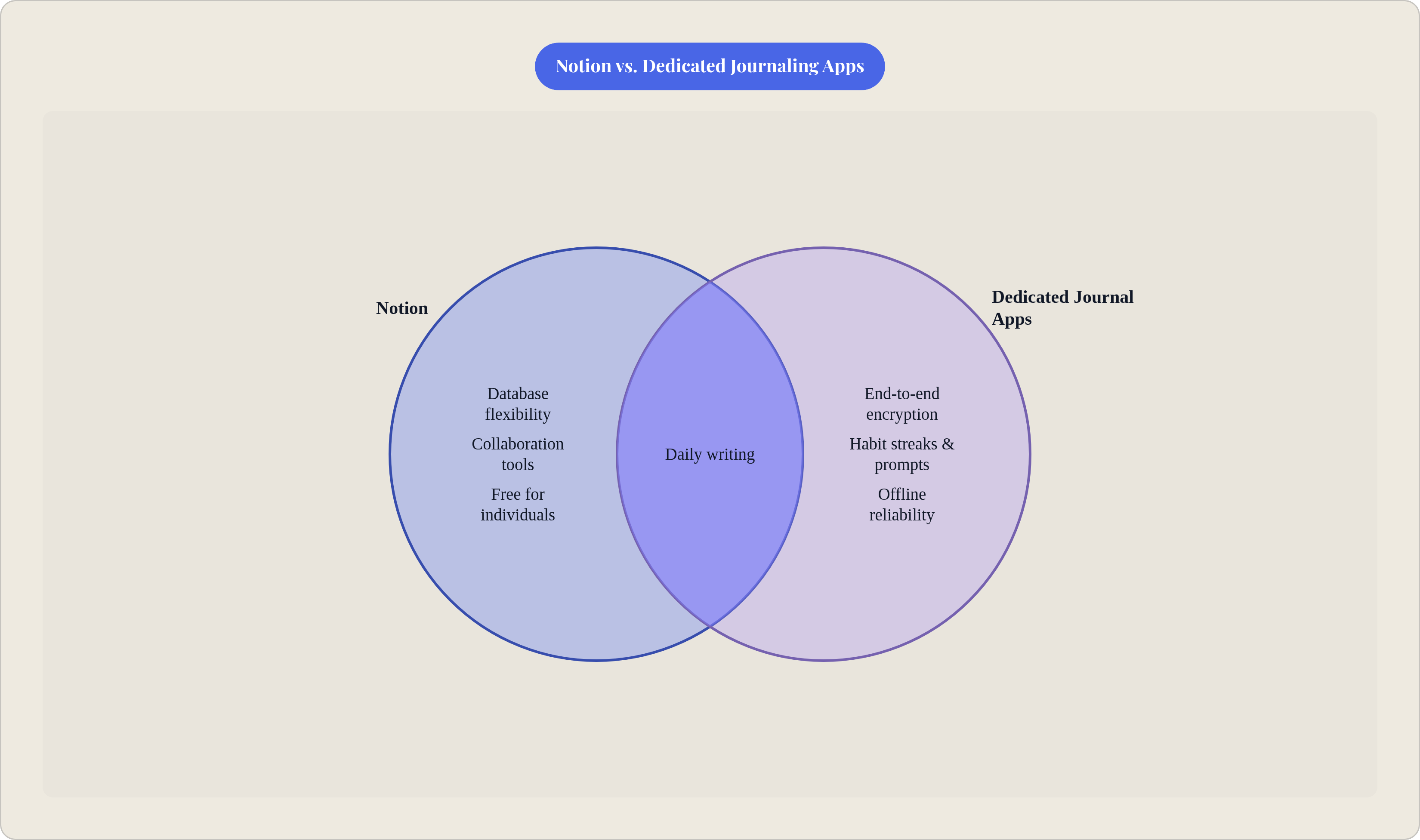
For a certain kind of journaler, that logic holds. If your journal is primarily work-adjacent, project retrospectives, decision logs, professional reflection, structured tracking of goals against outcomes, Notion's database flexibility is superior to what dedicated apps offer. Filter entries by mood, date range, project tag, client name. View them as a calendar, a gallery, or a table. No dedicated journaling app matches that kind of structured data manipulation. And Notion's free plan includes unlimited pages and blocks for individuals, while most dedicated journaling apps charge between thirty and one hundred dollars annually for full feature sets. The economics are real.
The case for Notion is not absurd. It just has a specific shape: it works for journalers who are already power users, whose content skews professional rather than personal, and who find value in keeping their reflective writing adjacent to their work systems. That is a coherent use case. It is also, in practice, a minority one.
Where Notion's Flexibility Works Against the Journaling Habit
Here is the actual flow for a Notion journaling entry: navigate to your journal section, open the database, create a new entry, select the template, fill in the date field, write. A dedicated app: open, write. Each individual step in the Notion sequence is small. Compounded daily over weeks, it is not small at all.
Why exactly does this matter? Because habit formation research is consistent on the relationship between friction and persistence. The more steps between intention and behavior, the higher the dropout rate. This is not an aesthetic complaint about Notion's interface; it is a structural observation about where journaling habits die. They die in the gap between the impulse to write and the first blank line.
There is also a well-documented pattern in the Notion community, visible across forums and productivity blogs, where users spend considerably more time designing their journaling system than actually using it. This failure mode is particularly acute for journaling because, unlike project management or task tracking, the entire value proposition is in low-friction capture. A beautiful database template with mood dropdowns and linked habit trackers produces zero cognitive or emotional benefit if it sits unused because opening it feels like work.
But what if the friction were simply a configuration problem, something a better template could solve? It is worth considering whether Notion's architecture compounds the issue in ways no template can fix. The platform is built for collaboration. Shared workspaces, team wikis, published pages: these are its native operating conditions. Private pages exist, but they are bolted onto a collaboration-first architecture. More critically, Notion does not offer end-to-end encryption. The company can, technically, read your entries. Add unreliable offline support, and the picture sharpens considerably. The observed outcome, consistent across journaling communities, is that dedicated Notion journalers tend to either migrate to a purpose-built app or quietly stop journaling altogether.
What Sustained Journaling Actually Requires from a Tool
To understand why tool fit matters so acutely for journaling specifically, it helps to look at what journaling is actually doing to the brain. Expressive writing engages the prefrontal cortex and language-processing regions to translate raw emotional experience into structured narrative. The benefit, documented across more than two hundred randomized controlled trials spanning four decades by psychologist James Pennebaker, comes specifically from that narrative construction: organizing chaotic experience into a coherent story produces measurable cognitive and physiological effects. Venting alone does not. The structure is the mechanism, not the catharsis.
What this implies for tool design is concrete. The tool must not interrupt the moment of impulse to write. It must offer prompts that scaffold narrative construction rather than blank database fields. It must provide sufficient privacy to write without self-censorship. It must work offline, because emotional urgency does not schedule itself around Wi-Fi availability. And it must reinforce habit loops through streaks, reminders, and past-entry surfacing.
UCLA researcher Matthew Lieberman's work on affect labeling is relevant here. Naming an emotion on the page measurably lowers its intensity; the phrase most associated with his findings is "name it to tame it." That process requires a prompt environment that invites emotional specificity. A blank database field with a date property falls short. Frankly, so does an empty page in a workspace where three tabs over you have your Q3 roadmap. These requirements converge on tools designed for journaling from the ground up, not adapted from workspace software. That raises an important question: what does a purpose-built journaling tool actually look like, and how much do the leading options differ from one another?
How the Leading Dedicated Journaling Apps Divide Up the Space
The dedicated journaling app space has matured, and the leading options have differentiated along distinct axes. The differences are not superficial.
Day One is the established standard, earned over more than a decade and more than 150,000 five-star reviews, including an Apple App of the Year. Its habit-supporting features are among the most complete in the category: "On This Day" flashbacks, streaks, automatic tagging of weather, location, and music, and Apple Watch quick-capture for genuine zero-friction entry. A Windows version arrived in 2025, closing a persistent gap. End-to-end encryption is available on the Premium tier at roughly $34.99 per year. Acquired by Automattic in 2021, Day One benefits from robust sync infrastructure. Its meaningful weakness: many premium features remain iOS-exclusive, and the Android experience is noticeably thinner.
Journey is the strongest option for Android users and the most cross-platform product in the space, running across Android, iOS, Mac, Windows, web, and Chrome OS with Google Drive sync. Its AI surfaces insights from past entries, and it exports in ePUB or DOCX for writers who want portability. At $29.99 per year, it sits at the lower end of the pricing range, which is not nothing.
Diarium addresses a gap the major apps have largely ignored: Windows as a primary platform. Cloud sync with passphrase protection, photo and video support, mood tracking, and past-entry reminders. The pricing model is the rarity: a $29.99 lifetime license in a subscription-saturated market. For Windows-primary users who find the Day One or Journey experiences on that platform unsatisfying, Diarium is a serious option.
Penzu is browser-based, requiring no download, which makes it useful for desk-bound writers or people on shared machines. Its privacy architecture is among the strongest available: the Pro tier offers 256-bit AES encryption plus a per-entry password layer. At $19.99 per year, it is the most affordable premium option. The interface feels dated compared to its competitors. That is a fair trade for writers whose primary concern is privacy.
Reflection's differentiator is pattern recognition across entries over time. It surfaces what affects mood, identifies which weeks felt heaviest and why, and auto-generates weekly, monthly, and annual reviews. It imports directly from Day One, Journey, Penzu, Google Keep, and Apple Notes, keeping switching costs low. More than a hundred guided journaling programs cover anxiety, gratitude, and career reflection. For writers interested in longitudinal insight rather than daily capture, it occupies a distinct and underserved position.
Stoic structures the practice around a morning-prep and evening-reflection rhythm, drawing prompts from Stoic philosophy, cognitive behavioral therapy, and positive psychology. It folds in mood tracking, breathing exercises, and meditations, and includes a therapist export feature. The constraint is significant: it is Apple-only, which eliminates it for Android and Windows users.
Rosebud is designed in collaboration with mental health professionals and positions itself explicitly for use between therapy sessions. Its AI remembers patterns across weeks and months and provides crisis-appropriate responses. For readers seeking emotional support scaffolding rather than a pure writing tool, the design philosophy is coherent and the positioning is honest.
Apple Journal is the free baseline for iOS users, launched in late 2023 and now supporting multiple journals and intelligent suggestions drawn from photos and workouts. End-to-end encrypted and costs nothing. A notable ceiling: iOS only, no macOS or Android version. For iPhone users who want to start journaling without spending anything, it is the lowest-friction entry point in the market.
The Privacy Gap That Matters Most When Writing Honestly
End-to-end encryption means only the writer can read their entries. The provider cannot, even under legal compulsion or a data breach. That distinction matters less for professional retrospectives and considerably more for the writing that produces the largest cognitive and emotional benefits: entries that contain things the writer has never told anyone.
Pennebaker found, repeatedly, that the benefit of expressive writing was concentrated in precisely that kind of disclosure. Writing about previously undisclosed experiences produced measurably different outcomes from writing about neutral topics. The implication for tool design is uncomfortable: if a writer suspects their entries can be read, they write differently. And that difference is exactly what eliminates the benefit. You cannot write your way to clarity about something you are simultaneously obscuring.
Apps with end-to-end encryption as a standard or premium feature include Day One, Apple Journal, Penzu Pro, and Journal it!. Notion does not offer it. That is a structural mismatch rather than a scandal; Notion was not designed for personal disclosure. But it is a mismatch that matters most precisely when the writing matters most.
One argument holds that most people are not writing anything sensitive enough to warrant this level of concern. That raises an important question: do writers know, in advance, which entries will be the sensitive ones? Worth checking, for any app under consideration: is E2E encryption on by default, or does it require a paid tier? And does the sync pathway, whether Google Drive, iCloud, or proprietary cloud, fall within the encrypted perimeter? These are not paranoid questions. They are reasonable ones for anyone using journaling the way the research suggests it works best.
How to Choose Based on What Job You're Actually Hiring the Tool to Do
That question, what is your journal actually for, is the only one worth answering here. Not which app has the most features, not which one looks best in a screenshot.
Notion is a defensible choice when the journal is work-adjacent, when the writer is already a power user who benefits from consolidation, and when privacy is not a primary concern because the content is professional rather than personal. The flexibility is real, the database functionality is superior for structured data, and the economics favor it for writers already paying for a Notion subscription.
A dedicated app is the stronger choice in most other scenarios. When the goal is emotional processing, habit formation, or expressive writing, friction and privacy are determinative, not preferences. When the writer is new to journaling, the tool should reduce barriers, not introduce configuration decisions. When offline reliability and end-to-end encryption are non-negotiable, the choice becomes straightforward.
As a rough tiebreaker: iOS-first writers who want the most complete experience should look at Day One. Android and cross-platform users should look at Journey. Windows-primary writers have a strong case for Diarium's lifetime license. Browser-based writers who prioritize privacy will find Penzu's architecture the most defensible. Writers interested in longitudinal pattern recognition should consider Reflection. Philosophy-structured practitioners on Apple devices have a distinctive option in Stoic. iOS users who want to start for free have no reason to look past Apple Journal.
But here is the part nobody says plainly: every writer I have watched try to build a journaling habit asks "which journaling app should I use" when they are not really asking about software. They are asking whether they can build the habit at all. The tool matters less than the clarity about what you are trying to do with it. A journal given a specific job becomes a productive tool. Without that definition, even the most elegantly designed app becomes, eventually, a $34.99 annual reminder that you meant to write more.