journaling apps that blend typed and handwritten input for emotional processing
Different input modes serve different emotional jobs in journaling.
Journaling apps that let you type and handwrite in the same entry get marketed as a convenience upgrade, more ways to write, take your pick. That framing misses the finding underneath it. Typing and handwriting light up different circuits in the brain, and the difference matters for emotional processing specifically, not just for how fast you get words on a page. The real question is which mode an app hands you when you're actually upset, and whether it has any idea why that choice matters at all.
I've spent a chunk of the last few years reading through the journaling app landscape more closely than is probably healthy, partly for work, partly because I quit journaling myself a handful of times before something finally stuck. Most people who quit don't quit because they ran out of things to feel. They quit because the blank page creates friction, some mismatch between the mode of entry and whatever's trying to get out. To understand that mismatch, you have to start with what's actually happening in the skull when a pen moves versus when a finger taps a key.
What happens in the brain when you write by hand versus type
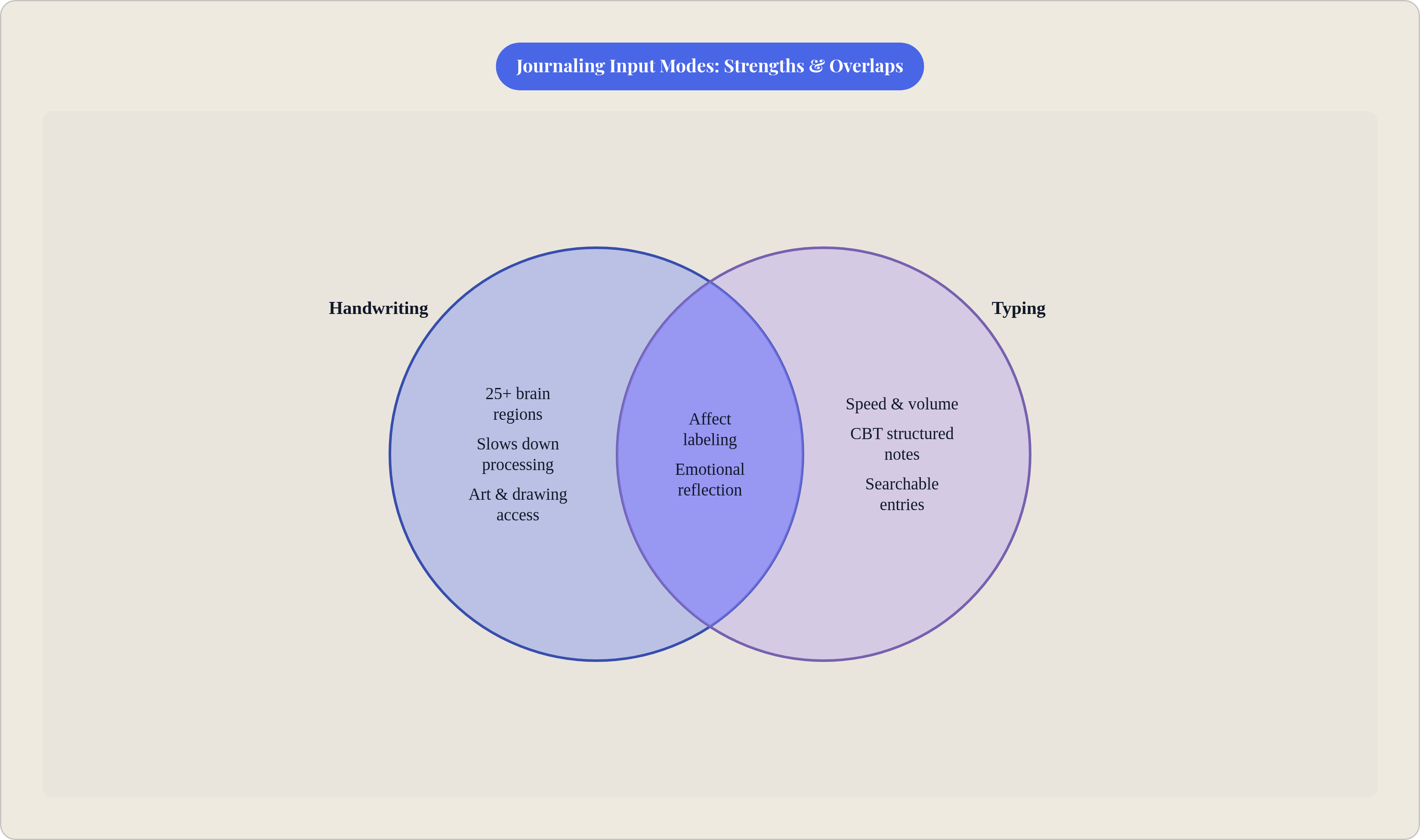
Handwriting is a demanding neurological event. A 2025 review by Marano and colleagues, published in Life, found that forming letters by hand pulls in more than 25 separate brain regions at once: motor control circuits, visual processing areas, memory formation networks, language production centers, all firing in overlapping patterns. The keystroke for "a" looks identical to the keystroke for "z" as far as your motor system cares, with no shape to trace, no pressure to adjust, no line to follow.
A 2023 study in Frontiers in Psychology backs this up with EEG data showing stronger, more widespread neural connectivity during handwriting than during typing. Regions talk to each other in patterns that key-tapping produces less often, which makes sense given the fine motor demands alone. Forming a cursive "g" is a different physical task than pressing a flat key, and the brain treats it that way.
Here's the catch, and it's worth sitting with before you run out and buy a notebook you'll use twice. Most of this research comes out of studies on learning and memory: students taking notes, kids acquiring literacy. Fewer studies look at people processing grief at 11pm on a Tuesday. The recall advantage handwriting shows doesn't automatically carry over to emotional reflection, because remembering a fact and metabolizing a feeling aren't the same cognitive job, even if they share some overlapping real estate in the brain. What the Marano review supports more directly is that handwriting's engagement with sensorimotor and memory networks overlaps with regions tied to emotional processing and self-awareness, which makes it a reasonable tool in mood disorder treatment, alongside its more familiar role as a habit for people who like nice pens. A neural difference existing is a narrower claim than handwriting beating typing across every journaling context, and anyone telling you otherwise is stretching the evidence past where it wants to go.
How typing serves emotional processing in ways handwriting doesn't
So if handwriting recruits more of the brain, why would anyone type when they're upset? Emotional processing has a lot to do with organizing: turning a mess of feeling into a sentence, deciding what happened first and what happened because of what. That's a sequencing task, and speed sometimes serves it better than depth does.
James Pennebaker's expressive writing protocol, one of the most replicated frameworks in psychological research, asks people to write about their deepest thoughts and feelings for 15 to 20 minutes across three or four consecutive days. The instructions are loose almost to the point of carelessness: don't worry about grammar, don't worry about structure, just write. That looseness is the whole point, since fluency matters more than form when the goal is outrunning the internal editor before it shuts things down. Typing, being faster than handwriting for most people, keeps pace with a racing thought in a way a pen sometimes can't. The words land on screen before self-censorship gets a vote.
A meta-analysis of journaling interventions found an average 5% reduction in mental health symptom scores across studies, with stronger effects in specific subgroups: roughly 9% for anxiety, about 6% for PTSD. That research doesn't cleanly separate typing from handwriting (most of the underlying protocols used whichever mode was fastest for the participant), but the pattern still points somewhere. Affect labeling, the plain act of naming an emotion in words, shifts brain activity from amygdala reactivity toward prefrontal reflection, and typing lowers the bar for getting words out at all, since there's no pressure to make the handwriting look presentable.
Voice input pushes this further by cutting out the typing step entirely. A conversational, prompt-guided approach, the kind Joice is built around, lets reflection happen in spoken language, closer to how a lot of people naturally think through a hard day: out loud, to someone, even if that someone is an app asking a decent question at the right moment. Different emotional tasks want different tools, though most apps still act like that isn't obvious.
The specific emotional jobs each input mode handles best
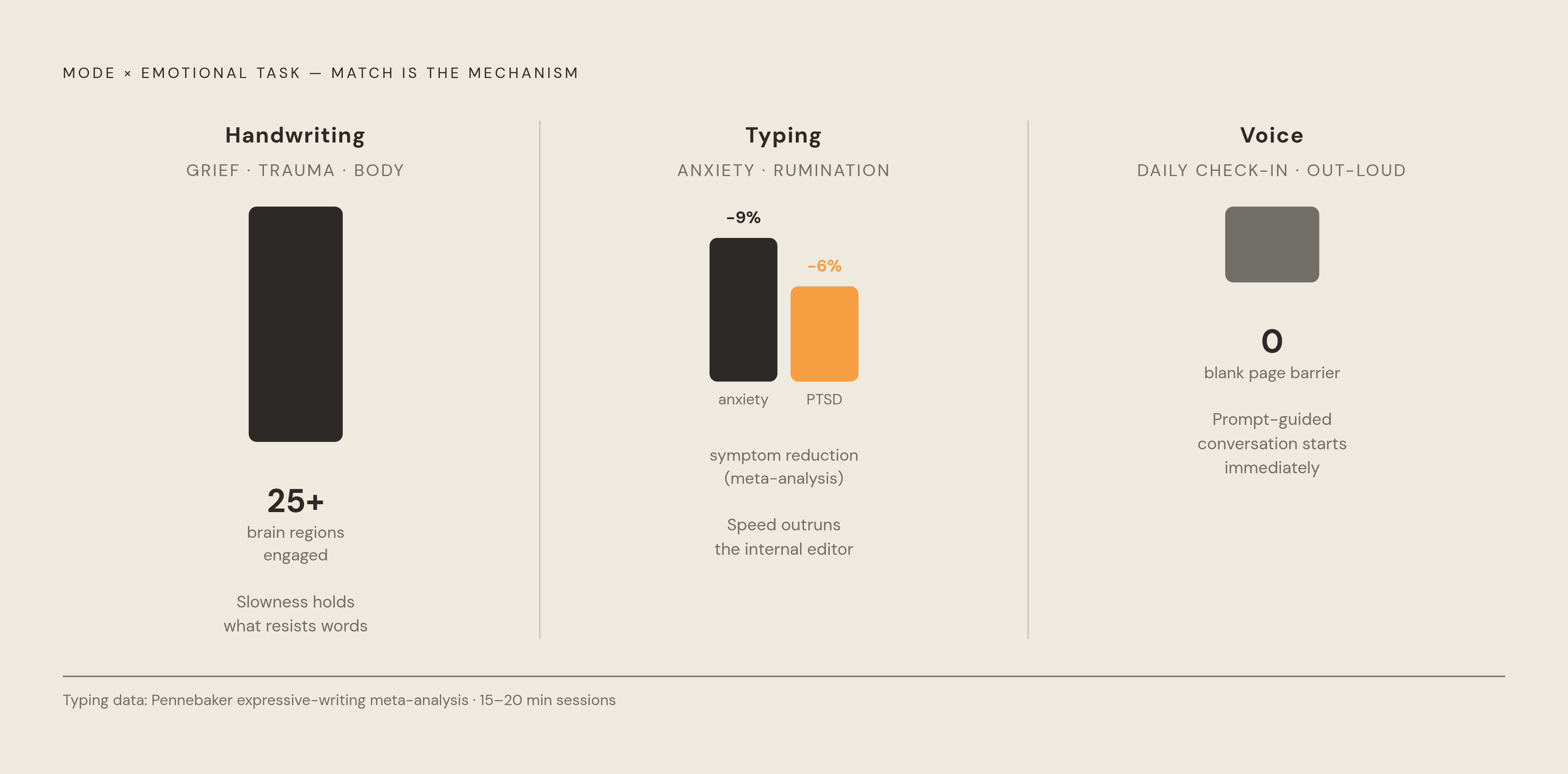
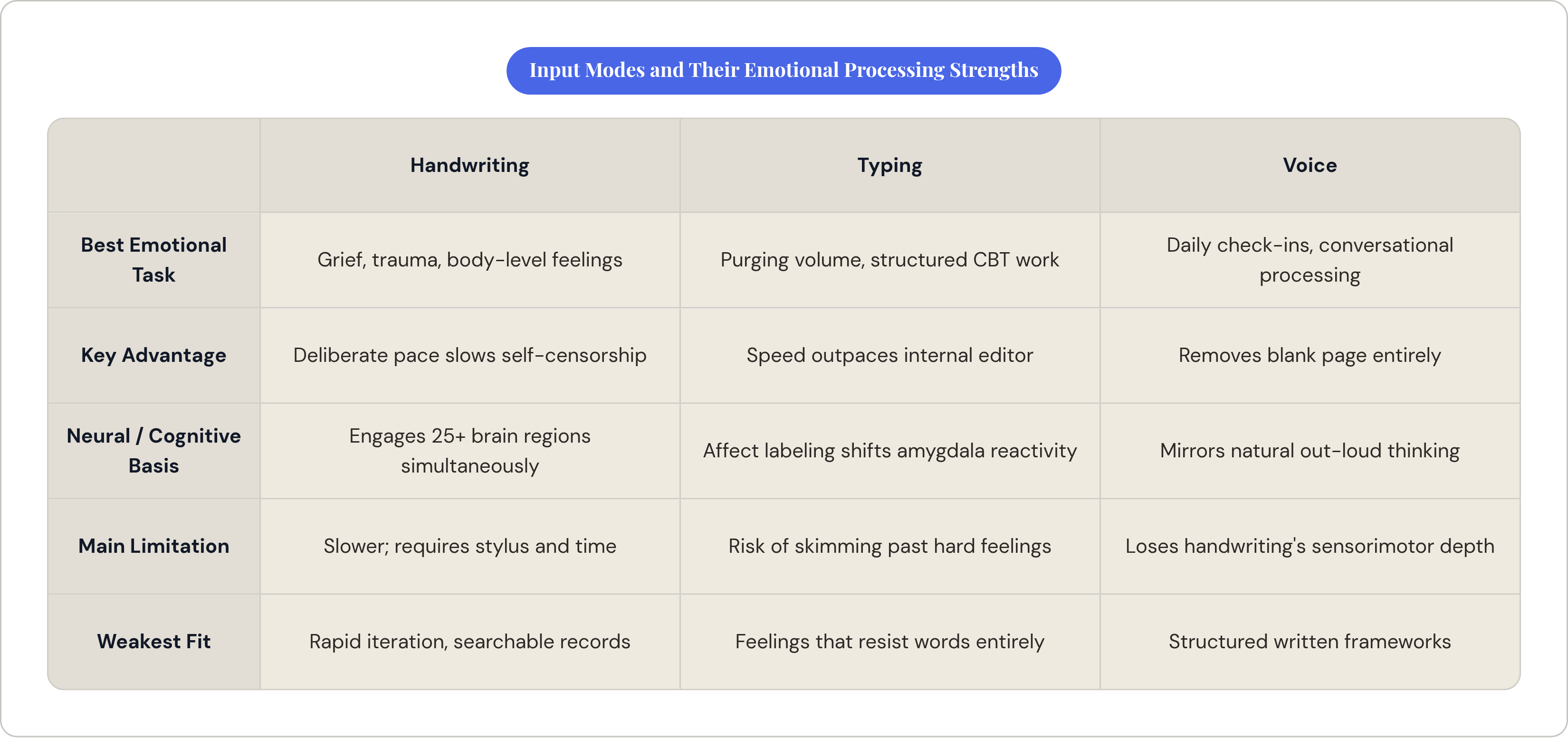
Handwriting earns its keep when the job is slowing down, since grief and trauma don't respond well to speed. Skimming past a hard memory because your fingers move faster than your feelings is a real risk with typing, and the deliberate physical pace of handwriting makes that harder to do by accident. Art journaling pushes this further, since drawing and color let you process something that resists being turned into a sentence at all, a mode typing has no access to whatsoever. There's also the ritual of it: picking up a physical notebook signals, at some bodily level, that this is a different register of attention than email or a work document. That containment has its own quiet value, even if nobody's figured out how to put a number on it.
Typing earns its keep in volume and structure. When the goal is getting everything out before self-censorship kicks in, speed is the whole advantage. CBT-style structured journaling, thought records, the kind of back-and-forth a therapist might walk you through, depends on quick iteration. Research on structured writing interventions shows anxiety symptom reductions in the range of 25 to 50% within about four weeks, and that kind of technique lives or dies on how easily you can revise, reorder, and search what you wrote. A typed entry from six months ago is also just easier to find again, and reviewing old entries for patterns is its own form of emotional work, one a shoebox of handwritten notebooks makes considerably harder.
Voice input brings a third option to the table: it gets rid of the blank page altogether. For people who process feeling through conversation rather than composition, and there are plenty, a prompt-guided spoken format sidesteps the "what do I even write" problem by turning journaling into something closer to talking through a hard day with someone who happens to ask decent follow-up questions. Therapist-built frameworks for matching technique to emotional need, a brain dump for racing thoughts, an unsent letter for anger, a mood-and-CBT note for anxiety, already assume the input mode should serve the technique and not the other way around. The mode is a delivery mechanism, and the work underneath it doesn't change.
What "hybrid input" actually means in current journaling apps — and where it falls short
Walk through the App Store and "hybrid" mostly breaks down into a few flavors. The most common treats handwriting or drawing as an inline attachment bolted onto a typed entry, decorative rather than functional. A second version gets closer to a real hybrid: typed text and stylus annotation living on the same canvas, though usually one mode is still clearly primary and the other tags along. A third converts speech to text and hands it back to you for editing, which quietly strips out the spoken, unfiltered quality that made voice useful in the first place.
The trouble with all of these is basically the same trouble. If an app just opens a blank canvas and says "write or draw, your call," it's handed the emotional processing decision to a user who is, by definition, not in the clearest headspace to make it well. Most people default to whatever opens fastest, not whatever actually serves the feeling they're sitting with. Apple's own Journal app is set to expand handwriting support and inline drawing for iPadOS 26 and macOS 26, which reads like a platform-level signal that hybrid input is turning into table stakes rather than a premium extra.
Worth flagging: feature parity across platforms isn't guaranteed even within a single app. The same product can carry a noticeably thinner toolkit on one device than another, depending on what got built first and which platform the team actually cared about. That gap, between the feature existing and the feature getting used well, is close to the whole point of this piece. Having both modes available is necessary; on its own, it's rarely enough. The real design question is whether the app nudges you toward the right mode for what you're actually feeling, and that's mostly a question about prompts. An app that opens a drawing canvas after asking about a loss is doing something categorically different from one that just offers a stylus option and leaves the choice entirely up to you.
How the leading hybrid-capable apps approach emotional processing across input modes
Judged against that bar, purposeful use rather than mere availability, the field splits fairly cleanly into two camps. Almost nobody straddles both well, which is either a market gap or a sign that it's genuinely hard to pull off, possibly both.
Journey, built Android-first with Material You design and stretched across Android, iOS, Mac, Windows, Linux, web, and Chrome OS, has the broadest reach of anything in the category, plus a Wear OS companion that lets you log a quick emotional check-in from your wrist without pulling out a phone. Its standout feature, Odyssey AI, launched in January 2024 as a GPT-based chat layer that reads back through past entries and offers context-aware reflection. It's a genuinely useful layer, but it sits on top of typed input; the hybrid modes exist elsewhere in the app, not organized around any particular emotional processing framework the way the AI chat is.
Stylus-first note apps like GoodNotes, Notability, and Noteshelf sit at the opposite end. People do journal in them, and the handwriting engagement is real, backed by the same neural connectivity research from earlier. These were built as note-taking tools, not journaling tools, though: no prompts, no emotional scaffolding, nothing nudging you toward a technique that matches what you're actually feeling. For someone with a steady journaling habit already, that blank canvas is freedom. For someone starting from zero, it's just a blank page with nicer handwriting tools. Same friction this whole piece keeps circling back to, because it keeps being the problem, apparently, no matter how many times the industry redesigns the pen.
Prompt-driven apps built around CBT, DBT, or ACT frameworks sit somewhere in between: strong on emotional scaffolding, offering technique-aligned prompts instead of another generic gratitude question, but typically typed-first, with handwriting or drawing support limited or missing outright. Good prompts, thin input options, roughly the mirror image of the stylus-first apps: rich input, thin prompts. The two camps haven't, as far as I can tell, learned much from each other yet.
Some apps sidestep the typing-versus-handwriting debate entirely by leaning fully into voice. A conversational, prompt-guided format handles the blank-page problem by getting rid of the page: you talk, the app asks a follow-up, you keep talking. For people whose emotional processing happens out loud, closer to conversation than composition, that approach lines up pretty well with what they actually need. The prompt structure gives it scaffolding the stylus-only apps lack, and the spoken format sidesteps the inhibition that sometimes comes with staring at a blinking cursor. It suits, more or less, the person who's tried keeping a written journal a few separate times and quit a few separate times, not for lack of things to say, but because writing itself, typed or handwritten, kept getting between them and saying it.
What to look for in a hybrid journaling app if emotional processing is the actual goal
A more useful question than "does this app support typing and handwriting" is whether the app tells you which one to use, when, and why. Bolting a drawing canvas onto a text field isn't hard. Building a prompt library that knows what you're trying to process before deciding which canvas to open is a different, much rarer thing.
Look for prompts that ask for a specific mode instead of leaving it open: a grief prompt that opens straight into a drawing canvas, a CBT thought-record that structures itself as a form rather than a blank field. Look for a prompt library that maps to emotional technique instead of looping "what are you grateful for today" for the four hundredth time; distinct approaches for rumination, for conflict, for closure, for anxiety that won't sit still. And look for voice or handwriting treated as real entry points on their own terms, worth building prompts and flows around, rather than attachments hanging off a text editor.
The tells that hybrid is cosmetic run the other direction: handwriting that only exists as a doodle option inside a typed note, voice input that transcribes itself to text the second you stop talking, erasing the spoken quality before you've had a chance to sit with what you actually said, prompts so generic they'd work identically whether you typed, wrote, or drew the answer. If the app doesn't seem to care which mode you use, that's usually because nobody building it cared either.
A rough guide, for what it's worth: type when you're purging volume or working a CBT-style structured exercise where speed of iteration matters. Reach for handwriting or drawing when you're sitting with grief, trauma, or something that lives more in the body than in words, assuming you've actually got the stylus and the time for it. Go voice-first for daily check-ins on the move, or if you're someone who's always processed better by talking something through than by writing it down.
None of this works if opening the app is itself a hassle. A hybrid input system so elaborate it becomes its own obstacle defeats its own purpose before you've written a word. Platform consistency matters here too, since the "same app" can hand you a meaningfully thinner emotional toolkit depending on which device happens to be in your pocket that day.
Done well, hybrid input shrinks the distance between whatever you're actually carrying and the one mode most likely to help you set it down. Done badly, it's just more menu to click through before you get to the feeling you sat down to deal with in the first place.